
Delete empty tab nodes of page properties | Community
Skip to main content
arturl43391132
New Participant
May 11, 2020
Solved

Delete empty tab nodes of page properties

  • May 11, 2020
  • 2 replies
  • 4577 views

Hello, Adobe Community,

We have one of custom tab included in page properties with some properties:
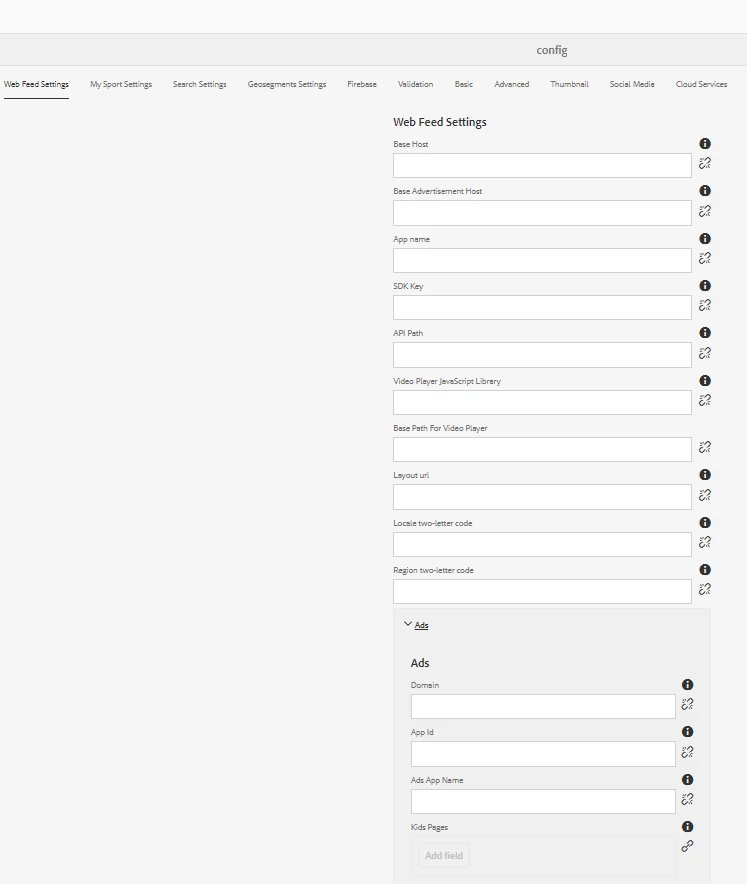
As we can see, all properties are empty on the screen but nodes in crx still exist:

m4w node - all properties which are located under tab "Web feed settings"
ads node - fieldset with properties under under tab "Web feed settings"

Properties have names like "./m4w/something" and "./m4w/ads/something".

Is there any beautiful way to delete nodes if all properties under some tab are empty or node doesn't have properties?
I tried typehints like "@Delete", but they did't help. And the problem is also that then we click "save & close" button on page properties page, it seems that it saves these nodes anyway.

Thanks. 


This post is no longer active and is closed to new replies. Need help? Start a new post to ask your question.
Best answer by user05162

You can look into Granite hide conditions[1] to hide properties based on some conditions.


[1] https://docs.adobe.com/content/help/en/experience-manager-65/developing/components/hide-conditions.html

2 replies

VeenaVikraman
New Participant
May 11, 2020

Do you have any hidden properties in this tabs ? I was wondering why this is getting created in the first place when you have not authored anything yet. This can happen only if you have authored it once , and then it was left empty. So when the first time you authored , the nodes might have got created.

user05162Accepted solution
Employee
May 11, 2020

You can look into Granite hide conditions[1] to hide properties based on some conditions.


[1] https://docs.adobe.com/content/help/en/experience-manager-65/developing/components/hide-conditions.html