Detect component name after user interaction | Community
Skip to main content
Level 2
Mar 26, 2021 8:37 AM UTC
Solved

Detect component name after user interaction

Hi all,

I'm using Adobe AEM 6.5 and I'm looking for a solution to my problem.

All I need is that when an user clicks on an html portion (a button, an input etc.), I have to be able to understand which component that portion belongs to. Is there an OOB way to detect the component name after an user interaction (e.g. a click)?

Otherwise, I was thinking to customize the html related to every component by adding an extra html line with helpful infos in order to detect the component name with javascript. By the way I wonder if is there a way to add this extra line once for all component, avoiding to customize every html file.


Has anyone had the same need? Please help me, I've been thinking about a solution for weeks.

This post is no longer active and is closed to new replies. Need help? Start a new post to ask your question.
Bhuwan_B
Bhuwan_BAccepted solution
New Participant
Mar 26, 2021 11:14 AM UTC

4 replies

arunpatidar
New Participant
Mar 28, 2021 8:43 PM UTC

Hi,

Yes, there is a way to add the component name(or node name) as a class using Sling Filter

https://github.com/Adobe-Consulting-Services/acs-aem-samples/blob/master/core/src/main/java/com/adobe/acs/samples/filters/impl/SampleSlingIncludeFilter.java

https://github.com/arunpatidar02/aem63app-repo/blob/master/java/XFFilter.java

or use sling rewriter pipeline to modify html while generating.


Translate
Arun Patidar
Bhuwan_B
Bhuwan_BAccepted solution
New Participant
Mar 26, 2021 11:14 AM UTC
Rohit_Utreja
New Participant
Mar 26, 2021 10:03 AM UTC

Hi @stochino,


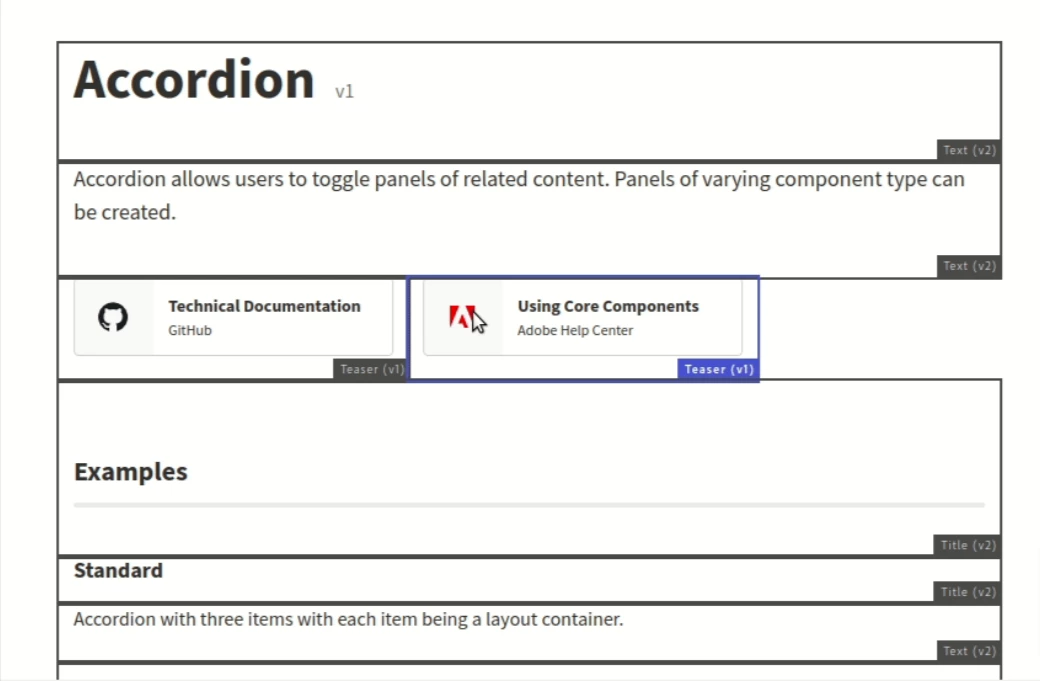
By default, the Component name is getting displayed at the bottom right corner of the component when you hover the cursor on it.


Otherwise, you can add following code in every component.

<div data-sly-test.emptyAuthor= "${(wcmmode.edit || wcmmode.design)}">

      This is test component. Edit this component to make the changes.

</div>


You can change this "test component" to the real component name. 


Translate
Kiran_Vedantam
New Participant
Mar 26, 2021 9:53 AM UTC

Hi @stochino,


For this, I don't think there is anything OOTB. You can customize it like below:

  1. Create a tracking component
  2. Add it [via data-sly-resource] to all the component
  3. Add a specific data variable [like parent component name] in each component and track it on any action via this tracking component

Hope this helps.


Thanks,

Kiran Vedantam.

Translate