Disable Copy Paste option for particular component | Community
Skip to main content
New Participant
June 13, 2023
Solved

Disable Copy Paste option for particular component

  • June 13, 2023
  • 3 replies
  • 1381 views

I am using AEM 6.5,

Let's imagine I have AEM components "Component A" 

 

I want to disable Copy, Cut and Paste option for this particular component.

How can I achieve that programmatically?

This post is no longer active and is closed to new replies. Need help? Start a new post to ask your question.
Best answer by EstebanBustamante

This can be achieved by using cq:actions, please find more here: https://experienceleague.adobe.com/docs/experience-manager-65/developing/components/components-basics.html?lang=en#cq-actions

For example:

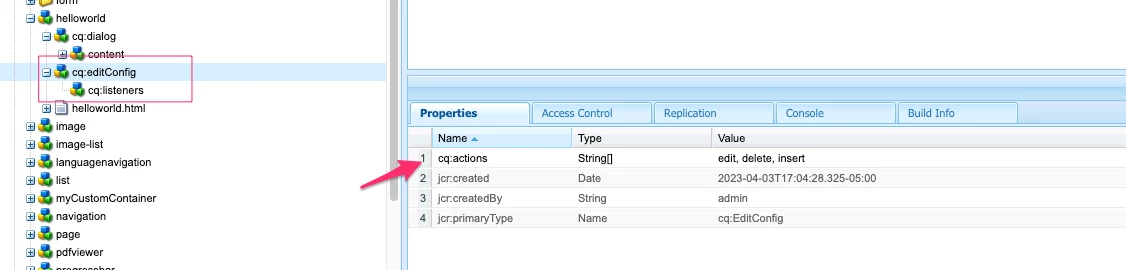
<jcr:root xmlns:cq="https://www.day.com/jcr/cq/1.0" xmlns:jcr="https://www.jcp.org/jcr/1.0" cq:actions="[edit,delete,insert]" cq:layout="editbar" jcr:primaryType="cq:EditConfig"/>

Config applied:
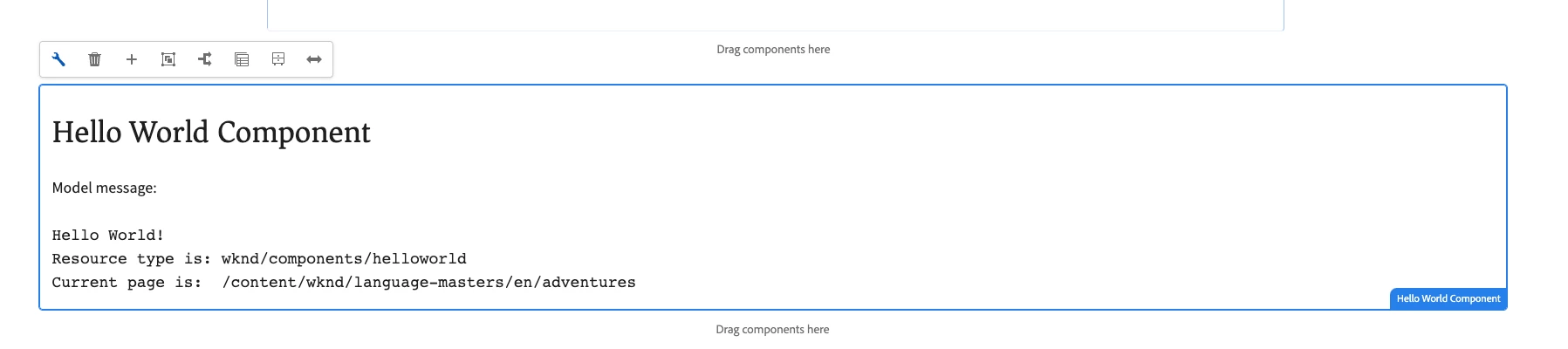
Result:


3 replies

ManviSharma
Employee
June 14, 2023

Hi,


To programmatically disable Copy, Cut, and Paste options for a specific component in AEM 6.5:

  1. Create a custom context-aware configuration under the component's folder.
  2. Add a property named cq:disableAction with a value of copy cut paste to the cq:actions node.
  3. Replicate the configuration to necessary language folders if applicable.
  4. After making these changes, the options will be disabled for the component in the AEM authoring interface.
Jagadeesh_Prakash
New Participant
June 14, 2023

@sam2k8  if you are looking for a custom solution follow below js code

(function ($, ns, channel, window, undefined) {
// Function to disable copy-paste for the component
function disableCopyPaste() {
// Disable copy-paste on component's elements
$('.your-component-class').on('copy paste', function (event) {
event.preventDefault();
return false;
});
}

// Wait for the foundation-contentloaded event to ensure the component has loaded
channel.on('foundation-contentloaded', function (event) {
var $component = $('.your-component-class');

if ($component.length) {
disableCopyPaste();
}
});
})(jQuery, Granite.author, jQuery(document), this);

Replace 'your-component-class' with the CSS class name of your component.


If you are looking for OOTB feature as suggested by @estebanbustamante  you can edit it in the cq:editConfig

EstebanBustamante
EstebanBustamanteAccepted solution
New Participant
June 13, 2023

This can be achieved by using cq:actions, please find more here: https://experienceleague.adobe.com/docs/experience-manager-65/developing/components/components-basics.html?lang=en#cq-actions

For example:

<jcr:root xmlns:cq="https://www.day.com/jcr/cq/1.0" xmlns:jcr="https://www.jcp.org/jcr/1.0" cq:actions="[edit,delete,insert]" cq:layout="editbar" jcr:primaryType="cq:EditConfig"/>

Config applied:

Result:


Esteban Bustamante