Disable Rendition so that core image component can use the direct path of the DAM in src | Community
Skip to main content
Level 3
Jun 13, 2022 10:33 PM UTC
Solved

Disable Rendition so that core image component can use the direct path of the DAM in src

We are not using renditions and have no plan of using them. Is there a way to configure the image core component or disable renditions so that when it tries to get the src of the image, it can use the direct path from the dam instead of the rendition path?

This post is no longer active and is closed to new replies. Need help? Start a new post to ask your question.
ShaileshBassi
ShaileshBassiAccepted solution
New Participant
Jun 14, 2022 4:10 AM UTC

Hi,


The possible solution I could think of right now is 

1. Update the OOTB launcher to restrict the OOTB "Dam Update Asset" to run over the selected folder hierarchy specific to your project.

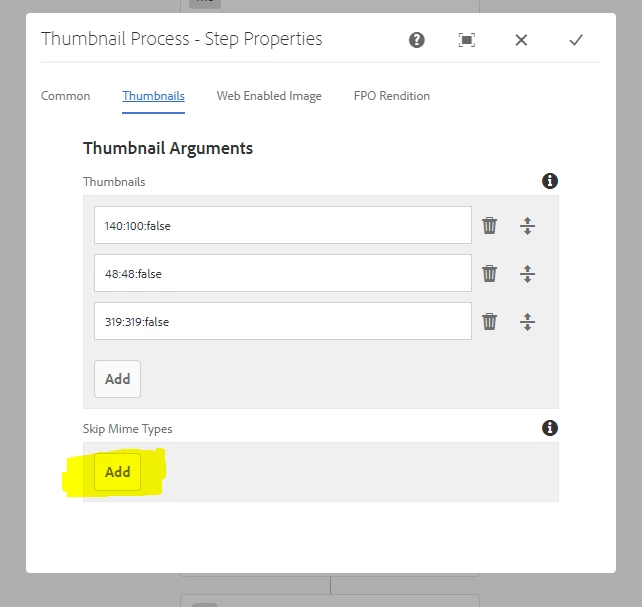
2. Create a copy of the "Dam Update Asset" and add the condition to skip creating the thumbnails for your hierarchy from the process step, by adding the mimeType you want to skip


This way all other steps will be executed, executed the thumbnail generation.


Thanks


4 replies

ShaileshBassi
ShaileshBassiAccepted solution
New Participant
Jun 14, 2022 4:10 AM UTC

Hi,


The possible solution I could think of right now is 

1. Update the OOTB launcher to restrict the OOTB "Dam Update Asset" to run over the selected folder hierarchy specific to your project.

2. Create a copy of the "Dam Update Asset" and add the condition to skip creating the thumbnails for your hierarchy from the process step, by adding the mimeType you want to skip


This way all other steps will be executed, executed the thumbnail generation.


Thanks


Translate
webdev91Author
Level 3
Jun 14, 2022 9:06 PM UTC

Hi @shaileshbassi 

This seems like a possible solution for us as I can set this up for a particular project and not for the entire instance. I am totally new to the AEM so would you please tell me where can I find OOTB Launcher and OOTB "Dam Update Asset"? 
If it's ok for you, would you please list down the steps to achieve the above?
Thank you in advance.

Translate
ShaileshBassi
New Participant
Jun 15, 2022 4:08 AM UTC

Hi,

Navigate to the path as shown below where you will find all the workflow and launchers.

 And under the launchers, you will see multiple entries under the path "http://localhost:4502/libs/cq/workflow/admin/console/content/launchers.html", after you navigate from the above screen.

The screenshot for the lauchers screen is as below, you need to make changes over here.


Translate
SantoshSai
New Participant
Jun 13, 2022 11:29 PM UTC
Santosh Sai