Dispatcher Cache Root in Local | Community
Skip to main content
Ankan_Ghosh
New Participant
March 28, 2024
Solved

Dispatcher Cache Root in Local

  • March 28, 2024
  • 3 replies
  • 3163 views

I am running the dispatcher using docker on my local Windows machine. Can anyone tell me where can I find the cache folder? I need to change some cache rules and check whether it is being applied successfully or not. 

Also how to change this cache root in local ?

Best answer by Ankan_Ghosh

Finally, I have found the answer to this question. 


I checked for the volume mappings for my running Docker container using this command 

docker inspect <container_id>

In the output you should see a "Mounts" section which looks something like this :

"Mounts": [
{
"Type": "bind",
"Source": "C:\\Users\\myUser\\Files\\AEMMainInstance\\dispatcher\\bin\\..\\lib",
"Destination": "/usr/lib/dispatcher-sdk",
"Mode": "ro",
"RW": false,
"Propagation": "rprivate"
},{
"Type": "bind",
"Source": "C:\\Users\\myUser\\Files\\AEMMainInstance\\dispatcher\\src",
"Destination": "/mnt/dev/src",
"Mode": "ro",
"RW": false,
"Propagation": "rprivate"
},

]


There was no "mount" defined for the path "/mnt/var/www/html" which is the path to my docroot. So, I changed the docer_run.cmd script to add a new mount to specify the mapping for "/mnt/var/www/html". 


Add this line in your docker_run.cmd and it will add the mount for you.

set volumes=-v C:\Users\yourUser\Files\AEMMainInstance\dispatcher\cache:/mnt/var/www/html:rw !volumes!
 
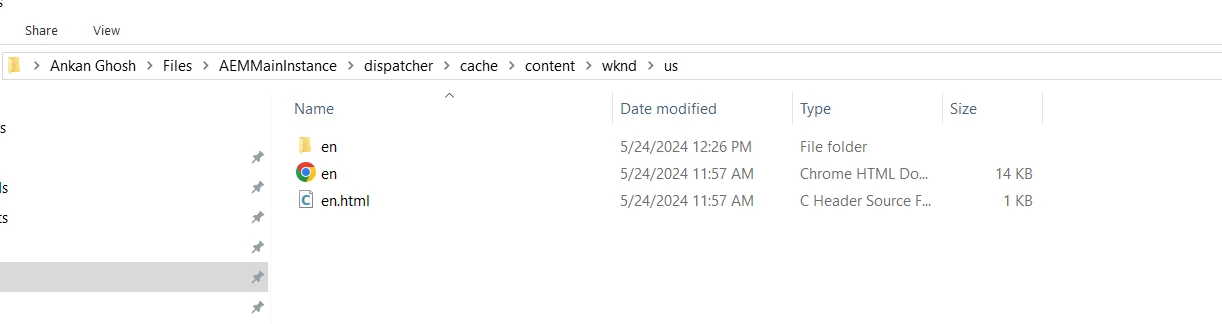
Restart your docker and try to hit a page from your dispatcher. And you check your local directory that you used for mapping to see how the caching is happening.



3 replies

Ankan_Ghosh
Ankan_GhoshAuthorAccepted solution
New Participant
May 24, 2024

Finally, I have found the answer to this question. 


I checked for the volume mappings for my running Docker container using this command 

docker inspect <container_id>

In the output you should see a "Mounts" section which looks something like this :

"Mounts": [
{
"Type": "bind",
"Source": "C:\\Users\\myUser\\Files\\AEMMainInstance\\dispatcher\\bin\\..\\lib",
"Destination": "/usr/lib/dispatcher-sdk",
"Mode": "ro",
"RW": false,
"Propagation": "rprivate"
},{
"Type": "bind",
"Source": "C:\\Users\\myUser\\Files\\AEMMainInstance\\dispatcher\\src",
"Destination": "/mnt/dev/src",
"Mode": "ro",
"RW": false,
"Propagation": "rprivate"
},

]


There was no "mount" defined for the path "/mnt/var/www/html" which is the path to my docroot. So, I changed the docer_run.cmd script to add a new mount to specify the mapping for "/mnt/var/www/html". 


Add this line in your docker_run.cmd and it will add the mount for you.

set volumes=-v C:\Users\yourUser\Files\AEMMainInstance\dispatcher\cache:/mnt/var/www/html:rw !volumes!
 
Restart your docker and try to hit a page from your dispatcher. And you check your local directory that you used for mapping to see how the caching is happening.


Ankan_Ghosh
New Participant
May 24, 2024

 @aashishdimri2002  @urmila  You guys can try this and see if it helps.

arunpatidar
New Participant
March 28, 2024

Hi @ankan_ghosh 
It will be inside the dispatcher sdk folder, if you are using AEM as a cloud SDK


Arun Patidar
Ankan_Ghosh
New Participant
March 28, 2024

I am on a Windows Machine and the cache folder is not being generated inside the Dispatcher Folder. Content is being served but I am not able to see how things are being cached. My main motive is to understand how things are cached and in what order. 


arunpatidar
New Participant
March 28, 2024

Hi @ankan_ghosh 
Maybe the cache is not working as expected, please check your configurations.
As @aanchal-sikka  mentioned, you would be able to see the cache from terminal which opens within container.

Arun Patidar
aanchal-sikka
New Participant
March 28, 2024

@ankan_ghosh 


  • Cache :
    • defined by: /docroot property in farm file
    • default location for AEMaaCS SDK’s docker image: /mnt/var/www/html


The following blog covers multiple important aspects around dispatcher set-up via docker

https://techrevel.blog/2023/08/28/navigating-aem-dispatcher-setup-farm-file-resolution-and-variable-utilization/

Aanchal Sikka
Ankan_Ghosh
New Participant
March 28, 2024

Thanks for the reply. But where is this mnt/var/www/html being created in the local directory?

How do I check the files that are cached? 

aanchal-sikka
New Participant
March 28, 2024

@ankan_ghosh 


Option-1:

I don't have a docker locally, so sharing the screenshots from internet.

- Go to Images

- Click on the vertical ellipses corresponding to your image. 

- Select "Open in terminal". You should be able to access logs at /mnt/var/www/html 


Option-2: To access via power shell.

https://www.youtube.com/watch?v=o5ycGE2bGIg


Aanchal Sikka