Dispatcher error: Cannot load (Filepath)/modules/disp_apache2.2.dll into server: The specified module could not be found.
Here is an odd one. I currently moved to Windows 11 and installed Apache 2.2.25 and dispatcher 4.2.3 (both same version as on my older Windows 10 machine).
However, when I start Apache server, it throws an error in the logs:
[Tue Jul 18 15:41:17 2023] [warn] pid file C:/ApacheSoftwareFoundation/Apache2.2/logs/httpd.pid overwritten -- Unclean shutdown of previous Apache run?
[Tue Jul 18 15:41:17 2023] [notice] Apache/2.2.25 (Win32) configured -- resuming normal operations
[Tue Jul 18 15:41:17 2023] [notice] Server built: Jul 10 2013 01:52:12
[Tue Jul 18 15:41:17 2023] [notice] Parent: Created child process 6272
[Tue Jul 18 15:41:17 2023] [notice] Child 6272: Child process is running
[Tue Jul 18 15:41:17 2023] [notice] Child 6272: Acquired the start mutex.
[Tue Jul 18 15:41:17 2023] [notice] Child 6272: Starting 64 worker threads.
[Tue Jul 18 15:41:17 2023] [notice] Child 6272: Starting thread to listen on port 80.
[Tue Jul 18 15:41:23 2023] [notice] Parent: Received restart signal -- Restarting the server.
[Tue Jul 18 15:41:23 2023] [notice] Child 6272: Exit event signaled. Child process is ending.
httpd.exe: Syntax error on line 151 of C:/ApacheSoftwareFoundation/Apache2.2/conf/httpd.conf: Cannot load C:/ApacheSoftwareFoundation/Apache2.2/modules/disp_apache2.2.dll into server: The specified module could not be found.
[Tue Jul 18 15:41:23 2023] [warn] (OS 995)The I/O operation has been aborted because of either a thread exit or an application request. : winnt_accept: Asynchronous AcceptEx failed.
[Tue Jul 18 15:41:24 2023] [notice] Child 6272: Released the start mutex
[Tue Jul 18 15:41:25 2023] [notice] Child 6272: All worker threads have exited.
[Tue Jul 18 15:41:25 2023] [notice] Child 6272: Child process is exiting
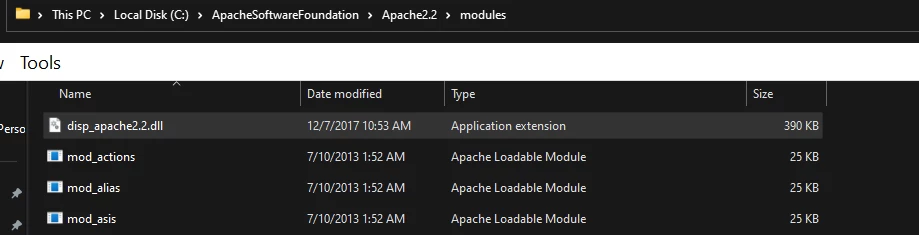
Now to show where the dll is located:
In the httpd.conf file:
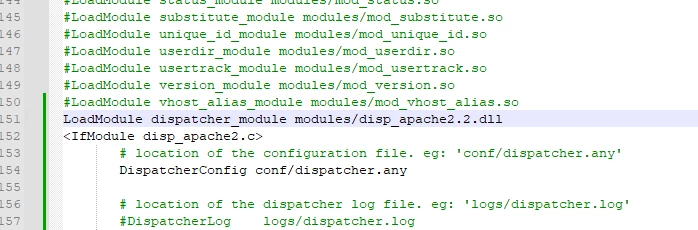
As you can see, the path is correct but, Apache doesn't think so. I've tried turning the UAC off, disabled my anti-virus software, reinstalled Apache 2.2 multiple times. Any idea what's going on for Windows 11? It works on my old Windows 10 laptop but, not my new Windows 11 laptop.