Drag and drop of Assets not working in Touch UI | Community
Skip to main content
trc41594544
Level 3
Nov 13, 2017 10:00 PM UTC
Solved

Drag and drop of Assets not working in Touch UI

Hi all,

In classic UI, we are able to drag and drop assets in the same folder wherever we want and we will get a popup to confirm the move.

Is this functionality not available in touch UI? In assets.html i am unable to move assets in the same folder.

For example: If i have 4 images in  a sling:orderedFolder, in classic UI i can move 4th asset to first position by just drag and drop. In touch UI though i am unable to do that.

Is there a way i can do this move in touch UI also?

Thanks for any help
This post is no longer active and is closed to new replies. Need help? Start a new post to ask your question.
kumaranfAccepted solution
Level 2
Nov 14, 2017 8:13 AM UTC

It can be done using Touch UI too.

1. Go to your folder where you are planning to reorganize the assets positions. I am in Geometrixx-Outdoors folder

http://localhost:4502/assets.html/content/dam/geometrixx-outdoors/brand

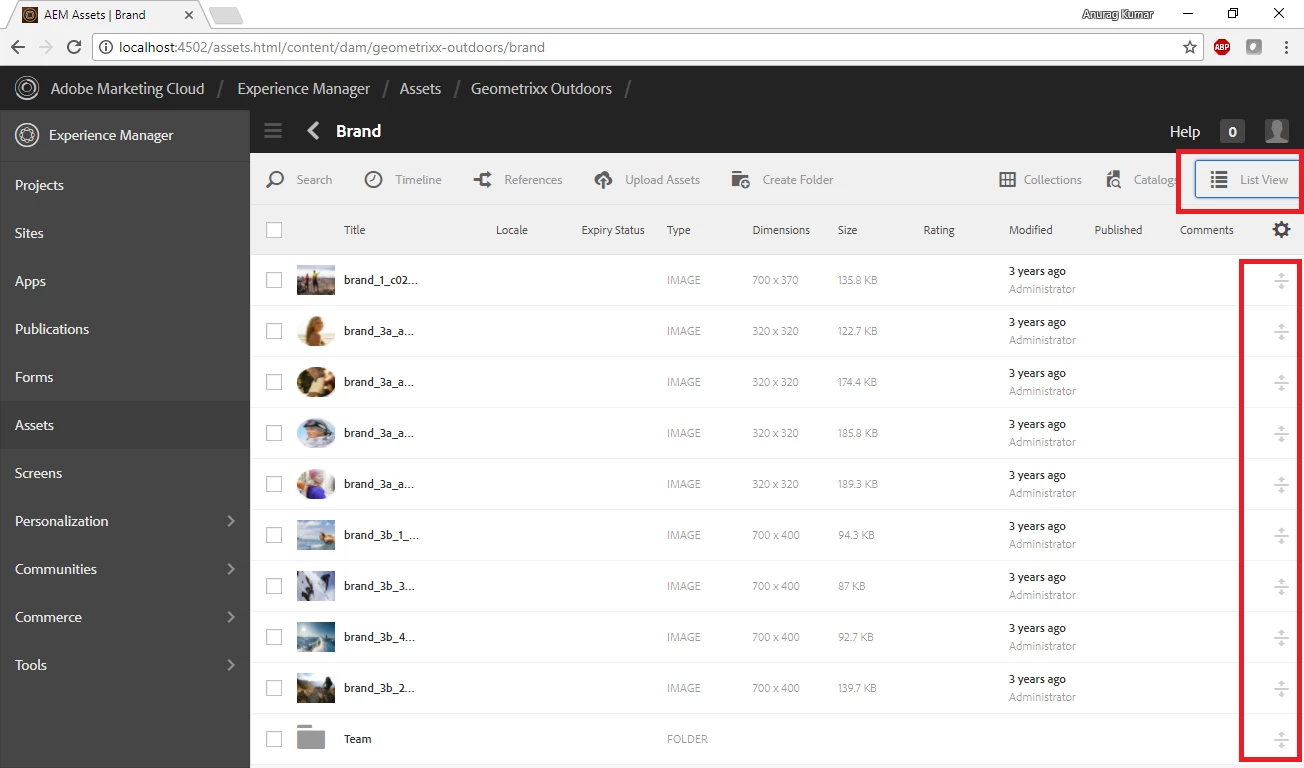
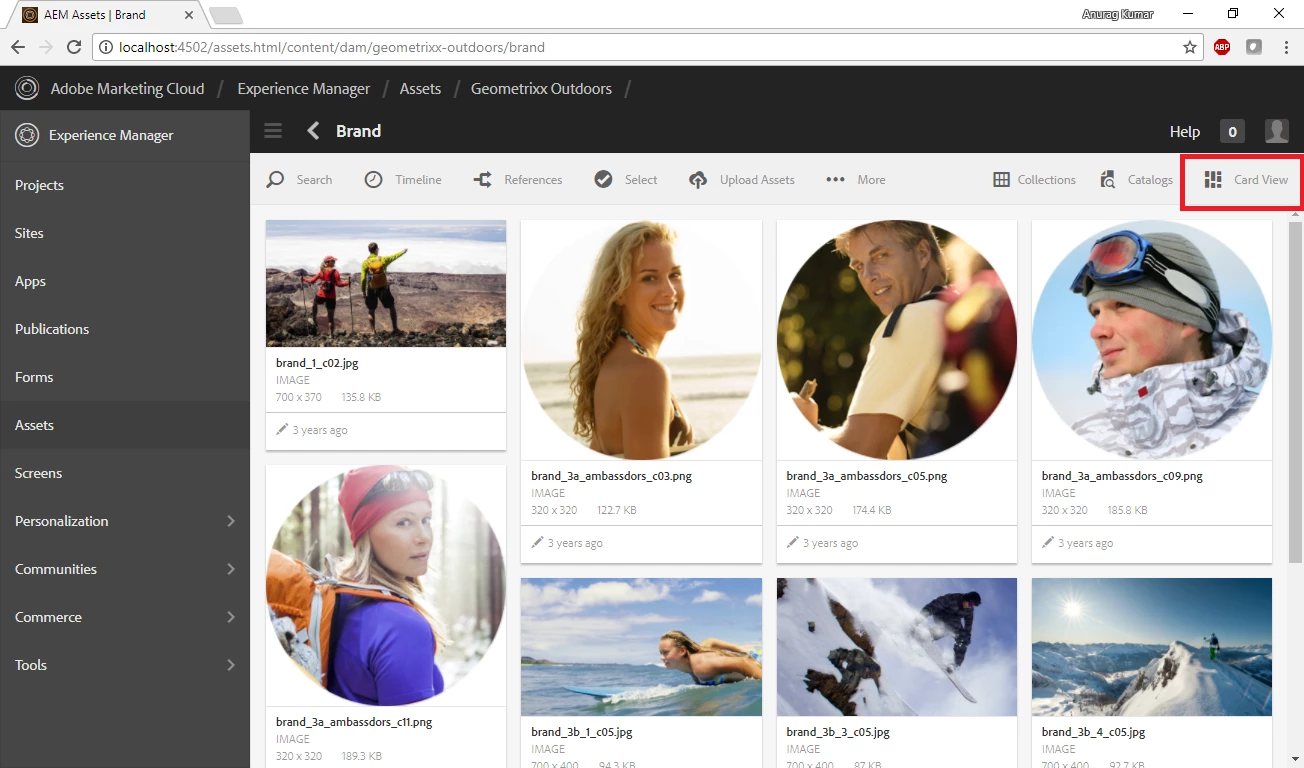
2. Note the view that you in. Click on the view button to change it to List view.

3. Note the icons on right most side of page. Using these icons you are shuffle the sequence of your assets.

This feature is available not only in Assets but in Sites too. I use it very frequently to move my latest projects (/content/xyz) to the top.

Hope this helps.

8 replies

trc41594544
Level 3
Nov 14, 2017 2:56 PM UTC

Hi,

It worked, it just did not looked the same way in 6.2.

Thanks for your help

Translate
Level 2
Nov 14, 2017 2:55 PM UTC

6.1

Translate
trc41594544
Level 3
Nov 14, 2017 2:42 PM UTC

Hi,

Thanks for your response. Which version of AEM are you using?

I am using AEM 6.2 SP1. I do not see that option in Touch UI.

Thanks

Translate
kumaranfAccepted solution
Level 2
Nov 14, 2017 8:13 AM UTC

It can be done using Touch UI too.

1. Go to your folder where you are planning to reorganize the assets positions. I am in Geometrixx-Outdoors folder

http://localhost:4502/assets.html/content/dam/geometrixx-outdoors/brand

2. Note the view that you in. Click on the view button to change it to List view.

3. Note the icons on right most side of page. Using these icons you are shuffle the sequence of your assets.

This feature is available not only in Assets but in Sites too. I use it very frequently to move my latest projects (/content/xyz) to the top.

Hope this helps.

Translate
trc41594544
Level 3
Nov 14, 2017 2:37 AM UTC

Hi,

I can do this in classic UI but how can i move the asset in the same folder if i have more than 15 assets in one folder. i cannot do that right?

For example: If i have 30 assets, how can i move the last one to the first place using damadmin?

Thanks

Translate
smacdonald2008
Level 10
Nov 13, 2017 10:38 PM UTC

The TOuch UI does not behave like Classic with respect to the same folder. Moving Assets around in the same folder is really no advantage anyhow - they all appear in the side rail - as shown above.

To move an Asset in TOuch UI to another folder - you have to go to the Asset in the TOuch UI.

For example - in AEM 6.3

http://localhost:4502/assetdetails.html/content/dam/we-retail/en/people/mens/men_1.jpg

See move button in the tool bar --

Click Move and then you will be promoted for a Destination folder - see here:

pick a Destination folder and click MOVE and the Asset will be moved to the new folder.

TOuch UI does not support this -- if you want this experience - use Classic UI from the link above.

Translate
smacdonald2008
Level 10
Nov 13, 2017 10:24 PM UTC

If you mean the site admin - you can still do that here -- http://localhost:4502/damadmin

Translate
smacdonald2008
Level 10
Nov 13, 2017 10:23 PM UTC

In Touch UI. the main use case of moving/dragging Assets is from the side rail onto an image component located on a page -- like this

Translate