Hello @satishpothabathula ,
For your requirement, you can add a custom clientlib. To help or hints you can follow this JS, where after selecting the 1st dropdown other select field options are disabled. Where your requirement is just to hide.
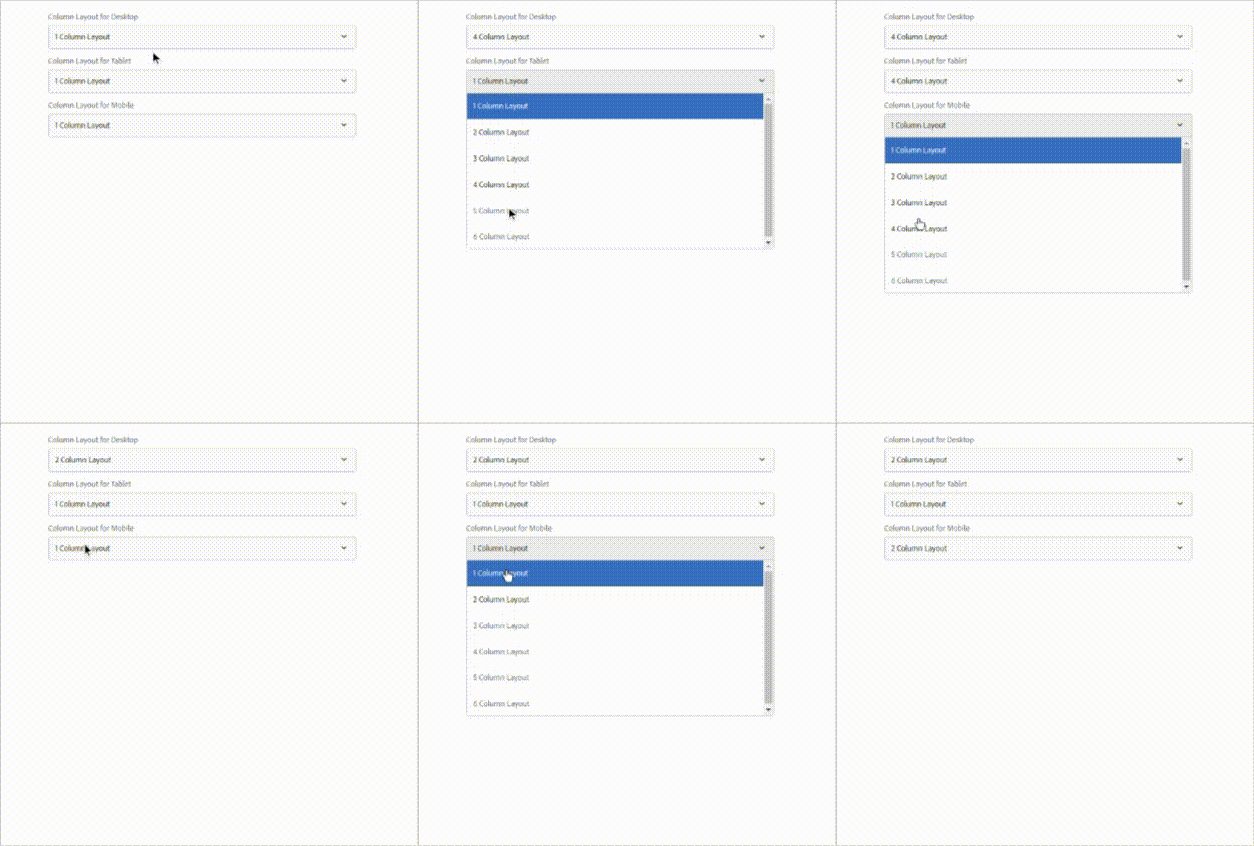
Code Sinppet,
(function (document, $, Coral) {
    let $doc = $(document);
    $doc.on('foundation-contentloaded', function (e) {
        let _element = $('.cq-dialog-dropdown-showhide.dropdown-main')[0];
        showHideHandler($(_element));
    });

    $(document).on("change", ".cq-dialog-dropdown-showhide", function(e) {
        showHideHandler($(this));
        resetChild();
    });

    function showHideHandler(_this) {
        let desktopData = init();

        for(let i=0; i<desktopData.children.length; i++){
            let grandChildren = $(desktopData.children[i]).find("coral-select-item");

            for (let j=0; j<=desktopData.index; j++){
                grandChildren[j].removeAttribute("disabled");
            }
            for(let j=desktopData.index+1; j<grandChildren.length; j++){
                grandChildren[j].setAttribute("disabled", true);
            }
        }
    }

    function resetChild() {
        let desktopData = init();

        let tabletChildren = $(desktopData.children[0]).find("coral-select-item");
        let mobileChildren = $(desktopData.children[1]).find("coral-select-item");

        let tabletSelectedIndex = Array.prototype.findIndex.call(tabletChildren, ele => ele.hasAttribute('selected'));
        let mobileSelectedIndex = Array.prototype.findIndex.call(mobileChildren, ele => ele.hasAttribute('selected'));

        if(desktopData.index < tabletSelectedIndex){
            tabletChildren[tabletSelectedIndex].removeAttribute("selected");
            tabletChildren[0].setAttribute("selected", true);
        }
        if(desktopData.index < mobileSelectedIndex){
            mobileChildren[mobileSelectedIndex].removeAttribute("selected");
            mobileChildren[0].setAttribute("selected", true);
        }
    }

    function init () {
        let desktopData = {};
        let mother = $('coral-select.dropdown-main');
        let elementChildren = $(mother).find('coral-select-item');
        desktopData.index = Array.prototype.findIndex.call(elementChildren, ele => ele.hasAttribute('selected'));
        desktopData.children = $('coral-select.dropdown-child');

        return desktopData;
    }

})(document, Granite.$, Coral);
XML,
<rapidColumnConfigDesktop
    granite:class="cq-dialog-dropdown-showhide tab-show-hide-select dropdown-main"
    jcr:primaryType="nt:unstructured"
    sling:resourceType="granite/ui/components/coral/foundation/form/select"
    fieldLabel="Column Layout for Desktop"
    name="./rapidColumnConfigDesktop">
    <granite:data
        jcr:primaryType="nt:unstructured"
        cq-dialog-dropdown-showhide-target=".rapid-column-layout-show-hide"
        tab-showhide-target=".rapid-tab-show-hide"/>
    <items jcr:primaryType="nt:unstructured">
        <oneColumnLayout
            jcr:primaryType="nt:unstructured"
            selected="{Boolean}true"
            text="1 Column Layout"
            value="1"/>
        <twoColumnLayout
            jcr:primaryType="nt:unstructured"
            selected="{Boolean}false"
            text="2 Column Layout"
            value="2"/>
        <threeColumnLayout
            jcr:primaryType="nt:unstructured"
            selected="{Boolean}false"
            text="3 Column Layout"
            value="3"/>
        <fourColumnLayout
            jcr:primaryType="nt:unstructured"
            selected="{Boolean}false"
            text="4 Column Layout"
            value="4"/>
        <fiveColumnLayout
            jcr:primaryType="nt:unstructured"
            selected="{Boolean}false"
            text="5 Column Layout"
            value="5"/>
        <sixColumnLayout
            jcr:primaryType="nt:unstructured"
            selected="{Boolean}false"
            text="6 Column Layout"
            value="6"/>
    </items>
</rapidColumnConfigDesktop>
<rapidColumnConfigTablet
    granite:class="dropdown-child"
    jcr:primaryType="nt:unstructured"
    sling:resourceType="granite/ui/components/coral/foundation/form/select"
    fieldLabel="Column Layout for Tablet"
    name="./rapidColumnConfigTablet">
    <items jcr:primaryType="nt:unstructured">
        <oneColumnLayout
            jcr:primaryType="nt:unstructured"
            selected="{Boolean}true"
            text="1 Column Layout"
            value="1"/>
        <twoColumnLayout
            jcr:primaryType="nt:unstructured"
            selected="{Boolean}false"
            text="2 Column Layout"
            value="2"/>
        <threeColumnLayout
            jcr:primaryType="nt:unstructured"
            selected="{Boolean}false"
            text="3 Column Layout"
            value="3"/>
        <fourColumnLayout
            jcr:primaryType="nt:unstructured"
            selected="{Boolean}false"
            text="4 Column Layout"
            value="4"/>
        <fiveColumnLayout
            jcr:primaryType="nt:unstructured"
            selected="{Boolean}false"
            text="5 Column Layout"
            value="5"/>
        <sixColumnLayout
            jcr:primaryType="nt:unstructured"
            selected="{Boolean}false"
            text="6 Column Layout"
            value="6"/>
    </items>
</rapidColumnConfigTablet>
<rapidColumnConfigMobile
    granite:class="dropdown-child"
    jcr:primaryType="nt:unstructured"
    sling:resourceType="granite/ui/components/coral/foundation/form/select"
    fieldLabel="Column Layout for Mobile"
    name="./rapidColumnConfigMobile">
    <items jcr:primaryType="nt:unstructured">
        <oneColumnLayout
            jcr:primaryType="nt:unstructured"
            selected="{Boolean}true"
            text="1 Column Layout"
            value="1"/>
        <twoColumnLayout
            jcr:primaryType="nt:unstructured"
            selected="{Boolean}false"
            text="2 Column Layout"
            value="2"/>
        <threeColumnLayout
            jcr:primaryType="nt:unstructured"
            selected="{Boolean}false"
            text="3 Column Layout"
            value="3"/>
        <fourColumnLayout
            jcr:primaryType="nt:unstructured"
            selected="{Boolean}false"
            text="4 Column Layout"
            value="4"/>
        <fiveColumnLayout
            jcr:primaryType="nt:unstructured"
            selected="{Boolean}false"
            text="5 Column Layout"
            value="5"/>
        <sixColumnLayout
            jcr:primaryType="nt:unstructured"
            selected="{Boolean}false"
            text="6 Column Layout"
            value="6"/>
    </items>
</rapidColumnConfigMobile>
Hope this will help you to modify it.