Dynamically populate selection dropdown in AEM6.2 | Community
Skip to main content
Level 5
Nov 9, 2017 9:14 AM UTC
Solved

Dynamically populate selection dropdown in AEM6.2

Hi All,

I have a requirement in AEM6.2 to populate selection dtopdown dynamically.

Requirement is

There are 5 dropdown, first is fixed all others are dependent upon values selected in previous dropdown.

Similar to like countries(fixed dropdown), then state, district, blocks then villages etc all dynamic dropdown values.

Followed below link didn't work in AEM6.2

Touch UI dynamic selection of multiple drop downs | Adobe AEM Club

Please help/advise if you have worked upon such requirement.

Thanks,

Pradeep

This post is no longer active and is closed to new replies. Need help? Start a new post to ask your question.
manoj_devapath
manoj_devapathAccepted solution
Level 5
Nov 9, 2017 3:31 PM UTC

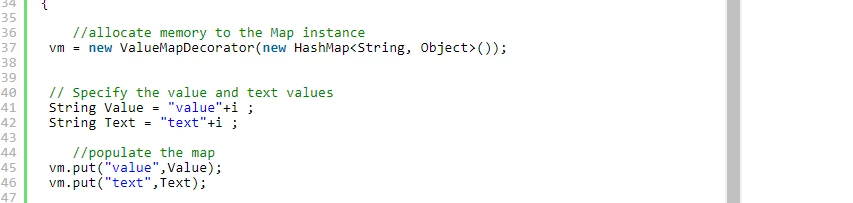
In touch ui dialog you can Use DataSource objects api to build dynamic drop down we have very good documents

Adobe Experience Manager Help | Using Granite DataSource objects to populate AEM Touch UI objects

acs-aem-samples/sample-datasource.jsp at master · Adobe-Consulting-Services/acs-aem-samples · GitHub

you have to dynamically inject your value and text.

In your use case if it is on page you need a custom sling servlet with 5 different request params.

when  one input selection is selected you can do ajax call to servlet that will return you values dynamically..

sample servlets in aem 6.2

Adobe Experience Manager Help | Submitting Adobe Experience Manager form data to Java Sling Servlets

7 replies

arunpatidar
New Participant
Jun 18, 2019 11:30 AM UTC

Hi,

Below is sample js which populate second dropdown with child pages values based on pathbrowser values in first field.

You can modify the code to listen events on first dropdown

aem63app-repo/dynamic-dropdown.js at master · arunpatidar02/aem63app-repo · GitHub

Translate
Arun Patidar
Level 5
Jun 18, 2019 7:40 AM UTC

I don't remember full but there is js code which makes ajax call to pull

dynamic values and populated them using jquery and coral ui.

Translate
New Participant
Jun 18, 2019 6:39 AM UTC

Hi Pradeep,

I have a same scenario as you have mentioned. I am able to populate values in first drop-down using dataSource. but not understanding the exact approach to populate values in second drop down based on the first. can you please share me your approach.

Thanks,

Akash

Translate
Level 5
Nov 10, 2017 9:26 AM UTC

Onload(very first time) i used dataasource API as suggested to populate dropdown options.

Finally i managed by working on listener.js.

It's really tough task to look widget html code given by adobe granite, and write lot of jquery code to fulfil our requirement. In AEM 6.2 everything is listener.js where only we have to play around for anything dynamic.

Thanks,

Pradeep

Translate
Level 5
Nov 9, 2017 4:31 PM UTC

This logic is working fine but first dropdown selected value i am able to capture in listener(listener.js). How do i populate 2nd dropdown based on value selected in first?

Please help.

Thanks,

Pradeep

Translate
manoj_devapath
manoj_devapathAccepted solution
Level 5
Nov 9, 2017 3:31 PM UTC

In touch ui dialog you can Use DataSource objects api to build dynamic drop down we have very good documents

Adobe Experience Manager Help | Using Granite DataSource objects to populate AEM Touch UI objects

acs-aem-samples/sample-datasource.jsp at master · Adobe-Consulting-Services/acs-aem-samples · GitHub

you have to dynamically inject your value and text.

In your use case if it is on page you need a custom sling servlet with 5 different request params.

when  one input selection is selected you can do ajax call to servlet that will return you values dynamically..

sample servlets in aem 6.2

Adobe Experience Manager Help | Submitting Adobe Experience Manager form data to Java Sling Servlets

Translate
Ratna_Kumar
Level 10
Nov 9, 2017 12:11 PM UTC

Hi Pradeep,

Seems the HELPX article Adobe Experience Manager Help | Dynamically updating Adobe Experience Manager TouchUI Dialog Select Fields is for AEM 6.1. We will check this HELPX article once again for AEM 6.2 as well as AEM 6.3

Also, in that article the drop-down population is shown in JSP. We will convert to HTL and will let you know!!

See this article for how to populate the drop-down dynamically in HTL: Adobe Experience Manager Help | Using an WCMUsePojo class to populate an Experience Manager Touch UI Select Field

Thanks,

Ratna Kumar.

Translate