Eclipse AEM Plug-in not working with multiple projects | Community
Skip to main content
FrancescaBueti
Level 2
Jul 9, 2019 8:42 PM UTC

Eclipse AEM Plug-in not working with multiple projects

I have been using the AEM Eclipse Plug-In. I have the option to import/export from the server.
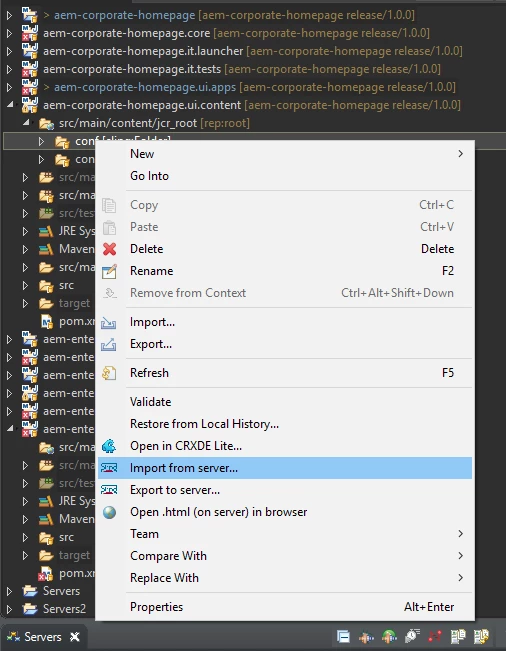
However, I have recently added another AEM project to Eclipse and am unable to import or export content.
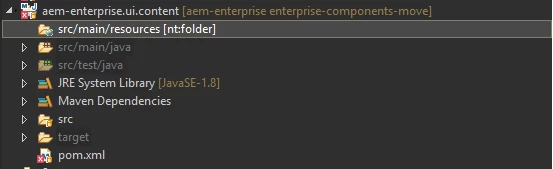
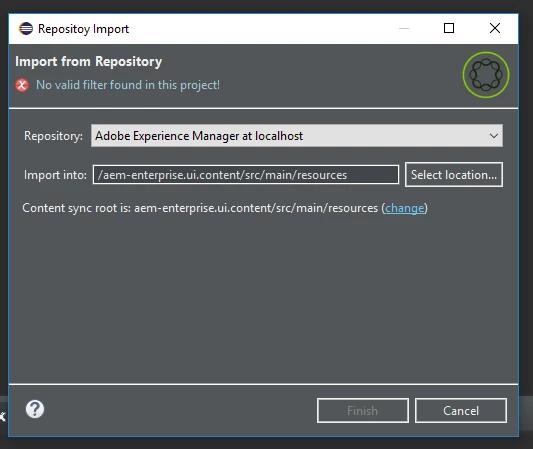
The src/main/resources folder isn't able to be expanded and when I do click import from server, I get the following error: "No valid filter found in this project!"
Any idea on how to resolve this?

Thanks,

Francesca

This post is no longer active and is closed to new replies. Need help? Start a new post to ask your question.

9 replies

kaushik-Datta
Level 2
Jul 1, 2020 11:16 AM UTC

Click on CHANGE on repository import dialog and browse to  /src/main/content/jcr_root/apps rather than /src/main/resources . Hopefully this will solve the  problem.image.png


Translate
kaushik-Datta
Level 2
Jul 1, 2020 1:49 PM UTC

sorry you have to browse until browse to /src/main/content/jcr_root/ only. It will solve the issue perfectly.


Translate
Level 2
Mar 11, 2021 5:02 AM UTC

Worked Perfectly fine ! Thanks a lot 


Translate
allanj91110471
New Participant
Nov 13, 2019 10:42 AM UTC

Its happening in latest Maven Archetype

Translate
New Participant
Feb 26, 2020 1:45 PM UTC

even i am facing the same issue...any resolution Please let us know

Translate
Level 2
Feb 28, 2020 3:39 PM UTC

I faced this today, here is my solution:


Select Project


Right Click on it, configure -> convert to content project


Missing Filter is added and import works again

Translate
Nisha_Nivedita
Employee
Jul 10, 2019 5:59 AM UTC

Could be possible it is not a valid location, can you try with any other small project.

Translate
Prince_Shivhare
New Participant
Jul 10, 2019 5:31 AM UTC

Can you please tell me what it should import from CRXDE to src/main/resources. Can you try with other folders or node.

Translate