Eclipse "Import from Server..." function corrupts the JCR | Community
Skip to main content
New Participant
February 13, 2018
Solved

Eclipse "Import from Server..." function corrupts the JCR

  • February 13, 2018
  • 7 replies
  • 6260 views

Executing the "Import from Server" function corrupts the JCR, by leaving out attributes of jcr:content.

Example showing /content/dam/myproject before (right) and after import (left):
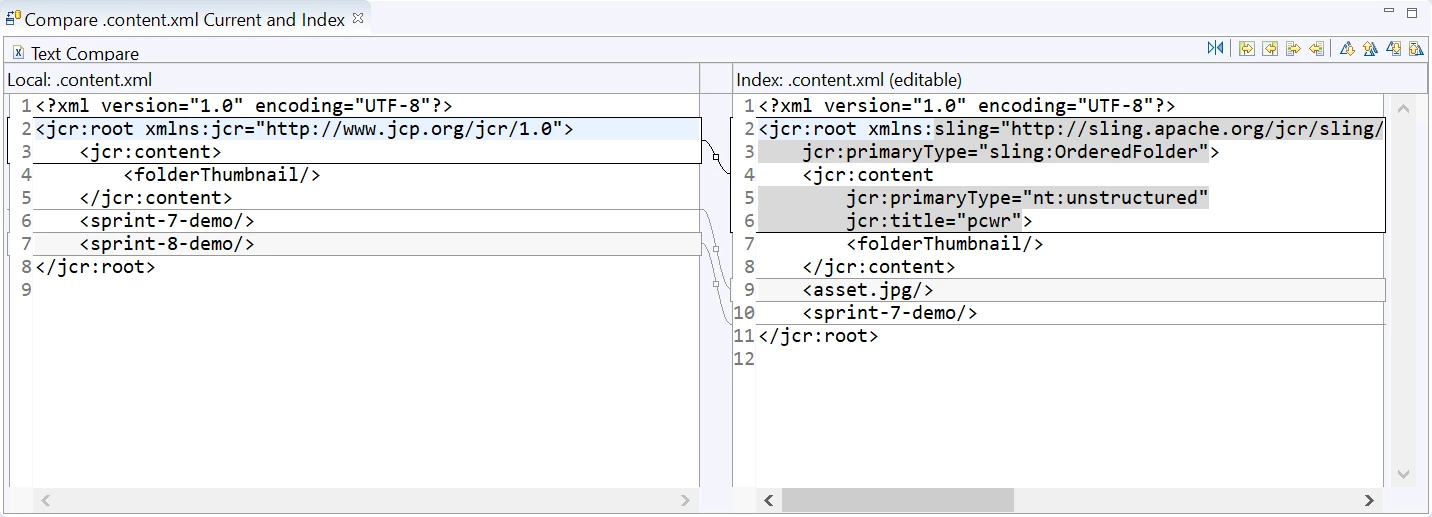
What could cause this and what's the solution?

Eclipse version: Neon.3

Sling IDE Plug-in: 1.2.0

AEM: 6.3 with SP1, CFP2

This post is no longer active and is closed to new replies. Need help? Start a new post to ask your question.
Best answer by alexr21

ThanksJulio Tobar​ for pin-pointing the root cause of the issue. I relayed your explanation to the Sling IDE Tools project and they immediately pushed a fix (upgrade File Vault to 3.1.42) to the 1.2.1-SNAPSHOT version of the plugin as of this morning.

7 replies

Julio_Tobar
New Participant
February 19, 2018

Great alexr2​. Thank you so much for letting us know this fixed the issue!

Regards,

alexr21AuthorAccepted solution
New Participant
February 19, 2018

ThanksJulio Tobar​ for pin-pointing the root cause of the issue. I relayed your explanation to the Sling IDE Tools project and they immediately pushed a fix (upgrade File Vault to 3.1.42) to the 1.2.1-SNAPSHOT version of the plugin as of this morning.

Julio_Tobar
New Participant
February 15, 2018

Let me elaborate on the issue, as I see it, and then give you my recommendation for fixing it.

Issue:

Apache Jackrabbit FileVault tool is responsible for Synchronizing files in the File System with content in the JCR repository. Sadly, FileVault version 3.1.38 has a bug that serializes .content.xml file (-the one that contains the node properties-) almost empty.

Since AEM plugin for Eclipse uses Sling-Ide-Tooling internally (AEM Developer Tools for Eclipse ), and Sling-Ide-tooling uses Apache Jackrabbit FileVault tool behind the scenes (sling-ide-tooling/impl-vlt/src/org/apache/sling/ide at master · apache/sling-ide-tooling · GitHub ), we end up having that same issue (-almost empty .content.xml files-) when using AEM plugin for Eclipse.

solution:

The way I resolved my issue back then, since I was using FileVault directly and not the AEM plugiin for Eclipse at the time, was to get a new build of Jackrabbit FileVault tool. You can try to build a new version of AEM plugin for Eclipse (GitHub - apache/sling-ide-tooling: Apache Sling IDE Tools ) or Have a ticket raised with Adobe asking for a newer version of the plugin.

Regards,

alexr21Author
New Participant
February 14, 2018

Apparently the vaultClipse project is defunct:

alexr21Author
New Participant
February 14, 2018

Julio Tobar​ I see that I have filevault-3.1.38. I quick Google search did not reveal where other versions can be downloaded. I did find an alternate version "VaultClipse" at http://www.aemcq5tutorials.com/tutorials/configure-filevault-vlt-tool-in-cq/ which I will try next.

smacdonald2008​ the step to reproduce is to use the Import from server... option below:

Julio_Tobar
New Participant
February 14, 2018

I ran into a similar issue and it turns out to be a problem with "File Vault" tool provided by Jackrabbit. The version of the tool I had the problem with was 3.1.18 and I had to either degrade to a previous version (3.1.16) or get a more recent build (3.1.42). To be 100% the issue comes from this tool you can:

1) install fileVault in your system (expand the tools from AEM_HOME/crx-quickstart/opt/filevault into any other folder you choose) and configure your PATH to also include this application

3) using "vlt" command do a check out

4) modify some content in the file system and do a check in

5) modify same content using CRXDE lite and do an "update"

6) take a look into .content.xml files and see if there are properties missing, if so, we are 100% sure the issue comes from the file vault version you have. If not, we need to look into other things.

smacdonald2008
New Participant
February 14, 2018

Can you post the step you did to see if this can be reproduced.