Edit and configure component options are not showing when we search in chrome browser | Community
Skip to main content
New Participant
October 10, 2019

Edit and configure component options are not showing when we search in chrome browser

  • October 10, 2019
  • 11 replies
  • 15811 views

Hi All,

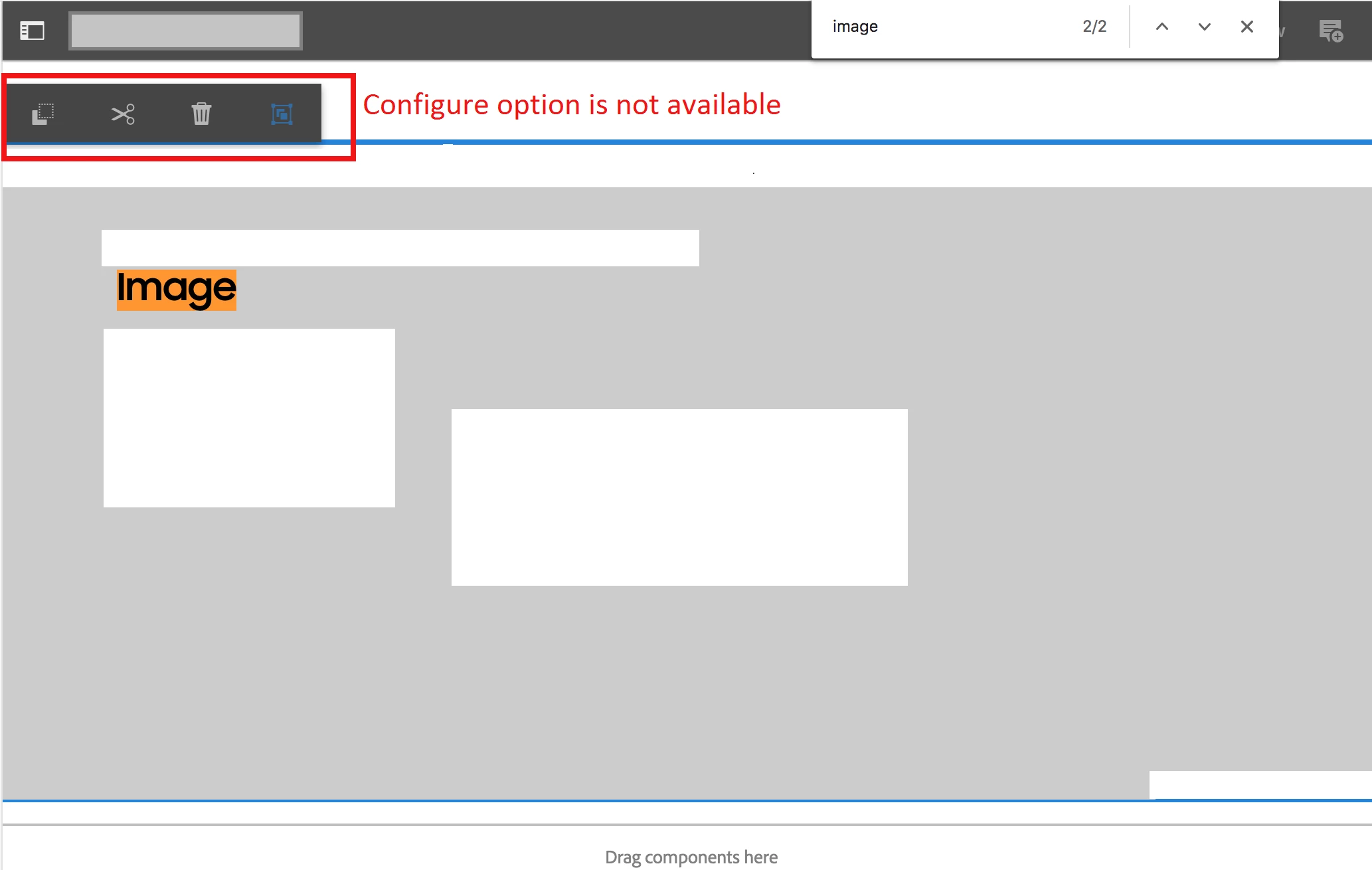
I am facing issue in authoring the component.  When I search a word in the page in edit mode and click on the component doesn't showing the configure option to author the dialog.  So I couldn't open the dialog to author in AEM 6.1.

Template type: Editable template

Browser : issue happening in Chrome only

AEM version: AEM 6.4.4

Please refer the below screenshot.  Any suggestions would be helpful.
Thanks,

Velmurugan

This post is no longer active and is closed to new replies. Need help? Start a new post to ask your question.

11 replies

New Participant
August 12, 2024

Hi @velmuruganv38 ,

To get this issue resolved, I have used workaround of overlaying cq:infoProviders node from path: "/libs/wcm/foundation/components/basicpage/v1/basicpage/cq:infoProviders"

to "/apps/core/wcm/components/page/v2/page/cq:infoProviders"

and remove all child nodes from cq:infoProviers node except status and permissions.

Regards,
Shrishail


New Participant
August 17, 2022

I can even reproduce this issue with AEM 6.5.11. But only when i have two different sites deployed which is pointing to two different core.wcm.components. For ex: Site A uses Core 2.4.0 & Site B uses Core 2.17.10

New Participant
November 23, 2022

I am also facing same issue with AEM 6.5.13. Do we have any fix for this issue.

varuns46785756
New Participant
November 10, 2019

Hi All,

I am facing the same issue and I am using AEM 6.4.2.0. I have tried all the steps but still not able to see "configure" option.Is there any hotfix to fix this issue.Only these options are coming:

Regards,

anelem1760873
New Participant
July 20, 2020

Am also facing the same issue, is there any fix for this????

ArpitVarshney
New Participant
October 14, 2019

velmuruganv38 Yes, I have checked on pages created using editable template.

New Participant
October 14, 2019

arpitv27529355 Yeah correct, it's happening only once.  Are you using Editable template?

jbrar​ Do you have any idea on this?

ArpitVarshney
New Participant
October 11, 2019

Hi velmuruganv38  jbrar

The same behaviour is occurring in AEM 6.4.6 as well but only once.

Below are the steps in touchui:

1. Open any page and do ctrl+f and search for a word and click enter.

2. Click on dialog editable area and you can't see the edit & configure options.

3. Click outside.

4. Again Click on the editable area again and it is visible now.

It happened only once when a search is made after page load. The issue didn't happen after step 4 even though you make any search.

Regards,

Arpit Varshney

New Participant
November 20, 2020

@kautuk_sahni Did not understand your answer. What is the fix for this issue ?

New Participant
December 7, 2020

@kashyapta - Is there any fix for this issue?

New Participant
October 11, 2019

hamidk92094312Yes it's happening in private mode also.

ka786​ & jbrar  I don't see any console errors.

Also noticed if we click outside of editable area and click on the component, i'm able to see config options.

Employee
October 10, 2019

I can confirm this is not a BUG. Cannot reproduce the issue on any AEM instances (6.3-6.5)

Your best option is to check the developer console for any js errors.

Employee
October 10, 2019

Does it also happen in private mode (incognito) ?

ArpitVarshney
New Participant
October 10, 2019

Hi velmuruganv38

Even it is a bug in AEM 6.4.6 as well. Better to log a daycare ticket.

Regards,

Arpit Varshney