Edit dropdown is not working in local | Community
Skip to main content
New Participant
June 6, 2022
Solved

Edit dropdown is not working in local

  • June 6, 2022
  • 1 reply
  • 777 views

Hi All,


I m not able to edit any page in my local AEM environment. The Edit Drop down is not working.

 

Can any one please suggest what i m missing.

This post is no longer active and is closed to new replies. Need help? Start a new post to ask your question.
Best answer by SantoshSai

Hi @keshri12 

  • What version of AEM are you using? Unable to reproduce it on 6.5.0/6.5.11.
  • Can you share screenshot of the errors you see in browser console logs or error.log file?

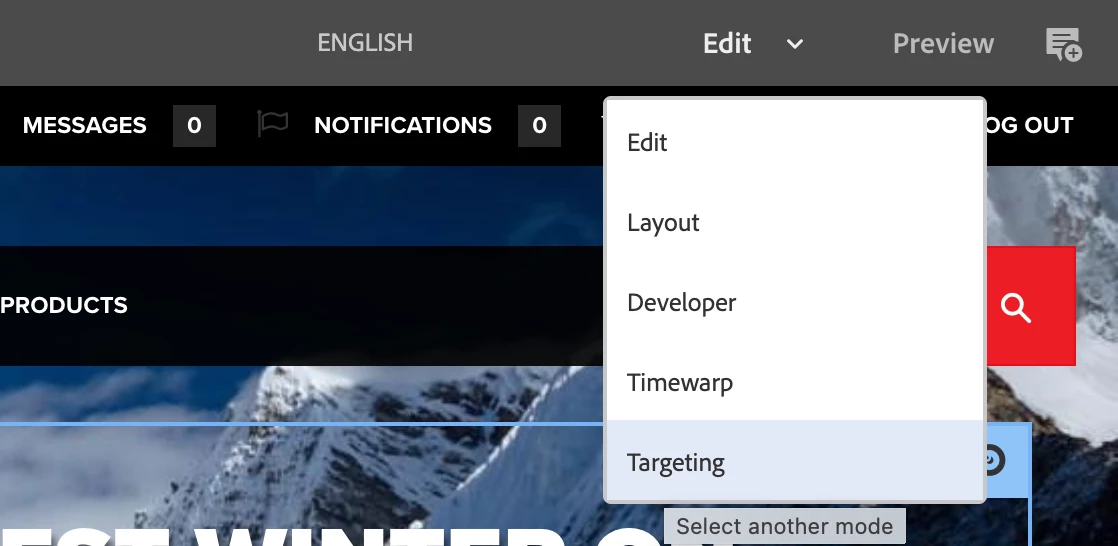
Try on a fresh instance of AEM to see what should occur. When you open a page, you have access to different modes via this drop-down.


Regards,
Santosh

1 reply

SantoshSai
SantoshSaiAccepted solution
New Participant
June 6, 2022

Hi @keshri12 

  • What version of AEM are you using? Unable to reproduce it on 6.5.0/6.5.11.
  • Can you share screenshot of the errors you see in browser console logs or error.log file?

Try on a fresh instance of AEM to see what should occur. When you open a page, you have access to different modes via this drop-down.


Regards,
Santosh

Santosh Sai
Keshri12Author
New Participant
June 6, 2022

Hi Santosh,

i m using AEM 6.5.11. Below is the error screenshot.

And yes for, Demo sites, the Drop down is working. But for other is not working.


SantoshSai
New Participant
June 6, 2022

@keshri12 
Are those (other) your custom project pages? If so, I hope you got your answer - that has caused JS errors. Have to figure out what it is causing.

Santosh Sai