Editbar missing for touch ui component | Community
Skip to main content
Level 2
Oct 7, 2018 11:35 AM UTC
Solved

Editbar missing for touch ui component

Hi All,

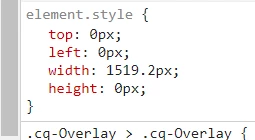
I have created a header component but not able to edit the component. The editbar is missing. the height value is coming as zero. I am getting this issue only for the specific component for other components, editbar is working fine.

I am adding the component through parsys and  parsys editbar is overlaying on the header component.

Using AEM 6.3 version.

Please help me to resolve this issue.
This post is no longer active and is closed to new replies. Need help? Start a new post to ask your question.
edubey
edubeyAccepted solution
Level 10
Oct 8, 2018 5:16 AM UTC

Two things can create issue:

1. your components configs- Can you share the editconfig node

2. component specific CSS?

Can you share any screenshot?

3 replies

arunpatidar
New Participant
Oct 22, 2018 5:57 AM UTC

Hi,

Can you check your header html, sometimes it happened because of extra closing divs.

Translate
Arun Patidar
Level 2
Oct 22, 2018 5:55 AM UTC

Thanks edubey,

the hamburger menu css is causing the issue.

Translate
edubey
edubeyAccepted solution
Level 10
Oct 8, 2018 5:16 AM UTC

Two things can create issue:

1. your components configs- Can you share the editconfig node

2. component specific CSS?

Can you share any screenshot?

Translate