Error: Solr Integration with AEM 6.4 | Community
Skip to main content
mayank0928
New Participant
September 30, 2018
Solved

Error: Solr Integration with AEM 6.4

  • September 30, 2018
  • 22 replies
  • 11450 views

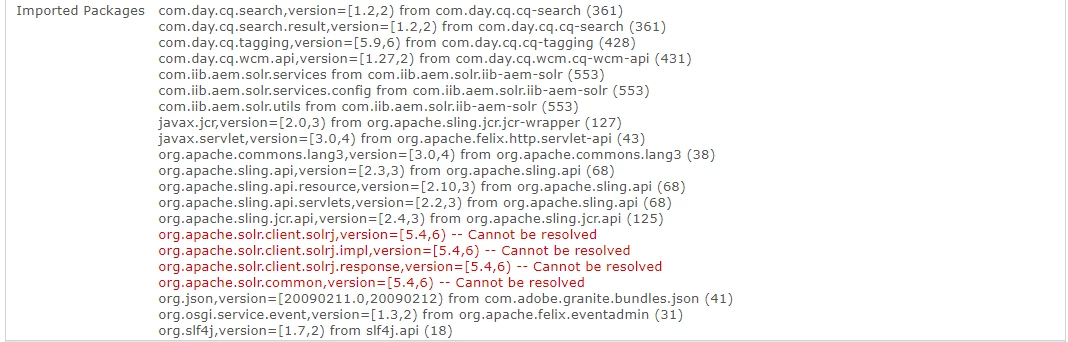
I'm not able to integrate Solr 7.5 with AEM 6.4,

getting the following error:

I have tried with almost every version of Solr, but I am getting the same error again and again!

I am simply following this tutorial:

Adobe Experience Manager Help | Integrating SOLR with Adobe Experience Manager

But, in this tutorial, apache.felix.scr.annotations are used. I am just replacing these annotations with osgi annotations.

This post is no longer active and is closed to new replies. Need help? Start a new post to ask your question.
Best answer by smacdonald2008

Here is the new article with R6 annotations working - along with a video.

Adobe Experience Manager Help | Integrating SOLR with Adobe Experience Manager 6.4

@Component

public class SolrSearchServiceImpl implements SolrSearchService

One difference here is we show new way of reading OSGi config values for this use case. This involves these annotations:

package com.adobe.aem.core;

import org.osgi.service.metatype.annotations.AttributeDefinition;

import org.osgi.service.metatype.annotations.AttributeType;

import org.osgi.service.metatype.annotations.ObjectClassDefinition;

@ObjectClassDefinition(name = "AEM Solr Search - Solr Configuration Service", description = "Service Configuration")

public @interface MySimpleService {


    @AttributeDefinition(name = "Protocol", defaultValue ="http", description = "Configuration value")

    String protocolValue();


    @AttributeDefinition(name = "Solr Server Name", defaultValue ="localhost", description = "Server name or IP address")

    String serverName();


    @AttributeDefinition(name = "Solr Server Port", defaultValue ="8983", description = "Server port")

    String serverPort();


    @AttributeDefinition(name = "Solr Core Name", defaultValue ="collection", description = "Core name in solr server")

    String serverCollection();


    @AttributeDefinition(name = "Content page path", defaultValue ="/content/we-retail", description = "Content page path from where solr has to index the pages")

    String serverPath();


}

22 replies

New Participant
March 5, 2020
I am using AEM 6.5 and solr version 8 and facing same issue. Is there any solution for this error?
New Participant
June 20, 2023

I had the same problem and added the following dependencies to remove the error:

<!-- SOLR CORE AND ITS DEPENDENCIES --> <dependency> <groupId>org.apache.solr</groupId> <artifactId>solr-core</artifactId> <version>8.11.2</version> </dependency> <dependency> <groupId>org.apache.solr</groupId> <artifactId>solr-solrj</artifactId> <version>8.11.2</version> </dependency>


azaquan
New Participant
November 15, 2019

Do you think is there a chance you guys could update a more recent Solr version? That makes the big difference on this issues though. That would be really awesome :-)

We are getting the same kind of problems when trying to do the same project on the article (sing archetype 22) and different Solr versions, higher than 7.1

Thanks,

Juan

Lucas_Reyes
New Participant
July 12, 2019

I ran into the same issue and I fixed it by manually installing the bundle in Web Console from my local maven repository. After that, the bundle will resolve the dependency and the service can be activated.

Note that I'm using Solr 7.5 and tried both jars from org.apache.servicemix.bundles.solr-solrj and org.apache.solr.solr-solrj, but installing org.apache.solr.solr-solrj failed with error: java.io.IOException: Bundle-SymbolicName header missing, cannot install bundle.

BTW, I hope someone can explain what the difference is, but org.apache.servicemix.bundles.solr-solrj jar is bigger in size than org.apache.solr.solr-solrj.

Regards,

Lucas

ajinkayk6258253
New Participant
July 10, 2019

i'm also getting same issue whie interating with solr 8.1

New Participant
March 5, 2020

am facing the same issue.How did you resolve it ?

smacdonald2008
smacdonald2008Accepted solution
New Participant
October 3, 2018

Here is the new article with R6 annotations working - along with a video.

Adobe Experience Manager Help | Integrating SOLR with Adobe Experience Manager 6.4

@Component

public class SolrSearchServiceImpl implements SolrSearchService

One difference here is we show new way of reading OSGi config values for this use case. This involves these annotations:

package com.adobe.aem.core;

import org.osgi.service.metatype.annotations.AttributeDefinition;

import org.osgi.service.metatype.annotations.AttributeType;

import org.osgi.service.metatype.annotations.ObjectClassDefinition;

@ObjectClassDefinition(name = "AEM Solr Search - Solr Configuration Service", description = "Service Configuration")

public @interface MySimpleService {


    @AttributeDefinition(name = "Protocol", defaultValue ="http", description = "Configuration value")

    String protocolValue();


    @AttributeDefinition(name = "Solr Server Name", defaultValue ="localhost", description = "Server name or IP address")

    String serverName();


    @AttributeDefinition(name = "Solr Server Port", defaultValue ="8983", description = "Server port")

    String serverPort();


    @AttributeDefinition(name = "Solr Core Name", defaultValue ="collection", description = "Core name in solr server")

    String serverCollection();


    @AttributeDefinition(name = "Content page path", defaultValue ="/content/we-retail", description = "Content page path from where solr has to index the pages")

    String serverPath();


}
mayank0928
New Participant
October 1, 2018

Please use OSGi Annotations in that article!

and Thank you so much for your help!

smacdonald2008
New Participant
October 1, 2018

I will include a video too in the new article and show everything!

mayank0928
New Participant
October 1, 2018

Okay, I have tried to replicate this project, But I don't know why my OSGi bundle is not getting resolved! It is getting installed!

but again the same error is coming!

smacdonald2008
New Participant
October 1, 2018

I keep Felix Annotations for now - my main concern was getting the code to work in AEM 6.4. I am writing up the article now.

mayank0928
New Participant
October 1, 2018

Are you using OSGI Annotations? and can you please send me the SOLR dependencies which you've used in this project.