Error when publishing from Eclipse: rep:policy Item is protected | Community
Skip to main content
Level 2
Jun 25, 2018 3:20 PM UTC
Solved

Error when publishing from Eclipse: rep:policy Item is protected

I am unable to run a clean & publish to AEM from Eclipse and am getting the following error message:

Failed publishing path=/conf/aemproject/settings/wcm/policies/rep:policy, result=JcrResult[ success:false, exception: org.apache.sling.ide.transport.RepositoryException - javax.jcr.nodetype.ConstraintViolationException: Item is protected]
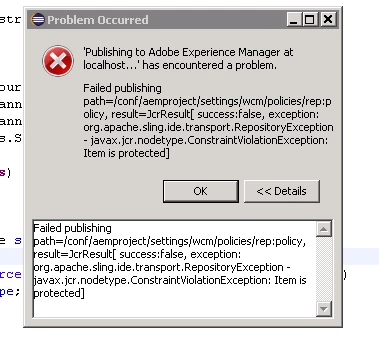
When following this path in CRX/DE I do not see a rep:policy node within the path specified. Any help is much appreciated, thank you!

This post is no longer active and is closed to new replies. Need help? Start a new post to ask your question.
coreym89078266Accepted solution
Level 2
Jun 27, 2018 6:08 PM UTC

Weirdly enough, I was able to solve it (or at least find a workaround) by removing the ui.content from the server.

9 replies

coreym89078266AuthorAccepted solution
Level 2
Jun 27, 2018 6:08 PM UTC

Weirdly enough, I was able to solve it (or at least find a workaround) by removing the ui.content from the server.

Translate
joerghoh
Employee
Jun 26, 2018 9:06 PM UTC

I don't know for sure if installing rep:policy nodes with the eclipse tooling is supported. But ACLs as part of a deployment package is a bit strange anyways; I don't understand why it should be deployed; rather use the Netcentric ACL tool to generate them directly on the system instead of deploying it.

Jörg

Translate
smacdonald2008
Level 10
Jun 26, 2018 3:38 PM UTC

What Eclipse version are you using?  Make sure you are following all instructions that are specified in this communtiy article -- Getting Started with AEM Sites - WKND Tutorial

Translate
Level 2
Jun 26, 2018 3:07 PM UTC

Yes, I tried and this worked successfully. However I am still unable to push changes to the server from Eclipse

Translate
smacdonald2008
Level 10
Jun 26, 2018 1:26 PM UTC

This could be a bug in the Eclipse tool. If you build your project with Maven 13 from a command line and run -PautoInstallPackage install - you should be able to change the node values in the JCR. Can you confirm by trying this. 

Translate
Level 2
Jun 26, 2018 12:25 PM UTC

I have not made any changes in Eclipse - it is a Maven 13 project

Translate
smacdonald2008
Level 10
Jun 25, 2018 8:39 PM UTC

Have you made any changes to this node in Eclipse. Is this a Maven 12 or 13 project?

Translate
Level 2
Jun 25, 2018 7:13 PM UTC

Thank you for the response - definitely makes sense. However upon viewing the node properties of this path i am unable to change any values. Do you have any insight as to how I would be able to update it?

Translate
Employee
Jun 25, 2018 6:58 PM UTC

coreym89078266In Apache Oak, the node types are defined by applying a set of rules, similar to the columns of a relational database. This means that the node definition of the node you try to add a property / subnode to was defined in that way that won't allow this.

So, the recommendation here will be to check the node properties of "/conf/aemproject/settings/wcm/policies" . This issue can be due to incorrect "jcr:primaryType", "sling:resourceType"

Translate