
Error While Build AEM 6.4 project in eclipse
Dear All,
First time I am building a new AEM 6.4 project by using DarchetypeVersion=13 , as shown below.
mvn org.apache.maven.plugins:maven-archetype-plugin:2.4:generate -DarchetypeGroupId=com.adobe.granite.archetypes -DarchetypeArtifactId=aem-project-archetype -DarchetypeVersion=13 -DarchetypeCatalog=https://repo.adobe.com/nexus/content/groups/public/
I am following the steps mentioned in the below Helpx.adobe
Getting Started with AEM Sites Part 1 - Project Setup
My maven and Java version are below.
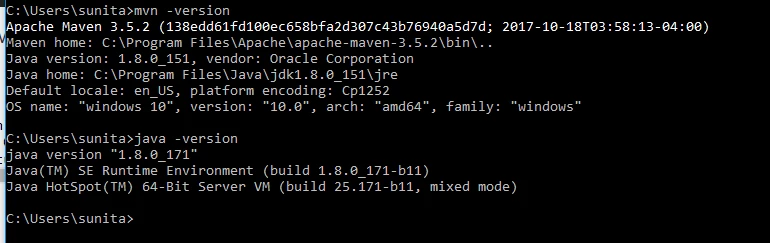
After importing the maven project and build in eclipse , i am getting the following error.
[INFO] Scanning for projects...
[INFO] ------------------------------------------------------------------------
[INFO] Reactor Build Order:
[INFO]
[INFO] aem-guides-wknd
[INFO] WKND Sites Project - Core
[INFO] WKND Sites Project - UI apps
[INFO] WKND Sites Project - UI content
[INFO] WKND Sites Project - Integration Tests Bundles
[INFO] WKND Sites Project - Integration Tests Launcher
[INFO]
[INFO] Using the builder org.apache.maven.lifecycle.internal.builder.singlethreaded.SingleThreadedBuilder with a thread count of 1
[INFO]
[INFO] ------------------------------------------------------------------------
[INFO] Building aem-guides-wknd 0.0.1-SNAPSHOT
[INFO] ------------------------------------------------------------------------
[INFO]
[INFO] --- maven-clean-plugin:3.0.0:clean (default-clean) @ aem-guides-wknd ---
[INFO]
[INFO] --- maven-enforcer-plugin:1.4.1:enforce (enforce-maven) @ aem-guides-wknd ---
[WARNING] Rule 0: org.apache.maven.plugins.enforcer.RequireMavenVersion failed with message:
Detected Maven Version: 3.2.1 is not in the allowed range [3.3.9,).
[INFO] ------------------------------------------------------------------------
[INFO] Reactor Summary:
[INFO]
[INFO] aem-guides-wknd ................................... FAILURE [ 0.379 s]
[INFO] WKND Sites Project - Core ......................... SKIPPED
[INFO] WKND Sites Project - UI apps ...................... SKIPPED
[INFO] WKND Sites Project - UI content ................... SKIPPED
[INFO] WKND Sites Project - Integration Tests Bundles .... SKIPPED
[INFO] WKND Sites Project - Integration Tests Launcher ... SKIPPED
[INFO] ------------------------------------------------------------------------
[INFO] BUILD FAILURE
[INFO] ------------------------------------------------------------------------
[INFO] Total time: 3.012 s
[INFO] Finished at: 2018-09-10T21:03:52-05:00
[INFO] Final Memory: 14M/245M
[INFO] ------------------------------------------------------------------------
[ERROR] Failed to execute goal org.apache.maven.plugins:maven-enforcer-plugin:1.4.1:enforce (enforce-maven) on project aem-guides-wknd: Some Enforcer rules have failed. Look above for specific messages explaining why the rule failed. -> [Help 1]
[ERROR]
[ERROR] To see the full stack trace of the errors, re-run Maven with the -e switch.
[ERROR] Re-run Maven using the -X switch to enable full debug logging.
[ERROR]
[ERROR] For more information about the errors and possible solutions, please read the following articles:
[ERROR] [Help 1] http://cwiki.apache.org/confluence/display/MAVEN/MojoExecutionException
My settings.xml are below.
<profile>
<id>adobe-public</id>
<activation>
<activeByDefault>true</activeByDefault>
</activation>
<repositories>
<repository>
<id>adobe</id>
<name>Nexus Proxy Repository</name>
<url>https://repo.adobe.com/nexus/content/groups/public/</url>
<layout>default</layout>
</repository>
</repositories>
<pluginRepositories>
<pluginRepository>
<id>adobe</id>
<name>Nexus Proxy Repository</name>
<url>https://repo.adobe.com/nexus/content/groups/public/</url>
<layout>default</layout>
</pluginRepository>
</pluginRepositories>
</profile>
</profiles>
Can you please help me on this.