Experience fragment - Not able to get Default CSS Classes defined in policy | Community
Skip to main content
Level 3
Apr 9, 2022 9:20 PM UTC
Solved

Experience fragment - Not able to get Default CSS Classes defined in policy

Hi All,


In author mode, I am trying to get the classes defined in the policy for experience fragment template but not able to.


Tried using the method "cssClassNames" of com.adobe.cq.wcm.core.components.models.Page but no luck.

Same seems to be the case in wknd project as well.


Anyways it will not be of any use for experience fragment once moved to target but will help the content authors to author content on XF with styles in place. Any suggestions to enable the style system or get the classes defined in policy for experience fragment template will help.


Thanks

This post is no longer active and is closed to new replies. Need help? Start a new post to ask your question.
B_Sravan
B_SravanAccepted solution
New Participant
Apr 10, 2022 5:08 PM UTC

Hi @sagarkmr0915 ,


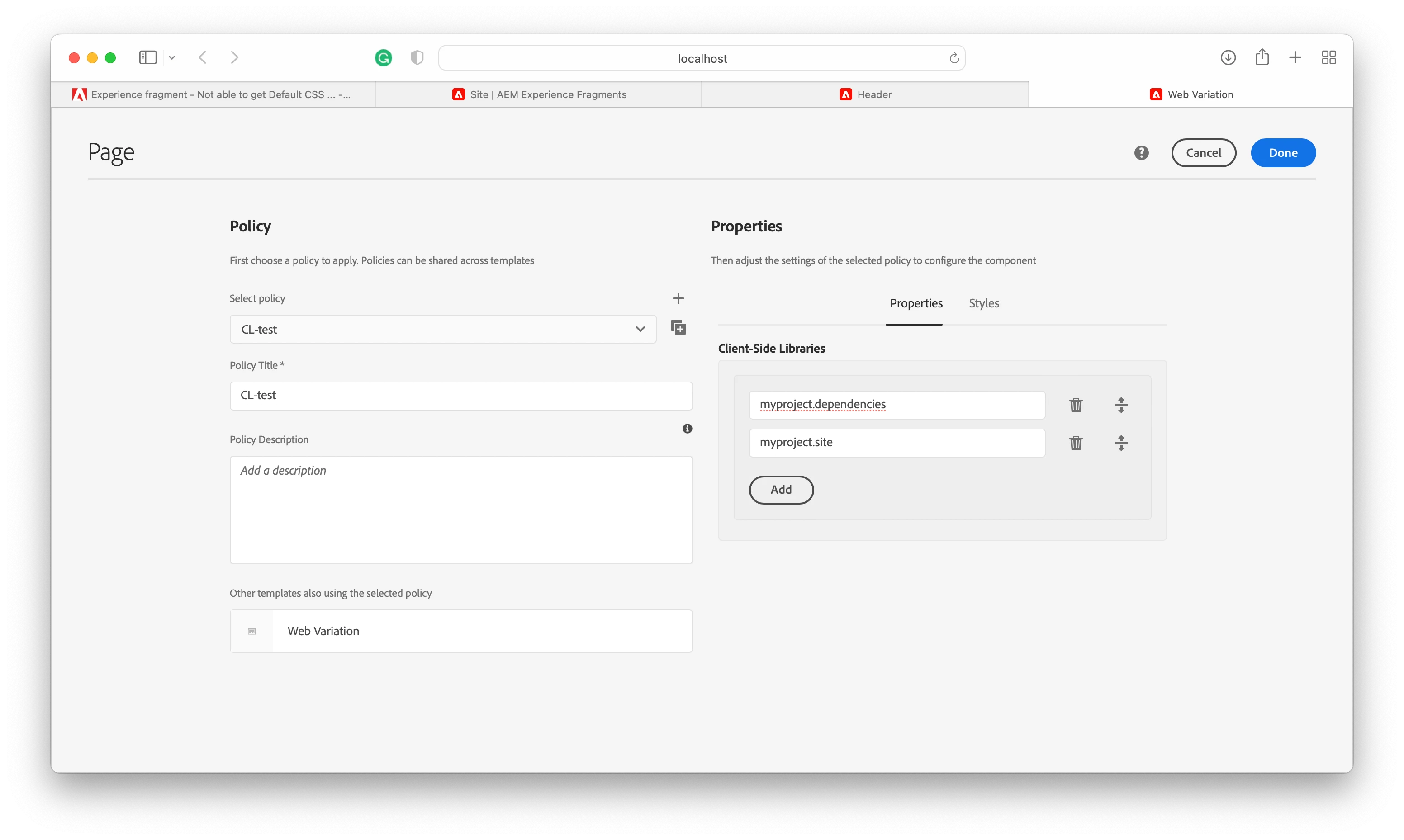
you can add your client library's category name in the XF's template's policy (page policy).
click on experience fragment --> Edit Template --> Page policy and add your clientlib category under client-side libraries.

PS: In general, we don't add our styles here as we always load them on-page component. I was skeptical earlier, but after reading your question I tried it in a demo project and I could see styles loading on XF's edit page.

FYI, the template was archetype generated (archetype-35) and the template name was Web variation.  

7 replies

Anmol_Bhardwaj
New Participant
Apr 11, 2022 9:22 AM UTC

Hi @sagarkmr0915 ,


Please refer to my answer in this question, I think you have created a policy , but yet to assign it as a default one for the exp. fragment template.

https://experienceleaguecommunities.adobe.com/t5/adobe-experience-manager/component-policy-getting-reset-while-doing-authoring-changes/m-p/446793#M32513 

Translate
Level 3
Apr 12, 2022 12:46 AM UTC

Hi @AnmolBhardwaj1808 ,


The policy has been added to the template and saved under the property "cq:policy" for the template. Clientlibraries are being rendered. Issue is with only the Default CSS classes as shown below. I am on 6.4.8 version of AEM.


Translate
Sanjay_Bangar
New Participant
Apr 11, 2022 8:51 AM UTC

Hi @sagarkmr0915 ,

There are 2 ways to handle  it one using clientlibs added to the template level nd other way is to add you Style Class name in Template page policy.

This class should be implemented your Clienlib-site  or your base client library which you called every template.

Kr,

Sanjay

Translate
B_Sravan
B_SravanAccepted solution
New Participant
Apr 10, 2022 5:08 PM UTC

Hi @sagarkmr0915 ,


you can add your client library's category name in the XF's template's policy (page policy).
click on experience fragment --> Edit Template --> Page policy and add your clientlib category under client-side libraries.

PS: In general, we don't add our styles here as we always load them on-page component. I was skeptical earlier, but after reading your question I tried it in a demo project and I could see styles loading on XF's edit page.

FYI, the template was archetype generated (archetype-35) and the template name was Web variation.  

Translate
Level 3
Apr 11, 2022 1:59 PM UTC

Hi @b_sravan,


Thanks for the reply. But that was not the problem i was stuck with. I am able to get the clientlibs values in the experience fragment page but not the "Default Class CSS". Below is the screenshot for the same. Also not seeing the style system option on the page. 

I could see the value stored in the policy of the template but not able to get the value using the  "com.adobe.cq.wcm.core.components.models.Page" class using the getcssClassNames(). Able to to get all other options form above class. Not sure if anything needs to be enabled for this.

Note: This is only happening on Experience fragment templates whose supertype set to "cq/experience-fragments/components/xfpage"


Translate
New Participant
Aug 15, 2023 8:40 PM UTC

Please help me to understand and resolving steps : following image in styles in aem , hide horizontal is working fine but hide title is not working , to fix that i'm unable to see here css class name , why am not able to see this and how to resolve this ?


Translate