
Extra div block in iParsys | Community
Skip to main content
Himanshu_Singhal
New Participant
November 21, 2017
Solved

Extra div block in iParsys

  • November 21, 2017
  • 9 replies
  • 3874 views

P

Hi,

I've using iParsys in my project. On parent page when I'm dragging component in iParsys, the DOM is like this.
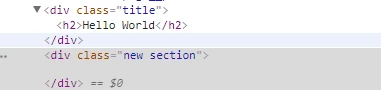
In above snapshot, an extra is coming which is coming below dragged component section. But, in case of child pages, when we see DOM, the div section is coming at the top of the dragged component which is creating extra space.
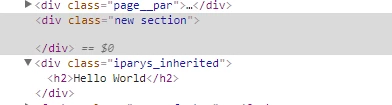
I need to remove this extra <div class="new section"> or it would be okay if it comes to the dragged component for child pages instead of coming at the top of it.

Thanks,

Himanshu

This post is no longer active and is closed to new replies. Need help? Start a new post to ask your question.
Best answer by kautuk_sahni

Did you check this Technical Brainstorming : Removing component's auto generated div in AEM

// [Not tested]

For removing these extra divs you have to include these lines of code in your component level. These lines are-

if(WCMMode.fromRequest(request) != WCMMode.EDIT){

        IncludeOptions.getOptions(request,true).setDecorationTagName("");

}

We have to import these two statement for WCMMode and includeOptions-

@page import="com.day.cq.wcm.api.WCMMode"
@page import="com.day.cq.wcm.api.components.IncludeOptions"

And Worth reading:-https://aemcorner.com/aem-how-to-remove-div-wrapper-from-component/

9 replies

Nikash_Bahadur
Employee
August 22, 2018

Please elaborate on where to include these two lines when the components are developed using HTL.

Iparsys is included in the page component to hold the footer component. The extra div is coming up in the end of the page and it appears on Publish environment as well.

Awaiting your response.

kautuk_sahni
kautuk_sahniAccepted solution
Employee
November 22, 2017

Did you check this Technical Brainstorming : Removing component's auto generated div in AEM

// [Not tested]

For removing these extra divs you have to include these lines of code in your component level. These lines are-

if(WCMMode.fromRequest(request) != WCMMode.EDIT){

        IncludeOptions.getOptions(request,true).setDecorationTagName("");

}

We have to import these two statement for WCMMode and includeOptions-

@page import="com.day.cq.wcm.api.WCMMode"
@page import="com.day.cq.wcm.api.components.IncludeOptions"

And Worth reading:-https://aemcorner.com/aem-how-to-remove-div-wrapper-from-component/

Kautuk Sahni
Himanshu_Singhal
New Participant
November 22, 2017

Right. But, for iParsys even when I'm seeing the page in publish mode or "view as published", I can see the empty div there. The snapshot I've attached is from a page viewed as published.

VeenaVikraman
New Participant
November 21, 2017

himanshusinghal

        Both are basically same. ANy code intended to run only in publish should be written in a conditional statement where you check the wcmmode as publish.

smacdonald2008
New Participant
November 21, 2017

You do not want to remove that DIV from Author as components will not be editable.

Himanshu_Singhal
New Participant
November 21, 2017

Veena, you mean to say in publish instance or when viewed page as published, this empty div won't appear?

smacdonald2008
New Participant
November 21, 2017

Also - why do you want to remove them anyhow?

VeenaVikraman
New Participant
November 21, 2017

   For components other than parsys , One suggestion while using the above solutions is to use them only in publish mode , since the additional divs enable the authoring of the component. If these divs are not present around the component in edit mode , it will not be author-able.

smacdonald2008
New Participant
November 21, 2017