Failed to execute goal org.codehaus.mojo:jslint-maven-plugin:1.0.1:jslint (default) on project wknd-sites-guide.ui.apps: Issues found in project. -> [Help 1] | Community
Skip to main content
Level 3
Sep 13, 2017 2:31 AM UTC
Solved

Failed to execute goal org.codehaus.mojo:jslint-maven-plugin:1.0.1:jslint (default) on project wknd-sites-guide.ui.apps: Issues found in project. -> [Help 1]

can someone help me? thanks!

This post is no longer active and is closed to new replies. Need help? Start a new post to ask your question.
viveksachdeva
viveksachdevaAccepted solution
New Participant
Sep 13, 2017 6:28 AM UTC

JS Lint is more about "Good Parts" of JS(javascript - Does it make any sense to use JSLint and follow it? - Stack Overflow ). It seems the error that it shows is in bootstrap plugin JS. You should exclude plugins from the JS Lint checking. If your bootstrap JS is in one of these folders, it will be ignored. If no, you should add an exclusion rule for the same.

<configuration>

   <sourceJsFolder>src/main/content/jcr_root</sourceJsFolder>

   <failOnIssues>true</failOnIssues>

   <predefinedVars>jQuery,window,$,use,properties,pageProperties,inheritedPageProperties,component,componentContext,currentDesign,currentNode,currentPage,currentSession,currentStyle,designer,editContext,log,out,pageManager,reader,request,resource,resourceDesign,resourcePage,response,sling,slyWcmHelper,wcmmode,xssAPI</predefinedVars>

   <excludes>

   <exclude>**/extensions/**/*.js</exclude>

   <exclude>**/vendor/**/*.js</exclude>

   </excludes>

</configuration>

Hope this helps..

8 replies

Level 3
Sep 13, 2017 6:42 AM UTC

Many Thanks!!

Translate
viveksachdeva
viveksachdevaAccepted solution
New Participant
Sep 13, 2017 6:28 AM UTC

JS Lint is more about "Good Parts" of JS(javascript - Does it make any sense to use JSLint and follow it? - Stack Overflow ). It seems the error that it shows is in bootstrap plugin JS. You should exclude plugins from the JS Lint checking. If your bootstrap JS is in one of these folders, it will be ignored. If no, you should add an exclusion rule for the same.

<configuration>

   <sourceJsFolder>src/main/content/jcr_root</sourceJsFolder>

   <failOnIssues>true</failOnIssues>

   <predefinedVars>jQuery,window,$,use,properties,pageProperties,inheritedPageProperties,component,componentContext,currentDesign,currentNode,currentPage,currentSession,currentStyle,designer,editContext,log,out,pageManager,reader,request,resource,resourceDesign,resourcePage,response,sling,slyWcmHelper,wcmmode,xssAPI</predefinedVars>

   <excludes>

   <exclude>**/extensions/**/*.js</exclude>

   <exclude>**/vendor/**/*.js</exclude>

   </excludes>

</configuration>

Hope this helps..
Translate
Level 3
Sep 13, 2017 6:15 AM UTC

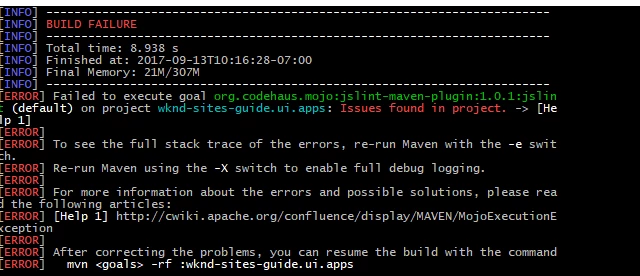
this is the error on the JS, i dont know why JS Lint rejects it when I build the project, it actually works on my own created Html with JS and CSS.

Translate
viveksachdeva
New Participant
Sep 13, 2017 5:45 AM UTC

It works because you have commented JS Lint checking from the build... If you dont want to follow JS Lint code quality tool, you can keep it commented but if you want to enforce the standards, then its worth taking a look at the errors that it is throwing and fix your JS code.

Translate
Level 3
Sep 13, 2017 5:25 AM UTC

yes I use lazybones too, I just used this guide to create my own. So I added new js files in it. And somehow it rejects my Js in the clientlibs folder

Translate
Level 3
Sep 13, 2017 5:23 AM UTC

i remove this one, the execution tag, and it works now. It has problem with JS dunno why

Translate
viveksachdeva
New Participant
Sep 13, 2017 4:26 AM UTC

The errors would be there just above Build Summary. Something like:

[ERROR] index.js:1:1:Expected an identifier and instead saw 'import'.

[ERROR] index.js:1:1:Stopping.  (25% scanned).

[ERROR] admin.bundle.js:1:31:'n' is not defined.

[ERROR] admin.bundle.js:1:36:Expected '{' and instead saw 'return'.

[ERROR] admin.bundle.js:1:43:'n' is not defined.

[ERROR] admin.bundle.js:1:62:'n' is not defined.

Can you check that?

Translate
Ratna_Kumar
Level 10
Sep 13, 2017 4:23 AM UTC

Hi,

Are you creating a project from scratch from this article: Adobe Experience Manager Help | Getting Started with AEM Sites - WKND Tutorial . It uses Lazybones. Please confirm.

Make sure to use the Maven 3.3.x version to create the new project using Lazybones. I have created the project and it works.

~Ratna.

Translate