
Fetch the specific Custom property from list of pages. [AEM6.5] | Community
Skip to main content
tushaar_srivastava
New Participant
April 18, 2024
Solved

Fetch the specific Custom property from list of pages. [AEM6.5]

  • April 18, 2024
  • 3 replies
  • 1492 views

Hi Team,


I would like to understand the most optimize way to fetch the specific property from the list of page.

[I tried using MCP and ACS commons report, but since we have to read the excel, and get the custom property]

example I have excel which contains the list of page path [e.g. /content/we-retail/us/en/experience/custompage] and I want to fetch the property [imgsrc] which is under
[/content/we-retail/us/en/experience/custompage/jcr:content/root/container/projectimage]
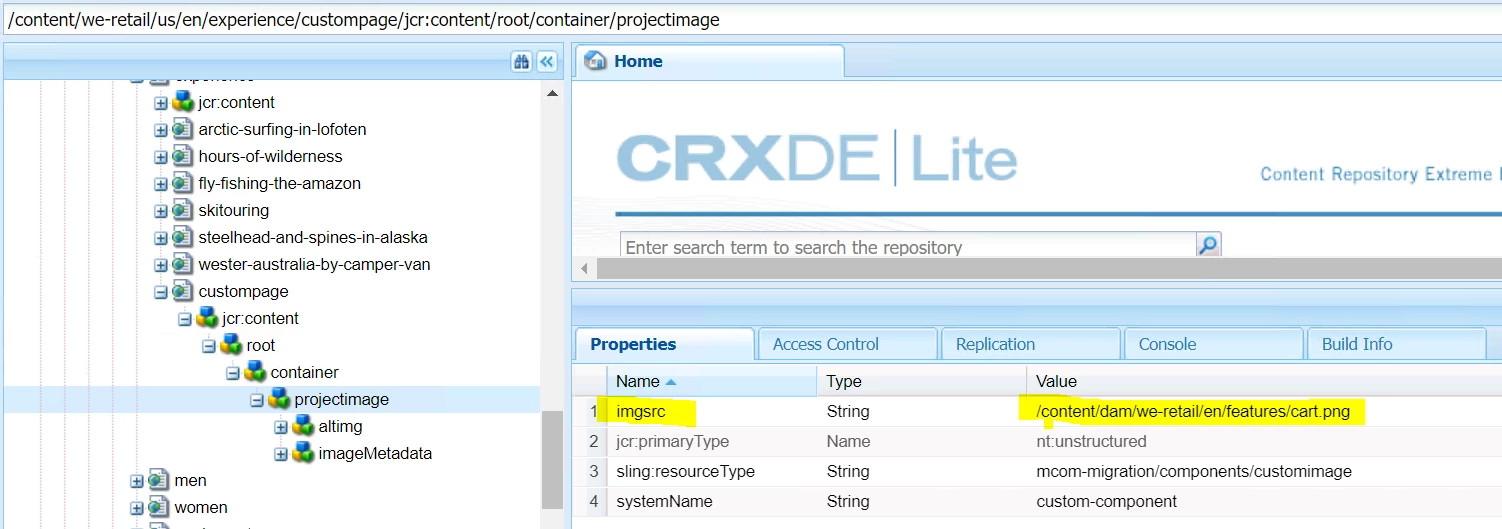
 

Similary how to value of property imgsrc from the list of page path. 

Page PathpropertyValue
/content/we-retail/us/en/experience/custompageimgsrc 
/content/we-retail/us/en/experience/arctic-surfing-in-lofotenimgsrc 
/content/we-retail/us/en/experience/hours-of-wildernessimgsrc 
/content/we-retail/us/en/experience/skitouringimgsrc 


is there any OOB way to fetch.


Thanks.


@lukasz-m  @kautuk_sahni  @arunpatidar 

This post is no longer active and is closed to new replies. Need help? Start a new post to ask your question.
Best answer by tushaar_srivastava

Hi Everyone,

The Solution is :

1- upload the excel under /content/dam

2- Write a fiddle script http://localhost:4502/etc/acs-tools/aem-fiddle.html#new-java

3- get the excel path as resource

4- Adapt it as asset and then create XSSWorkbook object to read the excel

5- with that you can iterate through rows and then from each row get the path

6- Convert that path to resource, and once iterated and you got the resource you can get the valuemap and here is your solution


Sample snippet


String excelFilePath = "/content/dam/project/yourFile.xlsx"; Resource inputFileRes = resourceResolver.getResource(excelFilePath); if(inputFileRes!=null){ Asset inputFileAsset = inputFileRes.adaptTo(Asset.class); InputStream inputStream = inputFileAsset.getOriginal().getStream(); XSSFWorkbook workbook = new XSSFWorkbook(inputStream); XSSFSheet inputSheet = workbook.getSheetAt(0); for (Row row : inputSheet) {} }


3 replies

tushaar_srivastava
tushaar_srivastavaAuthorAccepted solution
New Participant
April 22, 2024

Hi Everyone,

The Solution is :

1- upload the excel under /content/dam

2- Write a fiddle script http://localhost:4502/etc/acs-tools/aem-fiddle.html#new-java

3- get the excel path as resource

4- Adapt it as asset and then create XSSWorkbook object to read the excel

5- with that you can iterate through rows and then from each row get the path

6- Convert that path to resource, and once iterated and you got the resource you can get the valuemap and here is your solution


Sample snippet


String excelFilePath = "/content/dam/project/yourFile.xlsx"; Resource inputFileRes = resourceResolver.getResource(excelFilePath); if(inputFileRes!=null){ Asset inputFileAsset = inputFileRes.adaptTo(Asset.class); InputStream inputStream = inputFileAsset.getOriginal().getStream(); XSSFWorkbook workbook = new XSSFWorkbook(inputStream); XSSFSheet inputSheet = workbook.getSheetAt(0); for (Row row : inputSheet) {} }


Preetpal_Bindra
New Participant
April 18, 2024

Hello @tushaar_srivastava ,

The reason I see why AEM search or any other similar tooling like ACS Commons Reports, would not work for this scenario.


The usual requirement is to find pages that have a certain text or a component or a tag. So, a query (and a custom index, if needed) can be formed to look for pages containing the text.


In this scenario, however, both the page list and the fixed relative node underneath jcr:content is provided, so there is nothing to search for/look for per se.


Looping through the page list via. a custom code and fetching the property's value seems to be the  most likely solution.


thanks,

Preetpal

RikVanB
New Participant
April 18, 2024

Hi @tushaar_srivastava 

Can you provide some additional information please?


Do you want to feed AEM with a list of paths and properties and that it automatically get that property from the different pages? Or do you want that AEM generates a list of all pages and add a specific property value to the report?


Greetings

Rik

tushaar_srivastava
New Participant
April 18, 2024

Hi @rikvanb 
I have list of page path and from each page path I want to fetch the value of specific property.
How can we do that with OOB

New Participant
April 18, 2024

Which environment are you gonna try this on?

One approach would be groovy. Write a script that inputs the page paths you've in your excel and iterate through each nodes fetching the desired property, you can use Node API for this. 

This has got a good number of examples for basic groovy scripts - https://hashimkhan.in/aem-adobecq5-code-templates/groovy-script/