Folder "/apps" been overwritten during deploy | Community
Skip to main content
New Participant
June 6, 2023
Solved

Folder "/apps" been overwritten during deploy

  • June 6, 2023
  • 2 replies
  • 2681 views

We are facing a problem related to deploy, when we start the deploy of a project, any other project that is already on the environment loses the content of the created pages, basically goes away.


Since our company's repository does not have external access, we can not use the git submodules to deploy multiple projects. So we create a structure with a parent folder (with the pom.xml and dispatcher folder) that receive one of our projects, and then we do a push to adobe in branch set to start our pipeline.
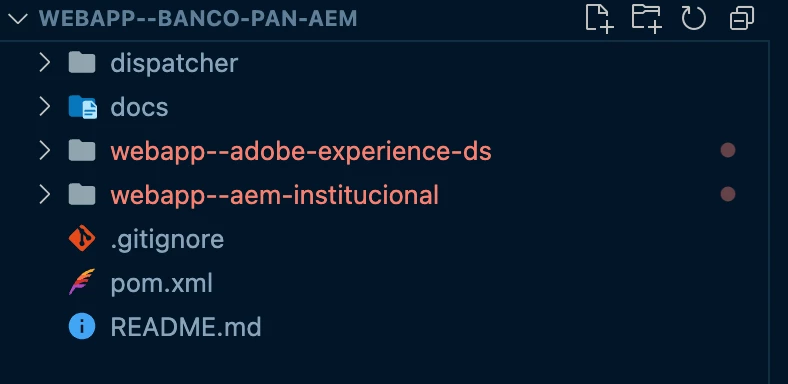
In our main POM.XML we change the deployed project and push to adobe repository.
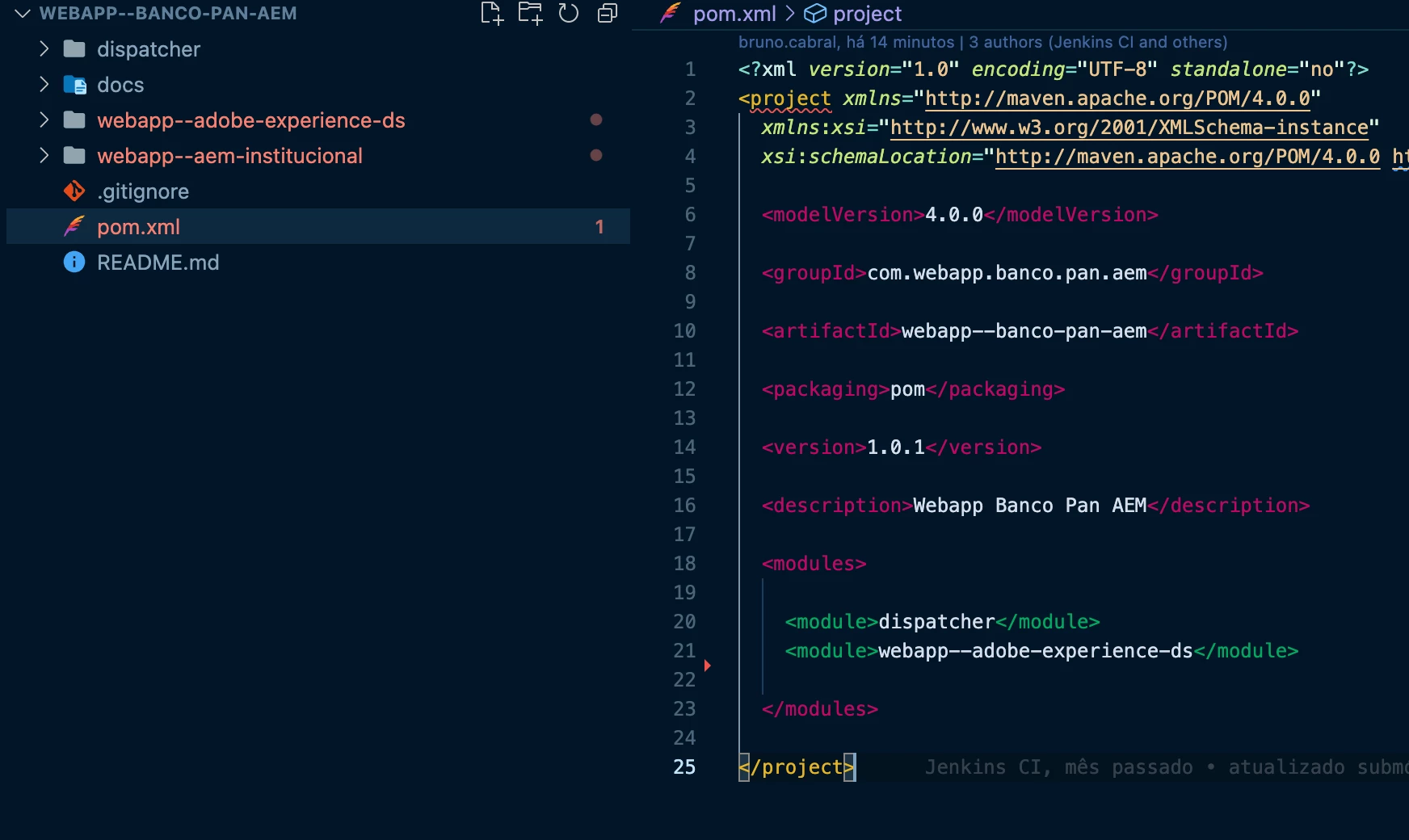
This does not happen in the local environment. We tried to change the "filter.xml" file using "mode=update" but without success.

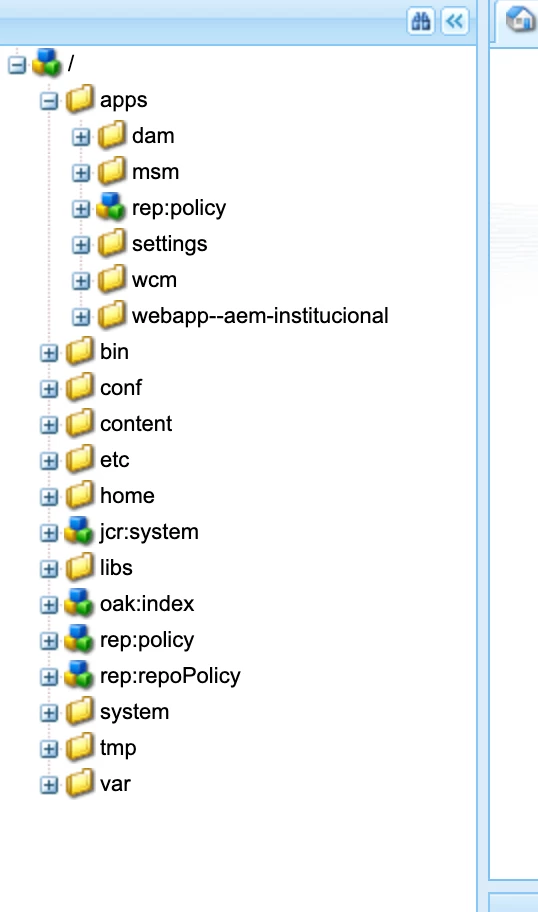
Checking CRXDE Lite we saw that "/apps" folder was completely replaced
 

This post is no longer active and is closed to new replies. Need help? Start a new post to ask your question.
Best answer by joerghoh

Hello @joerghoh,


How this "stage-deployment" branch should be structured? Did I need to overwrite everything on it with the project that need to be deployed?


Thanks in advance! 🙂


@aanchal-sikka  already shared the link how to correctly setup your git repo for such cases. See https://www.initialyze.com/insights/handle-multiple-projects-with-cloud-manager


Create this structure in your "stage-deployment" branch, and then each team can branch off from there and create their own working branch. When they are done, they merge back to the "stage-deployment" branch, which is then deployed to the Stage and PROD environments.

2 replies

New Participant
June 6, 2023

it would be helpful if you share the filter.xml of ui.apps and pom.xml of the ui.conf

New Participant
June 6, 2023

Sure,

/ui.apps/src/main/content/META-INF/vault/filter.xml

<?xml version="1.0" encoding="UTF-8"?> <workspaceFilter version="1.0"> <filter mode="update" root="/apps/webapp--adobe-experience-ds/clientlibs" /> <filter mode="update" root="/apps/webapp--adobe-experience-ds/components" /> <filter mode="update" root="/apps/webapp--adobe-experience-ds/i18n" /> </workspaceFilter>

/ui.config/pom.xml

<?xml version="1.0" encoding="UTF-8"?> <!-- | Copyright 2015 Adobe Systems Incorporated | | Licensed under the Apache License, Version 2.0 (the "License"); | you may not use this file except in compliance with the License. | You may obtain a copy of the License at | | http://www.apache.org/licenses/LICENSE-2.0 | | Unless required by applicable law or agreed to in writing, software | distributed under the License is distributed on an "AS IS" BASIS, | WITHOUT WARRANTIES OR CONDITIONS OF ANY KIND, either express or implied. | See the License for the specific language governing permissions and | limitations under the License. --> <project xmlns="http://maven.apache.org/POM/4.0.0" xmlns:xsi="http://www.w3.org/2001/XMLSchema-instance" xsi:schemaLocation="http://maven.apache.org/POM/4.0.0 http://maven.apache.org/xsd/maven-4.0.0.xsd"> <modelVersion>4.0.0</modelVersion> <!-- ====================================================================== --> <!-- P A R E N T P R O J E C T D E S C R I P T I O N --> <!-- ====================================================================== --> <parent> <groupId>com.webapp.adobe.experience.ds</groupId> <artifactId>webapp--adobe-experience-ds</artifactId> <version>0.0.1-SNAPSHOT</version> <relativePath>../pom.xml</relativePath> </parent> <!-- ====================================================================== --> <!-- P R O J E C T D E S C R I P T I O N --> <!-- ====================================================================== --> <artifactId>webapp--adobe-experience-ds.ui.config</artifactId> <packaging>content-package</packaging> <name>Design System - Componentes PAN - UI config</name> <description>UI config package for Design System - Componentes PAN</description> <!-- ====================================================================== --> <!-- B U I L D D E F I N I T I O N --> <!-- ====================================================================== --> <build> <sourceDirectory>src/main/content/jcr_root</sourceDirectory> <plugins> <plugin> <groupId>org.apache.jackrabbit</groupId> <artifactId>filevault-package-maven-plugin</artifactId> <configuration> <properties> <cloudManagerTarget>none</cloudManagerTarget> </properties> <packageType>container</packageType> <showImportPackageReport>false</showImportPackageReport> <repositoryStructurePackages> <repositoryStructurePackage> <groupId>com.webapp.adobe.experience.ds</groupId> <artifactId>webapp--adobe-experience-ds.ui.apps.structure</artifactId> </repositoryStructurePackage> </repositoryStructurePackages> </configuration> </plugin> <plugin> <groupId>com.day.jcr.vault</groupId> <artifactId>content-package-maven-plugin</artifactId> </plugin> </plugins> </build> <dependencies> <dependency> <groupId>com.webapp.adobe.experience.ds</groupId> <artifactId>webapp--adobe-experience-ds.ui.apps.structure</artifactId> <version>${project.version}</version> <type>zip</type> </dependency> </dependencies> </project>


aanchal-sikka
New Participant
June 6, 2023

Hello @sirbrunocabral 


I am hoping this is an AEM as a Cloud Service instance. In cloud, when images are created during deployment, only mutable content is retained, like /content /conf etc.


No custom code would be retained from previous /apps. Only the folders from the current branch would be available under /apps.


You would have to merge /apps code from all the projects/modules into one branch for deployment.

Aanchal Sikka
New Participant
June 6, 2023

Hello @aanchal-sikka.


It is AEM as a Cloud Service instance.

So when I have to deploy to cloud, I need to include in build all project that's already on environment?


How does it work properly with multiple project?