New Participant
March 21, 2023

fonts.adobe.com BUG showing HTML Code

  • March 21, 2023
  • 2 replies
  • 1031 views

When searching for Fonts on fonts.adobe.com it's showing HTML Code. Anyone else having this issue / BUG?

macOS Monterey V12.5.1 (Apple M1 Pro)
Found in: Safari (Version 15.6.1 (17613.3.9.1.16)) & Firefox (111.0 (64-Bit))
Couldn't recreate in Chrome (Version 111.0.5563.64 (Offizieller Build) (arm64)) 
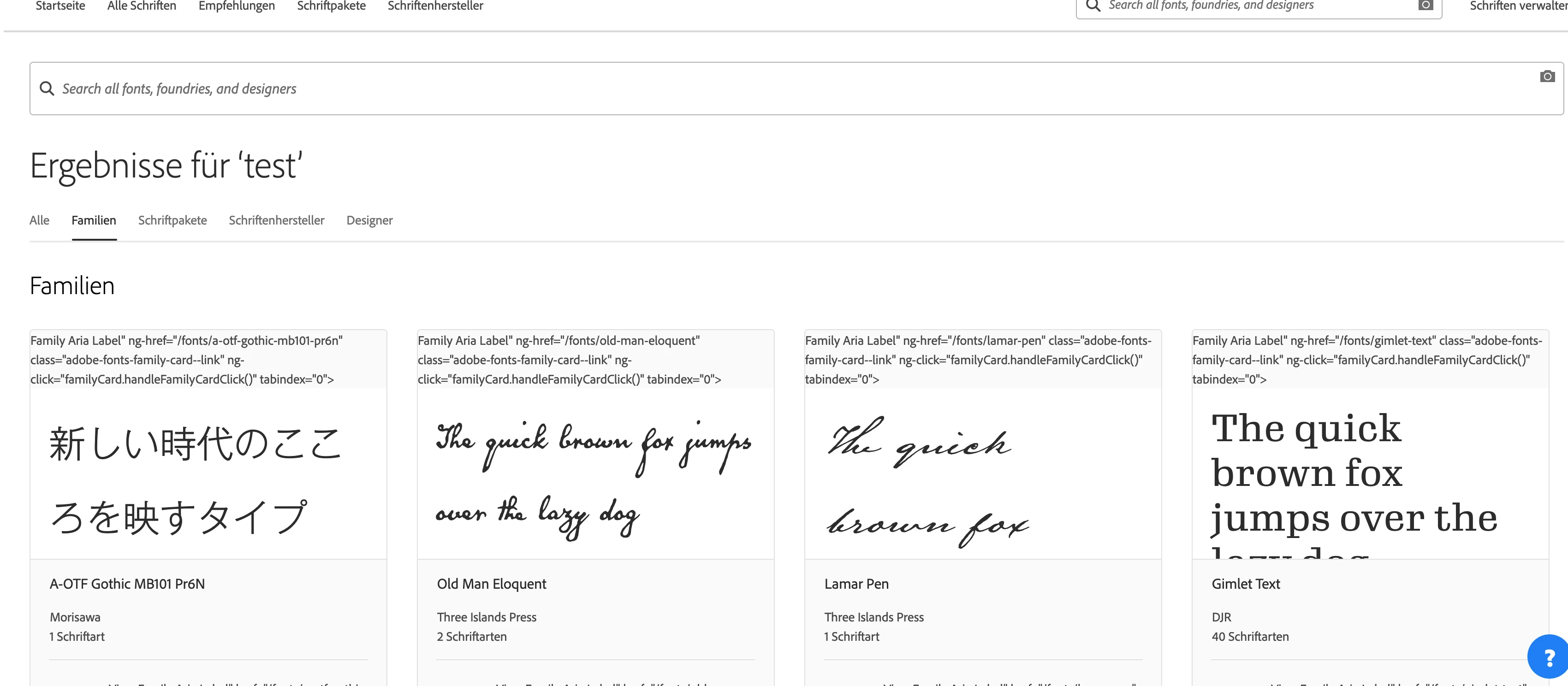


Edit: moved to Adobe Support Community No Idea why I posted it here.   


This post is no longer active and is closed to new replies. Need help? Start a new post to ask your question.

2 replies

nitesh_kumar-1
Employee
March 21, 2023

Hi @yanisdeplazes ,


I don't see this issue with 

Safari Version 16.2 (18614.3.7.1.5)
MacOS Ventura Version 13.1 (22C65) (Intel)


You can reach out to this community for better support on this:- https://community.adobe.com/t5/adobe-fonts/ct-p/ct-fonts?page=1&sort=latest_replies&lang=all&tabid=all 


Hope this helps!


Regards,

Nitesh

New Participant
March 21, 2023

Hi @nitesh_kumar-1 , I was just testing around a bit and found the problem and possible fix: 


https://experienceleaguecommunities.adobe.com/t5/adobe-experience-manager/fonts-adobe-com-bug-showing-html-code/m-p/580953/highlight/true#M37227

If you need any help or more infos HMU.


I created a new post on adobe fonts discussion. 


Regards
Yanis

New Participant
March 21, 2023

Just tested some more and I realized it depends on the language you are setting. 

Bug appears in all other languages except English

New Participant
March 21, 2023

Looks like the string that is used for missing translations on fonts is using a special character that escapes translation missing: 


Correct HTML Element: (English)


<a aria-label="View family Roboto" ng-href="/fonts/roboto" class="adobe-fonts-family-card--link" ng-click="familyCard.handleFamilyCardClick()" tabindex="0" href="/fonts/roboto"> </a>


Escaping HTML Element: (all other Languages)


<a aria-label="<span class=" translation_missing"="" title="translation missing: de_DE.neue.families.variations.family_aria_label, name: Roboto">Family Aria Label" ng-href="/fonts/roboto" class="adobe-fonts-family-card--link" ng-click="familyCard.handleFamilyCardClick()" tabindex="0"&gt; </a>