getting AEM to recognize styles | Community
Skip to main content
New Participant
August 30, 2019
Solved

getting AEM to recognize styles

  • August 30, 2019
  • 7 replies
  • 3893 views

I created a new style for my content fragment component. It appears to be well-formed. =) And i have added it to teh Policies of teh compinent included in my template. When I create the page using my template and style-enabled component, the page does not "apply" to the style. Even though I inspect the page for teh class it still doesn't reference it in the stylesheet. How do I app it to the css on a global level?
This post is no longer active and is closed to new replies. Need help? Start a new post to ask your question.
Best answer by Theo_Pendle

Ah I see, well if you are using the We.Retail-style structure then my previous answer is not applicable. You can undo the import you made in your main.less file.

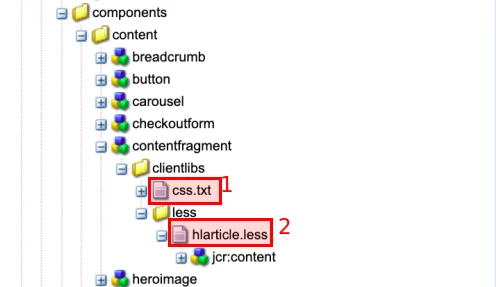
Here is a part of your screenshot:

The css.txt file (1) should contain a line referencing the hlarticle.less file (2). This is done with the following line:

less/hlarticle.less

If that doesn't work, could you please post your hlarticle.less file?

7 replies

Theo_Pendle
New Participant
September 6, 2019

Okay so I think I see the issue.

Your LESS

Simplified LESS

.cmp-contentfragment--hlarticle {

    .cmp-contentfragment {

          ...

    }

}

LESS selector in English

"This style applies to elements with a cmp-contentfragment class which are inside an element with a cmp-contentfragment--hlarticle class"

Example target of the LESS selector

<div ... class="cmp-contentfragment--hlarticle">

    <div ... class="cmp-contentfragment">...</div>

</div>

What the LESS should be

Simplified LESS

.cmp-contentfragment {

    &.cmp-contentfragment--hlarticle {

          ...

    }

}

LESS selector in English

"This style applies to elements with both a cmp-contentfragment and a cmp-contentfragment--hlarticle class"

Example target of the LESS selector

<div ... class="cmp-contentfragment cmp-contentfragment--hlarticle">...</div>

Explanation

The reason that the your LESS selector is wrong is because applying a style using the style dropdown simply appends the associated class to the end of the class attribute of the component's root div.

So a normal Content Fragment component with just the default style will look like this:

<div ... class="cmp-contentfragment">...</div>

A Content Fragment component  with your hlarticle style would look like this:

<div ... class="cmp-contentfragment cmp-contentfragment--hlarticle">...</div>

Practical example

Have a look at the We.Retail List component. It has 4 optional styles:

You can find those styles in /apps/weretail/components/content/list/clientlibs/less/list.less. Have a look at this file for more info on how to organise your LESS file.

For more information on LESS selector nesting see this page: Features In-Depth | Less.js

If that still doesn't work...

Check if your styles are even being compiled into the clientlib-base.css file. You can check this at http://localhost:4502/etc.clientlibs/weretail/clientlibs/clientlib-base.css

lgazzilloAuthor
New Participant
September 5, 2019

Thank you for your help on this matter. Yes sadly, I already had the call to the less/hlarticle.less inside the css.txt file. So in a last effort here is the code for my hlarticle.less file.

.cmp-contentfragment--hlarticle {

    .cmp-contentfragment {

        .cmp-contentfragment__element {

            .cmp-contentfragment__element--ArticleName {

            .cmp-contentfragment__element-label {

                display:none;           

            }

        }

        }

    }

}

Theo_Pendle
Theo_PendleAccepted solution
New Participant
September 4, 2019

Ah I see, well if you are using the We.Retail-style structure then my previous answer is not applicable. You can undo the import you made in your main.less file.

Here is a part of your screenshot:

The css.txt file (1) should contain a line referencing the hlarticle.less file (2). This is done with the following line:

less/hlarticle.less

If that doesn't work, could you please post your hlarticle.less file?

arunpatidar
New Participant
September 3, 2019

If you don't see your style then following could be the issue-

1. Browser or AEM clientlib caching

2.  hlarticle.less has some error, add directly where main.less is added.

Arun Patidar
lgazzilloAuthor
New Participant
September 3, 2019

Thank you!  I am using the We.retail demo to build off the existing Athlete styles, and the folder structure is different than the WKND tutorial.

If I follow your instructions.

I added the call to the style (hlarticle.less) for my content fragment into the main.less file:

@import "@{sitePath}/components/content/contentfragment/clientlibs/";

The css.txt file has the call out to my hlarticle.less

And I created a client libs folder for my contentfragment component.

But it still isn't work. What I am I missing?

Theo_Pendle
New Participant
September 1, 2019

Hi

"Even though I inspect the page for teh class it still doesn't reference it in the stylesheet" - It sounds like the policy is working, so may your styles are not properly set up? Here is how it should work:

  1. You should have a CSS/LESS file for your specific component style (eg: default.less)
  2. That file should be imported into the component styles file (eg: contentfragment.less)
  3. The component styles file should be imported into the main styles file (main.less)

Here's what that looks like (example based on the popular WKND Tutorial):

New Participant
August 31, 2019

Are you using Client Libs!