Getting properties from node and storing in String[] | Community
Skip to main content
New Participant
June 9, 2021
Solved

Getting properties from node and storing in String[]

  • June 9, 2021
  • 1 reply
  • 1008 views

Hi,


I have a component with multifiled (testAppIDs). The multifield data gets stored in form of nodes after Coral 3 migration (item0,item1 etc.). 
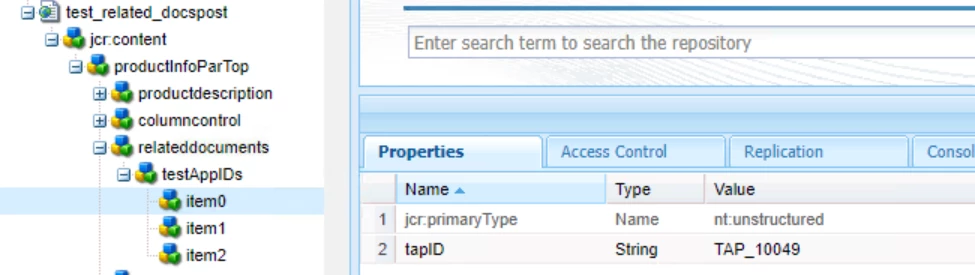
 

Earlier before Coral 3 Migration Model class had a logic to use the JSON array. I want the model class to use the same logic as the impact might be huge. So now after Coral 3 migration, as I cannot pass testAppIDs using @ValueMapValue , I am trying to create the same String[] by iterating through child node of testAppIDs. 
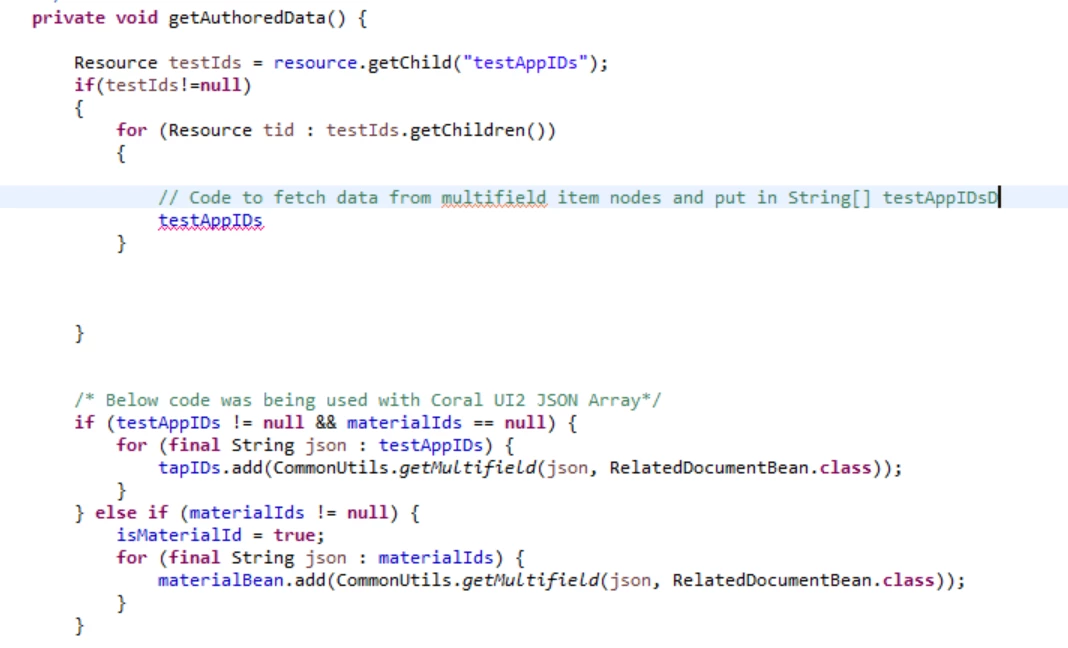
Can you help me understand how can I fetch property and value data from the item nodes and put it in testAppIds String []. Sample Data Expected to be stored in testAppIds ->  [{"tapID":"TAP_10050"}, {"tapID":"TAP_10049"}, {"tapID":"TAP_10050"}]

This post is no longer active and is closed to new replies. Need help? Start a new post to ask your question.
Best answer by davidjgonzalezzzz
// using gson JsonObject List<String> tapIds = new ArrayList<String>(); for(Resource item : items.getChildren()) { JsonObject itemObject = new JsonObject(); itemObject.addProperty("tapID", item.getValueMap().get("tapID", String.class)); tapIds.add(itemObject.toString()); } return tapIds.toArray(new String[tapIds.size()]);

Should be able to do something like that? i wrote that in the comment field itself, so there might be some syntax issues ... but should give you the gist. You can do it more concisely in a stream, but that's just style.

1 reply

davidjgonzalezzzzAccepted solution
Employee
June 9, 2021
// using gson JsonObject List<String> tapIds = new ArrayList<String>(); for(Resource item : items.getChildren()) { JsonObject itemObject = new JsonObject(); itemObject.addProperty("tapID", item.getValueMap().get("tapID", String.class)); tapIds.add(itemObject.toString()); } return tapIds.toArray(new String[tapIds.size()]);

Should be able to do something like that? i wrote that in the comment field itself, so there might be some syntax issues ... but should give you the gist. You can do it more concisely in a stream, but that's just style.