Google Maps Service | Community
Skip to main content
robin_wadhwa
New Participant
October 17, 2018
Solved

Google Maps Service

  • October 17, 2018
  • 15 replies
  • 6612 views

In java am trying to get Latitude and Longitude dynamically by passing the address.

GeoApiContext context = new GeoApiContext.Builder().apiKey("KEY") .build();

            String address = ""1600 Amphitheatre Parkway Mountain View, CA 94043";

            GeocodingResult[] results = GeocodingApi.geocode(context, address).await();

Added These two dependencies :

<dependency>

  <groupId>com.google.maps</groupId>

  <artifactId>google-maps-services</artifactId>

  <version>0.9.0</version>

</dependency>

<dependency>

  <groupId>org.slf4j</groupId>

  <artifactId>slf4j-simple</artifactId>

</dependency>

Note: There is no compilation error.

But AEM is not able to resolve these.

com.google.maps -- Cannot be resolved

com.google.maps.errors -- Cannot be resolved

com.google.maps.model -- Cannot be resolved

What all dependencies I need to add ?
This post is no longer active and is closed to new replies. Need help? Start a new post to ask your question.
Best answer by smacdonald2008

I developed a small service with your Google MAP API code:

package com.adobe.aem.core;

import java.io.DataOutputStream;

import java.io.EOFException;

import java.io.File;

import java.io.FileInputStream;

import java.io.FileOutputStream;

import java.io.IOException;

import java.io.ObjectInputStream;

import com.google.maps.DirectionsApi.RouteRestriction;

import com.google.maps.DistanceMatrixApi;

import com.google.maps.DistanceMatrixApiRequest;

import com.google.maps.GeoApiContext;

import com.google.maps.GeocodingApi;

import com.google.maps.errors.ApiException;

import com.google.maps.model.DistanceMatrix;

import com.google.maps.model.GeocodingResult;

import com.google.maps.model.LatLng;

import com.google.maps.model.TravelMode;

public class MapImpl {

public String getLat()

{

try{

GeoApiContext context = new GeoApiContext.Builder().apiKey("KEY") .build();

        String address = "1600 Amphitheatre Parkway Mountain View, CA 94043";

        GeocodingResult[] results = GeocodingApi.geocode(context, address).await();

}

catch(Exception e)

{

e.printStackTrace();

}

return "" ;

}

}

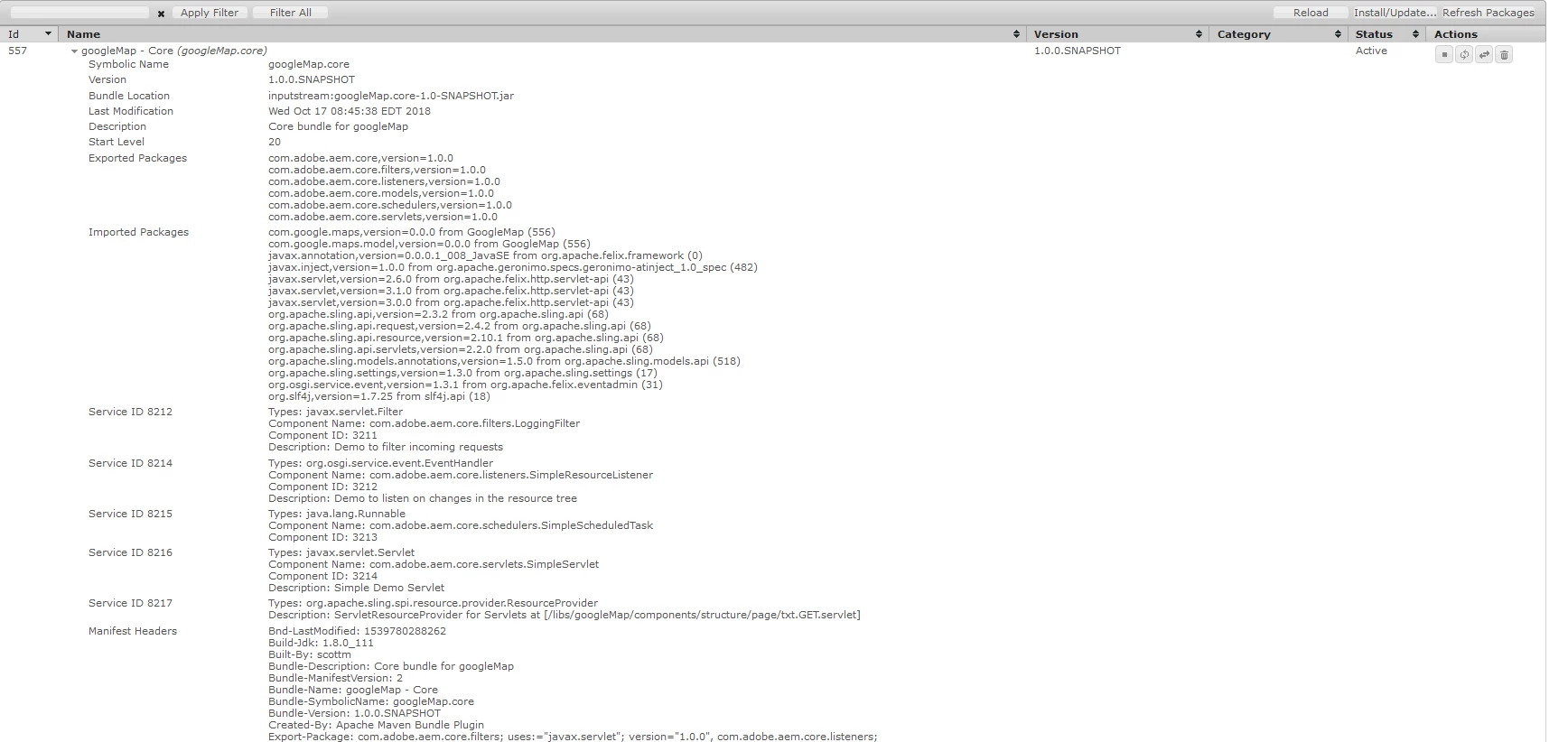
I added the dependencies you mentioned. Then built this OSGi bundle as a Maven 13 Archetype project. This now goes into ACTIVE state

The key was to wrap the Google MAP JAR into an OSGi bundle and deploy. Now my service that uses the GOOGLE MAP API can go into Active state. So we have 2 OSGi bundles here:

If you do not know how to use an Eclipse Plug-in project to wrap a JAR into an OSGi bundle - follow these instructions in this article (we wrap simple JSON JAR as an example):

Adobe Experience Manager Help | Submitting Adobe Experience Manager form data to Java Sling Servlets

15 replies

robin_wadhwa
New Participant
October 17, 2018

Thanks for the response,

After adding (as google-maps-services is dependent on these 2 dependencies )-->

<dependency>

    <groupId>com.squareup.okio</groupId>

    <artifactId>okio</artifactId>

    <version>2.1.0</version>

</dependency>

<!-- https://mvnrepository.com/artifact/com.squareup.okhttp3/okhttp -->

<dependency>

    <groupId>com.squareup.okhttp3</groupId>

    <artifactId>okhttp</artifactId>

    <version>3.11.0</version>

</dependency>

I am getting-->

android.os -- Cannot be resolved

android.util -- Cannot be resolved

I am not sure why its showing android ?

PuzanovsP

smacdonald2008
New Participant
October 17, 2018

Another option is to get the JAR file from Maven - Maven Repository: com.google.maps » google-maps-services » 0.9.0

Then use an eclipse plug-in project to wrap that JAR into an OSGi bundle and deploy to AEM. This will ensure these packages are part of the OSGi service container.

Peter_Puzanovs
New Participant
October 17, 2018

OK,

Then you would need to work through the dependencies list and add dependencies that are relevant and needed for your code to run e.g.

<Embed-Dependency>appengine-tools-api,okio,okhttp,google-maps-services;inline=true </Embed-Dependency>

Note, there might be even more dependencies you would need to include. They will show up, once you include these ones.

Please add the one's that are needed for your code to run.

Documentation[1]

[1] Apache Felix - Apache Felix Maven Bundle Plugin (BND)

Regards,

Peter

robin_wadhwa
New Participant
October 17, 2018

Hi PuzanovsP

Thanks for the response.

After making changes as you suggested. I am getting -->

okhttp3 -- Cannot be resolved

okio -- Cannot be resolved

com.google.appengine.api.urlfetch -- Cannot be resolved

To solve these I added below dependencies but still its not getting resolved.

<!-- https://mvnrepository.com/artifact/com.google.appengine/appengine-tools-api -->

<dependency>

    <groupId>com.google.appengine</groupId>

    <artifactId>appengine-tools-api</artifactId>

    <version>1.7.0</version>

</dependency>

<!-- https://mvnrepository.com/artifact/com.squareup.okio/okio -->

<dependency>

    <groupId>com.squareup.okio</groupId>

    <artifactId>okio</artifactId>

    <version>1.14.0</version>

</dependency>

<!-- https://mvnrepository.com/artifact/com.squareup.okhttp3/okhttp -->

<dependency>

    <groupId>com.squareup.okhttp3</groupId>

    <artifactId>okhttp</artifactId>

    <version>3.11.0</version>

</dependency>

Peter_Puzanovs
New Participant
October 17, 2018

Dear Rodin,

Please add following instruction to your apache felix plugin configuration:

<Embed-Dependency>google-maps-services;inline=true </Embed-Dependency>

to your pom.xml file.

Regards,

Peter
