Granite component looks differently since AEM 6.3 | Community
Skip to main content
Magicr
New Participant
May 12, 2022
Solved

Granite component looks differently since AEM 6.3

  • May 12, 2022
  • 1 reply
  • 1742 views

In my projects I used often the component 

granite/ui/components/coral/foundation/form/select

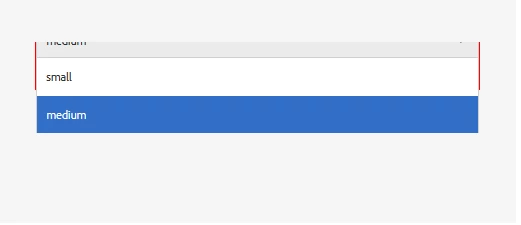
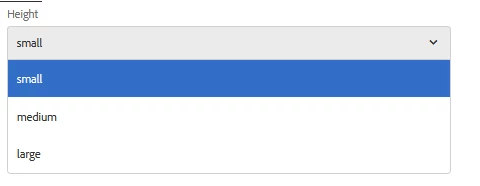
Since AEM 6.3 there is an issue that this granite component looks differently when you include it into a dialog for page properties and in dialog for a component.


Here the look in page properties: (This is not the expected look)
 

And here the look in component dialog. (This is the expected look)
How can I fix it in general? If is it a general bug will it fixed by Adobe?


Thanks in advanced.

This post is no longer active and is closed to new replies. Need help? Start a new post to ask your question.
Best answer by Magicr

Hi,

You can have any name for the category e.g. myproj.author.dialog.select.inline

example page dialog

<?xml version="1.0" encoding="UTF-8"?>
<jcr:root xmlns:sling="http://sling.apache.org/jcr/sling/1.0" xmlns:granite="http://www.adobe.com/jcr/granite/1.0" xmlns:cq="http://www.day.com/jcr/cq/1.0" xmlns:jcr="http://www.jcp.org/jcr/1.0" xmlns:nt="http://www.jcp.org/jcr/nt/1.0"
    jcr:primaryType="nt:unstructured"
    jcr:title="Page"
    sling:resourceType="cq/gui/components/authoring/dialog"
    extraClientlibs="[myproj.author.dialog.select.inline]">
    <content
        granite:class="cq-dialog-content-page"
        jcr:primaryType="nt:unstructured"
        sling:resourceType="granite/ui/components/coral/foundation/container">
        <items jcr:primaryType="nt:unstructured">
            <tabs
                granite:class="cq-siteadmin-admin-properties-tabs"
                jcr:primaryType="nt:unstructured"
                sling:resourceType="granite/ui/components/coral/foundation/tabs"
                size="L">
                <items jcr:primaryType="nt:unstructured">
                   ...
                </items>
            </tabs>
        </items>
    </content>
</jcr:root>


I solved it by going a different way:


I created an extra css file with value "overflow:unset". After that I added the recently created css file to clientlib category "coralui3", by creating an extra .content.xml with following content

<?xml version="1.0" encoding="UTF-8"?>
<jcr:root xmlns:cq="http://www.day.com/jcr/cq/1.0" xmlns:jcr="http://www.jcp.org/jcr/1.0"
jcr:primaryType="cq:ClientLibraryFolder"
categories="[coralui3]" />


1 reply

arunpatidar
New Participant
May 12, 2022

Hi,

Its looks like a cosmetic issue. Not sure if this is fixed or not in the latest version of AEM.

but you can fix it by introducing additional CSS or look for AEM hotfix/feature fix

Arun Patidar
Magicr
MagicrAuthor
New Participant
May 12, 2022

As I wrote "since AEM 6.3" this issue exists in AEM 6.4 und 6.5 either. And it is a little bit annoying.