HELP! SUMIF ADOBE LIVECYCLE FOR (REPEATING ROW) | Community
Skip to main content
Level 2
Dec 6, 2022 7:14 AM UTC
Solved

HELP! SUMIF ADOBE LIVECYCLE FOR (REPEATING ROW)

I'm new here and I would like to seek some assistance from the Adobe Gurus to complete this form using JavaScript and SUMIF. I'm experiencing issues getting my form to work properly. I've discovered a syntax that might enable me to obtain the proper formula, but it fails in various circumstances. My concern is this.

I want to sum up the "Amount Due" if the "Running days" were in line with this scenario.
For example, "1 to 30 Days," "32 to 60 Days." Here is an example: if the running days are between 1 and 30 days, the formula works! In this case, I altered the name of the cell depending on the text headers: cell 5 as "running days" and cell 7 as "amount due."
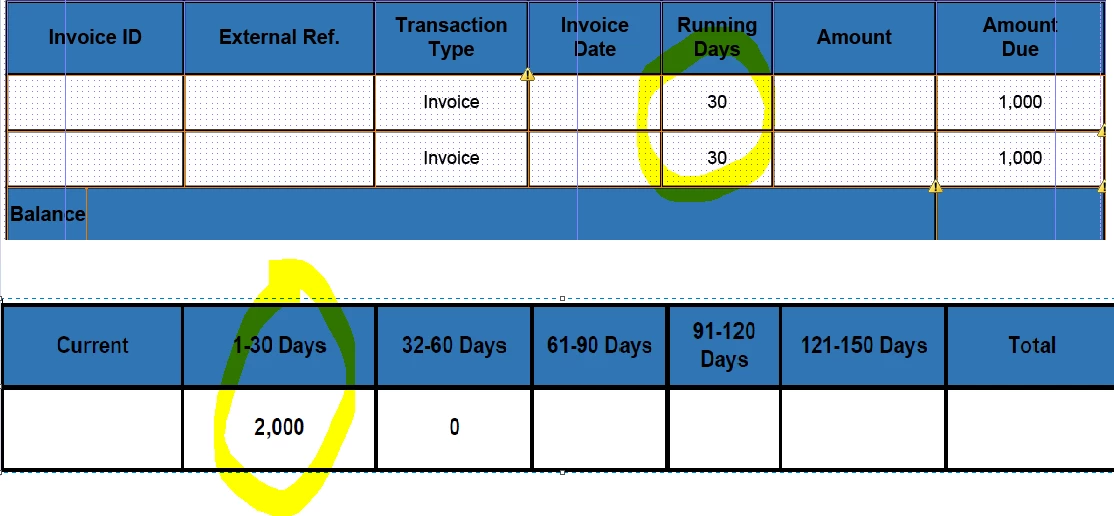


But if I changed the value of second row and try if it can sum up the amount simultaneously, the formula doesn't work 😞
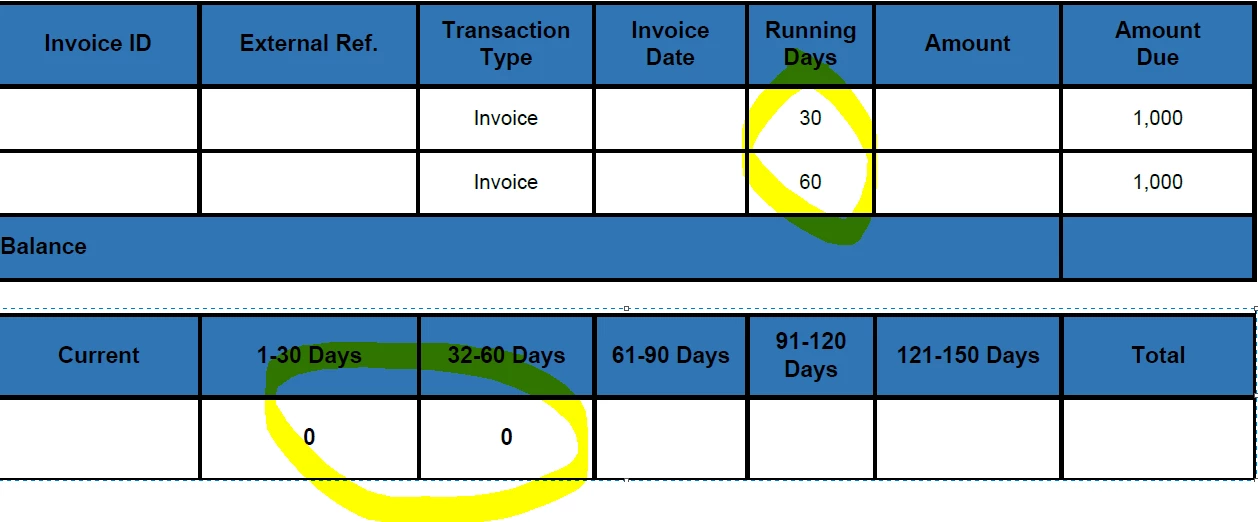
Here's my formula by the way for 1 - 30 days field

var sum = 0;

var rows = xfa.resolveNodes("Details[0].AmountDue");
var rows = xfa.resolveNodes("Details[1].AmountDue");

for (var i=1; i < xfa.resolveNodes("Details[0].AmountDue").length;i++)
for (var i=1; i < xfa.resolveNodes("Details[1].AmountDue").length;i++)


var item = xfa.resolveNodes("Details[0].AmountDue");
var item = xfa.resolveNodes("Details[1].AmountDue");


{

if (xfa.resolveNode("Details[0].RunningDays").rawValue >= "1" && xfa.resolveNode("Details[0].RunningDays").rawValue <= "30" && xfa.resolveNode("Details[0].RunningDays").rawValue !== "")

if (xfa.resolveNode("Details[1].RunningDays").rawValue >= "1" && xfa.resolveNode("Details[1].RunningDays").rawValue <= "30" && xfa.resolveNode("Details[1].RunningDays").rawValue !== "")
{

sum += xfa.resolveNode("Details[0].AmountDue").rawValue;
sum += xfa.resolveNode("Details[1].AmountDue").rawValue;

}
}
sum;



My formula for 32 - 60 days field

var sum = 0;

var rows = xfa.resolveNodes("Details[0].AmountDue");
var rows = xfa.resolveNodes("Details[1].AmountDue");

for (var i=1; i < xfa.resolveNodes("Details[0].AmountDue").length;i++)
for (var i=1; i < xfa.resolveNodes("Details[1].AmountDue").length;i++)


var item = xfa.resolveNodes("Details[0].AmountDue");
var item = xfa.resolveNodes("Details[1].AmountDue");


{

if (xfa.resolveNode("Details[0].RunningDays").rawValue >= "31" && xfa.resolveNode("Details[0].RunningDays").rawValue <= "61" && xfa.resolveNode("Details[0].RunningDays").rawValue !== "")


if (xfa.resolveNode("Details[1].RunningDays").rawValue >= "31" && xfa.resolveNode("Details[1].RunningDays").rawValue <= "61" && xfa.resolveNode("Details[1].RunningDays").rawValue !== "")
{

sum += xfa.resolveNode("Details[0].AmountDue").rawValue;
sum += xfa.resolveNode("Details[1].AmountDue").rawValue;

}
}
sum;


This post is no longer active and is closed to new replies. Need help? Start a new post to ask your question.
radzmar
radzmarAccepted solution
Level 10
Dec 6, 2022 7:30 PM UTC

Hi, 

your script can’t work since you're overwriting existing variables with others. Use the resolveNodes() method with a predicate to filter just those rows, that contain the values in a range.  This can look like this: This sample assumes that the table is named „Table" and contains rows named „Details“. 


// Summarize all amounts where the runnings day are between 1–30.
var nSum = 0,
	oAmounts = Table.resolveNodes("Details.[Within($.RunningDays, 1, 30) eq 1].AmountDue");
for (var i = 0; i < oAmounts.length; i += 1) {
	nSum += oAmounts.item(i).rawValue;
}
this.rawValue = nSum;


// Summarize all amounts where the runnings day are between 31–61.
var nSum = 0,
	oAmounts = Table.resolveNodes("Details.[Within($.RunningDays, 31, 61) eq 1].AmountDue");
for (var i = 0; i < oAmounts.length; i += 1) {
	nSum += oAmounts.item(i).rawValue;
}
this.rawValue = nSum;


5 replies

radzmar
radzmarAccepted solution
Level 10
Dec 6, 2022 7:30 PM UTC

Hi, 

your script can’t work since you're overwriting existing variables with others. Use the resolveNodes() method with a predicate to filter just those rows, that contain the values in a range.  This can look like this: This sample assumes that the table is named „Table" and contains rows named „Details“. 


// Summarize all amounts where the runnings day are between 1–30.
var nSum = 0,
	oAmounts = Table.resolveNodes("Details.[Within($.RunningDays, 1, 30) eq 1].AmountDue");
for (var i = 0; i < oAmounts.length; i += 1) {
	nSum += oAmounts.item(i).rawValue;
}
this.rawValue = nSum;


// Summarize all amounts where the runnings day are between 31–61.
var nSum = 0,
	oAmounts = Table.resolveNodes("Details.[Within($.RunningDays, 31, 61) eq 1].AmountDue");
for (var i = 0; i < oAmounts.length; i += 1) {
	nSum += oAmounts.item(i).rawValue;
}
this.rawValue = nSum;


Translate
Level 2
Dec 7, 2022 12:54 AM UTC

It Works!!! Thank you so much!! you saved me!!

Translate
Kosta_Prokopiu1
Employee
Dec 6, 2022 9:58 AM UTC

Hi @gaddiel_11 ,

find a possible solution here https://acrobat.adobe.com/link/track?uri=urn:aaid:scds:US:87aec40b-f842-41da-ad1e-e3fbed5f0eab

You needed to approach this differently and not use hardcoded indices. See my quick and dirty approach - but that shuld be a good base for you to continue.


Translate
kautuk_sahni
Employee
Dec 6, 2022 8:25 AM UTC

@kosta_prokopiu1 @radzmar Any help here?

Translate
Kautuk Sahni