Hide and Show Quick Publish and Manage Publication buttons based on the condition in the site console | Community
Skip to main content
New Participant
September 1, 2023
Solved

Hide and Show Quick Publish and Manage Publication buttons based on the condition in the site console

  • September 1, 2023
  • 4 replies
  • 1856 views

Hi Team,
I want  hide the Quick Publish and Manage Publication buttons based on the condition in the site console

If it starts  "/content/www/language-masters " then need to hide the Quick Publish and Manage Publication buttons
When it starts "/content/www/us/en" then based on the select checkbox, need to enable the Quick Publish and Manage Publication buttons.
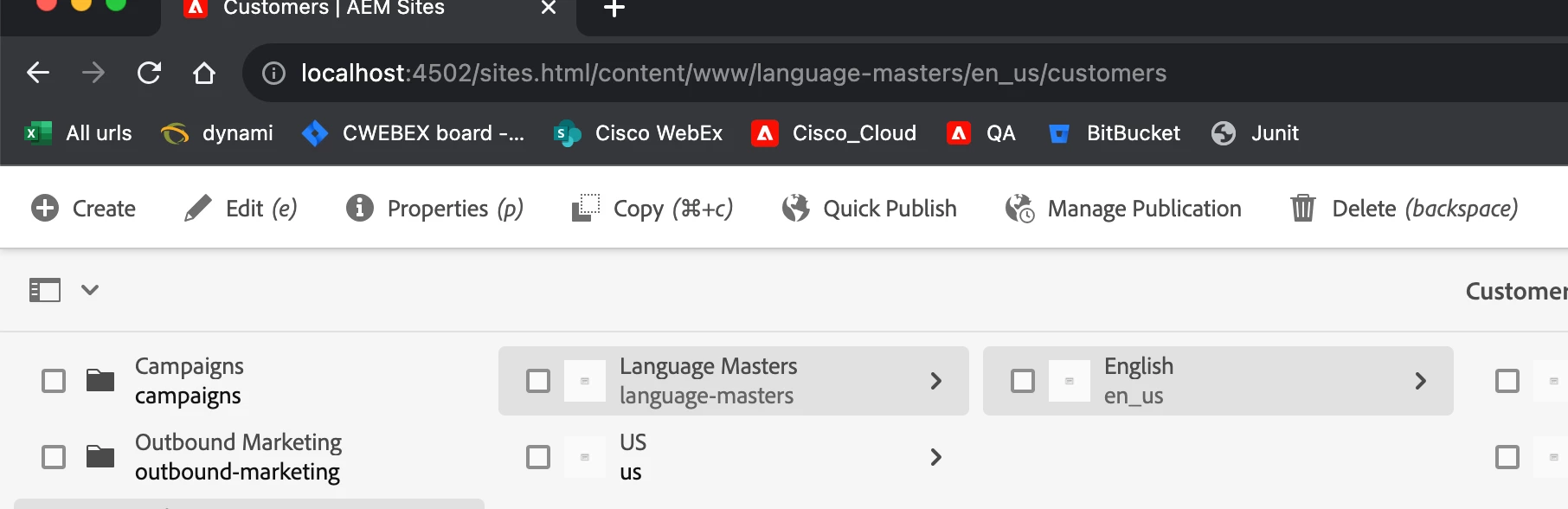

I used the below script but when selected the child pages the script was not loading, Because of the dynamic loading of child pages.

$('._coral-Checkbox').click(function() { 

 alert(“”checkbox checked);

  });


@EstebanBustamante  @Mahedi_Sabuj   

@aanchal-sikka  @arunpatidar  @sherinregi @harwindersingh 

This post is no longer active and is closed to new replies. Need help? Start a new post to ask your question.
Best answer by aanchal-sikka

Hello @naruk89179065 


There are multiple approaches:

1. Using path based render condition from ACS commons

https://adobe-consulting-services.github.io/acs-aem-commons/features/ui-widgets/path-rendercondition/index.html


2. Or use expression with simple render condition

expression="${granite:relativeParent(requestPathInfo.suffix, 3) != '/content/www/language-masters')}"/>

http://www.nateyolles.com/blog/2016/07/aem-granite-custom-render-conditions


4 replies

aanchal-sikka
aanchal-sikkaAccepted solution
New Participant
September 1, 2023

Hello @naruk89179065 


There are multiple approaches:

1. Using path based render condition from ACS commons

https://adobe-consulting-services.github.io/acs-aem-commons/features/ui-widgets/path-rendercondition/index.html


2. Or use expression with simple render condition

expression="${granite:relativeParent(requestPathInfo.suffix, 3) != '/content/www/language-masters')}"/>

http://www.nateyolles.com/blog/2016/07/aem-granite-custom-render-conditions


Aanchal Sikka
mahi1729
New Participant
September 1, 2023

All the responses stated above are close to what you may need. However since you are looking for controlling the existing buttons based on items selected, you may have to override some built in js. Or probably add a custom js to alter the behavior. Sorry I can't be sure as it's been a while I worked on this sort of a change. As of today these icons are rendered based on users permissions. A particular class is associated with the action they represent and show hide behavior is controlled by it. Now we may need to change this behavior by including addl condition based on selected item's path, which again should be retrieveable in ur js. Please see if these pointers help. If not I can dig a little deeper and advise u further. Thanks 

arunpatidar
New Participant
September 1, 2023
Mahedi_Sabuj
New Participant
September 1, 2023

Hi @naruk89179065,

You can address the issue by either adjusting User Permissions or utilizing granite:renderCondition. A detailed discussion is available here. https://experienceleaguecommunities.adobe.com/t5/adobe-experience-manager/how-to-disable-hide-quick-publish-option-for-pdf-assets-in-asset/m-p/605936 

Mahedi Sabuj
New Participant
September 1, 2023

thanks @mahedi_sabuj 
When the Page loads it works fine, but every time when need to select the page checkbox, then needs to hide and show based on the path