Hide OOTB workflow using ACL | Community
Skip to main content
New Participant
December 14, 2022
Solved

Hide OOTB workflow using ACL

  • December 14, 2022
  • 2 replies
  • 1219 views

ACL deny is working only for folder and not all OOB workflows are organized in folder. Is there a way to organize workflow models in folder so that we can handle them ACL - deny?

I don't even see those workflows in useradmin under /var path. I can only see folder names. How can I hide these? [Ex: Request for Activation]
@arunpatidar 

This post is no longer active and is closed to new replies. Need help? Start a new post to ask your question.
Best answer by arunpatidar

Hi,

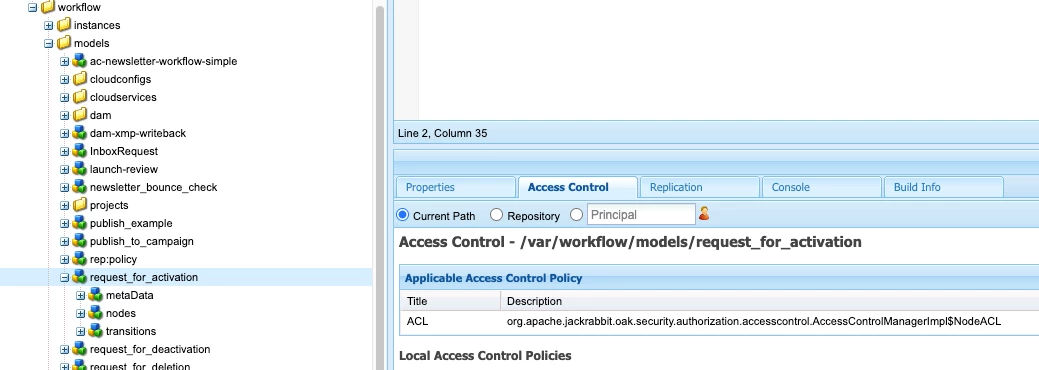
You need to apply ACL to the workflow model rather than the folder as you mentioned.

Are you doing this changes manually from useradmin?

You can also use crxde for applying ACLs


2 replies

arunpatidar
arunpatidarAccepted solution
New Participant
December 14, 2022

Hi,

You need to apply ACL to the workflow model rather than the folder as you mentioned.

Are you doing this changes manually from useradmin?

You can also use crxde for applying ACLs


Arun Patidar
Bhuwan_B
New Participant
December 14, 2022
New Participant
December 14, 2022

But that would hide the workflow for all users. I need specific to groups.

Bhuwan_B
New Participant
December 14, 2022

@shaheena_sheikh Then by default deny everything and allow specific. Use the "use case for DAM folder Hierarchy" in below article.

https://www.aemcq5tutorials.com/tutorials/adobe-aem-cq5-tutorials/aem-permissioning/