Hide or disable Touch UI dialog (asset) file upload | Community
Skip to main content
Level 2
Dec 30, 2018 5:02 PM UTC
Solved

Hide or disable Touch UI dialog (asset) file upload

Does anyone know the JS code required to hide or disable an (asset) file upload in a Touch UI dialog based on if a checkbox is ticked. I am loading the JS using a client library for the dialog.

                                        <items jcr:primaryType="nt:unstructured">

                                            <file

                                                jcr:primaryType="nt:unstructured"

                                                sling:resourceType="cq/gui/components/authoring/dialog/fileupload"

                                                allowUpload="{Boolean}false"

                                                autoStart="{Boolean}false"

                                                class="cq-droptarget"

                                                fieldLabel="Image Asset"

                                                fileNameParameter="./fileName"

                                                fileReferenceParameter="./fileReference"

                                                mimeTypes="[image/gif,image/jpeg,image/png,image/webp,image/tiff]"

                                                multiple="{Boolean}false"

                                                name="./file"

                                                title="Upload Image Asset"

                                                uploadUrl="${suffix.path}"

                                                useHTML5="{Boolean}true"/>

                                            <imageFromLinkedPage

                                                jcr:primaryType="nt:unstructured"

                                                sling:resourceType="granite/ui/components/coral/foundation/form/checkbox"

                                                fieldDescription="When checked, populate the image with the linked page's thumbnail."

                                                text="Get image from linked page"

                                                name="./imageFromPage"

                                                value="{Boolean}true"

                                                uncheckedValue="{Boolean}false"

                                                checked="{Boolean}false"/>

                                        </items>

This post is no longer active and is closed to new replies. Need help? Start a new post to ask your question.
Ravi_Pampana
Ravi_PampanaAccepted solution
New Participant
Jan 1, 2019 2:53 AM UTC

Hi,

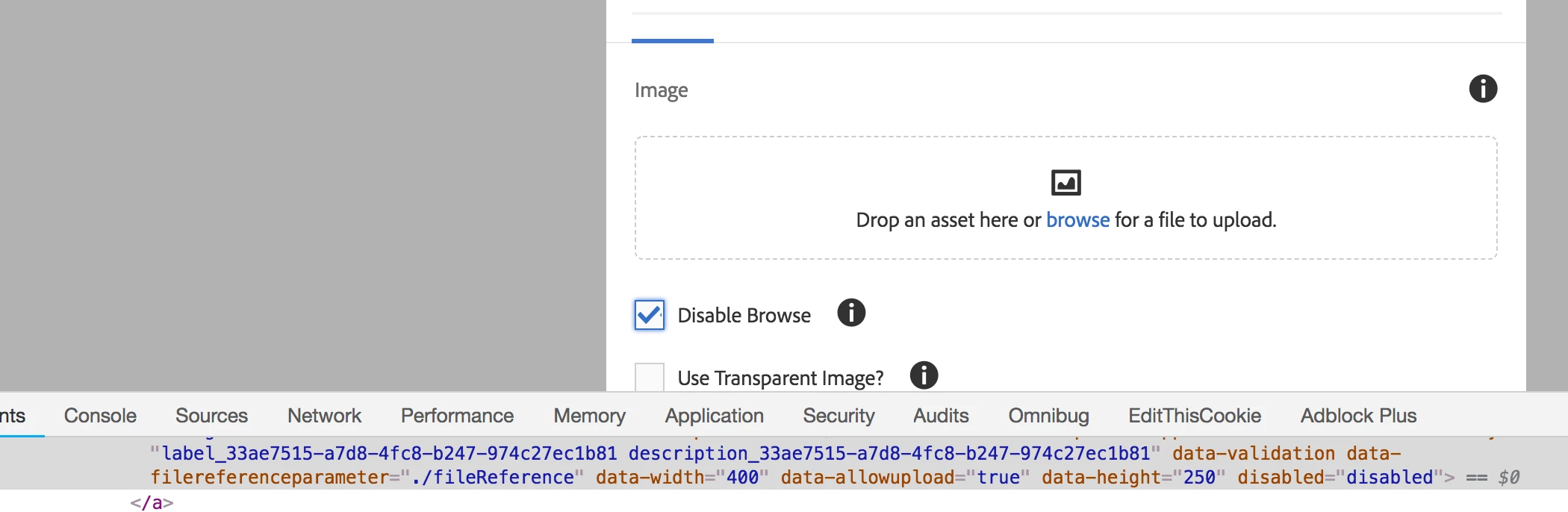
Below is the sample code, using this we can disable and enable the browse option for image field. You can extend this as per your requirement.

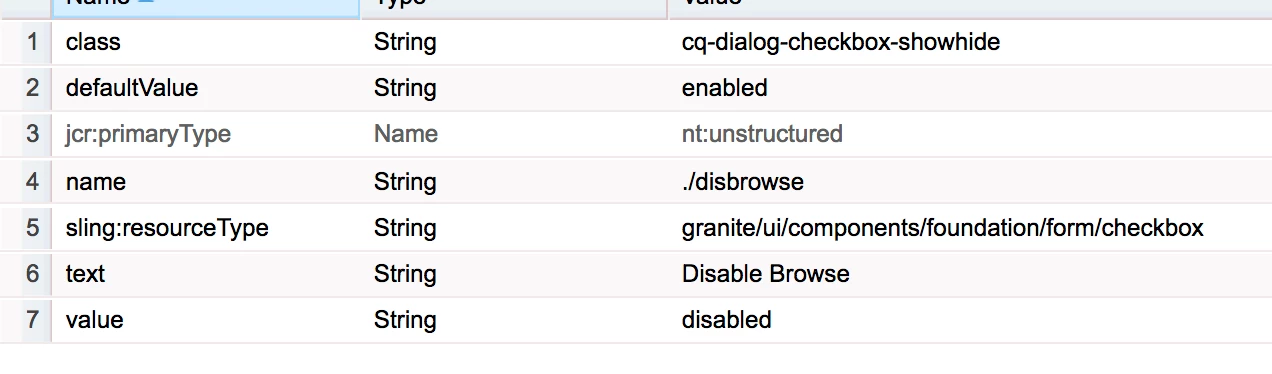
Add class "cq-dialog-checkbox-showhide" attribute to checkbox field. Class value can be any and update the js code accordingly.

Add below code to js file and add category as below

categories

String[]

cq.authoring.dialog

//For checkbox changes in dialog

$(document).on("change", ".cq-dialog-checkbox-showhide", function(e) {

        disabledBrowse($(this));

    });

    //To check the value on initial load

     $(document).on("foundation-contentloaded", function(e) {

        // if there is already an inital value make sure the according target element becomes visible

        $(".cq-dialog-checkbox-showhide").each( function() {

            disabledBrowse($(this));

        });

    });


    function disabledBrowse(el) {


    var checked = el.prop('checked');

    if(checked) {


    $("input.coral-FileUpload-input").attr('disabled','disabled');

    }else {


    $("input.coral-FileUpload-input").removeAttr('disabled');

    }

     }

3 replies

Level 2
Jan 3, 2019 5:10 PM UTC

Thanks Ravi!

Translate
Ravi_Pampana
Ravi_PampanaAccepted solution
New Participant
Jan 1, 2019 2:53 AM UTC

Hi,

Below is the sample code, using this we can disable and enable the browse option for image field. You can extend this as per your requirement.

Add class "cq-dialog-checkbox-showhide" attribute to checkbox field. Class value can be any and update the js code accordingly.

Add below code to js file and add category as below

categories

String[]

cq.authoring.dialog

//For checkbox changes in dialog

$(document).on("change", ".cq-dialog-checkbox-showhide", function(e) {

        disabledBrowse($(this));

    });

    //To check the value on initial load

     $(document).on("foundation-contentloaded", function(e) {

        // if there is already an inital value make sure the according target element becomes visible

        $(".cq-dialog-checkbox-showhide").each( function() {

            disabledBrowse($(this));

        });

    });


    function disabledBrowse(el) {


    var checked = el.prop('checked');

    if(checked) {


    $("input.coral-FileUpload-input").attr('disabled','disabled');

    }else {


    $("input.coral-FileUpload-input").removeAttr('disabled');

    }

     }

Translate
smacdonald2008
Level 10
Dec 31, 2018 4:19 PM UTC

See Sreekanth Choudry Nalabotu blog here - he has many write ups on how to manipulate a component dialog using JQuery -- Experiencing Adobe Experience Manager - Day CQ: In the blog "Experiencing Adobe Experience Manger - Day CQ"

Translate