How add new Feature RTE | Community
Skip to main content
New Participant
April 27, 2023
Solved

How add new Feature RTE

  • April 27, 2023
  • 3 replies
  • 892 views

Hi Team,


I have requirement as need to add extra feature under List or Paragraph Formats in RTE.

Enter the text and  i can select the my newly added feature then out put has to display as below "Icon with Text" refer screen shot.

Can you please review and guide us how to achieve. 



Regards

Mangala
 

This post is no longer active and is closed to new replies. Need help? Start a new post to ask your question.
Best answer by Sady_Rifat

Hello @madhu61 ,

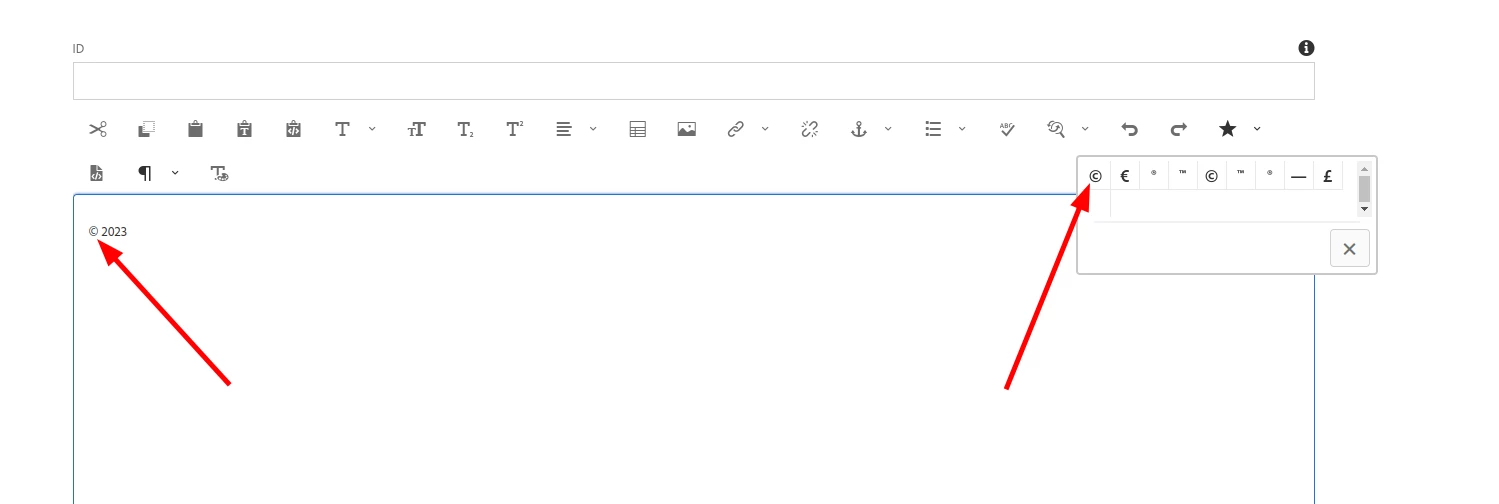
You can do it by adding a custom special character. This will look like below

Use:

<misctools jcr:primaryType="nt:unstructured" features="*"> <specialCharsConfig jcr:primaryType="nt:unstructured"> <chars jcr:primaryType="nt:unstructured"> <copyright jcr:primaryType="nt:unstructured" entity="&amp;#169;"/> <trademark jcr:primaryType="nt:unstructured" entity="&amp;#8482;"/> <registered jcr:primaryType="nt:unstructured" entity="&amp;#174;"/> <emDash jcr:primaryType="nt:unstructured" entity="&amp;#8212;"/> <pound jcr:primaryType="nt:unstructured" entity="&amp;#163;"/> <nbsp jcr:primaryType="nt:unstructured" entity="&amp;#160;"/> </chars> </specialCharsConfig> </misctools>

And use it by 

misctools#specialchars

Adding Custom Special Character: https://experienceleague.adobe.com/docs/experience-manager-65/administering/operations/configure-rich-text-editor-plug-ins.html?lang=en#spchar 

3 replies

madhu61Author
New Participant
April 28, 2023

HI Team,


Thanks for you responses. Let me implement the solution .

arunpatidar
New Participant
April 28, 2023
Sady_Rifat
Sady_RifatAccepted solution
New Participant
April 28, 2023

Hello @madhu61 ,

You can do it by adding a custom special character. This will look like below

Use:

<misctools jcr:primaryType="nt:unstructured" features="*"> <specialCharsConfig jcr:primaryType="nt:unstructured"> <chars jcr:primaryType="nt:unstructured"> <copyright jcr:primaryType="nt:unstructured" entity="&amp;#169;"/> <trademark jcr:primaryType="nt:unstructured" entity="&amp;#8482;"/> <registered jcr:primaryType="nt:unstructured" entity="&amp;#174;"/> <emDash jcr:primaryType="nt:unstructured" entity="&amp;#8212;"/> <pound jcr:primaryType="nt:unstructured" entity="&amp;#163;"/> <nbsp jcr:primaryType="nt:unstructured" entity="&amp;#160;"/> </chars> </specialCharsConfig> </misctools>

And use it by 

misctools#specialchars

Adding Custom Special Character: https://experienceleague.adobe.com/docs/experience-manager-65/administering/operations/configure-rich-text-editor-plug-ins.html?lang=en#spchar