codingStar
Level 3
Jul 5, 2017 8:15 AM UTC
Solved

How add new style class for Cell Properties in richtext' table plugin in touch ui dialog

Hi,

I am AEM 6.2 SP1.

I want to add a new style for table's cell style refer below image of dialog.
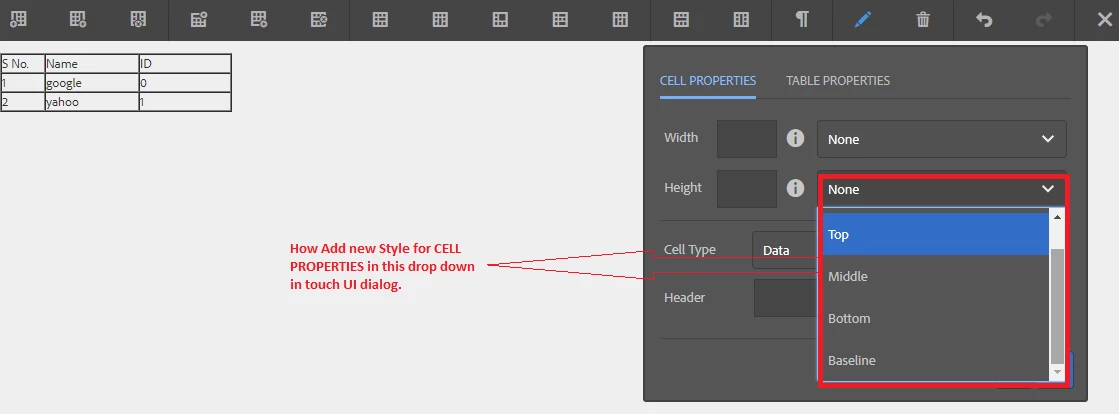
I have tried this https://docs.adobe.com/docs/en/aem/6-2/administer/operations/page-authoring/rich-text-editor.html#Styles (Tables and Table Cells)

but i am not able to achieve this.

Can you provide some link or any solution to achieve this touch ui dialog.

This post is no longer active and is closed to new replies. Need help? Start a new post to ask your question.
vivekanand-mishAccepted solution
Employee
Sep 3, 2019 6:38 AM UTC

Anyone looking for a direction to similar issue can find this link useful to solve this- Experiencing Adobe Experience Manager - Day CQ: AEM 64 - Extend TouchUI Rich Text Editor Table Plugin, Add Summary Field

3 replies

vivekanand-mishAccepted solution
Employee
Sep 3, 2019 6:38 AM UTC

Anyone looking for a direction to similar issue can find this link useful to solve this- Experiencing Adobe Experience Manager - Day CQ: AEM 64 - Extend TouchUI Rich Text Editor Table Plugin, Add Summary Field

Translate
codingStar
Level 3
Jul 5, 2017 12:55 PM UTC

How does this resolve my problem?

Translate
kautuk_sahni
Employee
Jul 5, 2017 9:45 AM UTC

In the documentation it is mentioned that:

1. Styles will only be available when editing a table within a Text component (or derivative), not the standard Table component.

2. Currently, you can define styles for tables and cells in Classic-UI only.

Check this AEM | RTE – Custom Styles Plugin – Touch UI – Need is the mother of invention … 

It should help you. It talks about creating RTE (Rich Text Editor) fontstyle & fontcolor plugin for Touch UI.

~kautuk

Translate
Kautuk Sahni