How can I add action to button in componnet | Community
Skip to main content
June 21, 2017
Solved

How can I add action to button in componnet

  • June 21, 2017
  • 6 replies
  • 3633 views

Hi,

How can I add action to button in component. Button is not selecting from inside the component in aem 6.2

please find below img for reference.
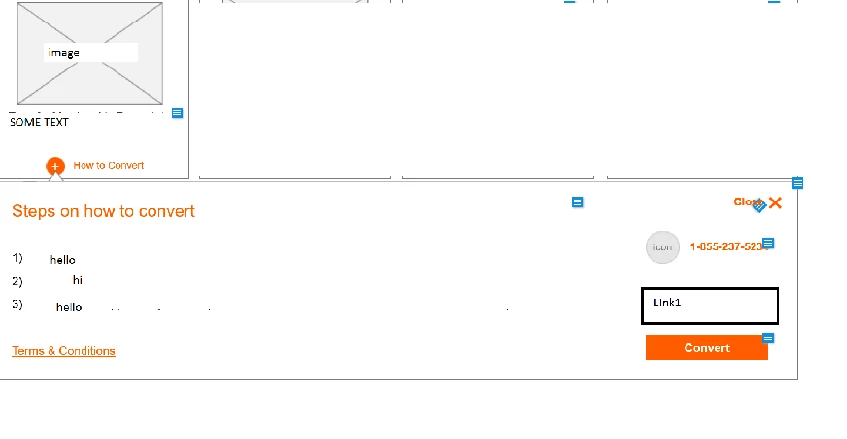
Thanks in advance.

Sandhya.

This post is no longer active and is closed to new replies. Need help? Start a new post to ask your question.
Best answer by VeenaVikraman

Hi Sandya

     You can write a click event associated with your button . (I assume the button you are referring here should be the one labelled Convert ? )

     Add a class or div id to you button's HTML and as smacdonald2008​ Scott mentioned , write a javascript/jquery function for the click event associated with the class or div .

This may help you https://api.jquery.com/click/

PS:- Above solution is in an assumption that you are looking to attach an event to your button in your page . (Since your query doesn't have much details to explore more )

Thanks

Veena

6 replies

August 3, 2017

thank you Scott

smacdonald2008
New Participant
August 1, 2017

Yes - you can put JS that handles a click event in a client lib.

This article will help you -- Scott's Digital Community: Creating an AEM HTL component that uses JavaScript

ebin_Aby
New Participant
August 1, 2017

Hey Scott,

Can we put the onclick / click end in our client lib ?

Prince_Shivhare
New Participant
June 21, 2017

Hi Sandhya,

It's same as normal html and js. if you want the button to be functional then you need to specify the logic in js.

and use clientlib to call the js into your component and js function into the html file.

onclick Event

Please check above link. you will get to know about it.

~ Prince

VeenaVikraman
VeenaVikramanAccepted solution
New Participant
June 21, 2017

Hi Sandya

     You can write a click event associated with your button . (I assume the button you are referring here should be the one labelled Convert ? )

     Add a class or div id to you button's HTML and as smacdonald2008​ Scott mentioned , write a javascript/jquery function for the click event associated with the class or div .

This may help you https://api.jquery.com/click/

PS:- Above solution is in an assumption that you are looking to attach an event to your button in your page . (Since your query doesn't have much details to explore more )

Thanks

Veena

smacdonald2008
New Participant
June 21, 2017

If you are using HTL - then use JavaScript to drive an action on a button in the component. Using HTL - you can use a ClientLib that contains the JS file - as shown in this article:

Scott's Digital Community: Creating an AEM HTL component that uses JavaScript