How can i create a title or heading in a dialog. | Community
Skip to main content
Level 2
Sep 20, 2022 9:24 AM UTC
Solved

How can i create a title or heading in a dialog.

Hi Everyone,


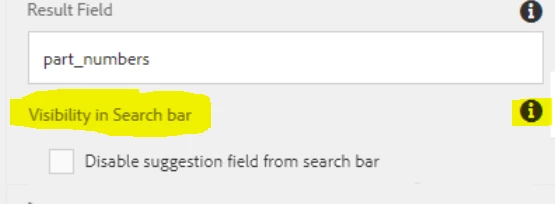
I am trying to create a dialog where I need a check box with a heading, which looks something like below image. 
The problem here is if I use heading as a resource type, field description is not appearing in that case.
Can anyone please help me with what resource type should I use here for "Visibility in Search bar" title, so that I get to use the field Description as well.
 

Any help will be appreciated. Thanks.

@arunpatidar @sachin_arora_ @joerghoh @mohit_kbansal @ksh_ingole7@lukasz-m

This post is no longer active and is closed to new replies. Need help? Start a new post to ask your question.
arunpatidar
arunpatidarAccepted solution
New Participant
Sep 20, 2022 10:55 AM UTC

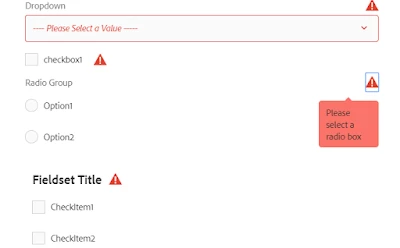
I think you might be looking for fieldset. If you just want to warp the checkbox and other field within container then use fieldset as container.

e.g.


Although none of the container provide descriptions , you can use headline as description along with fieldset title. This description would not be as tooltip but as a text, will serve the purpose tho.

Arun Patidar

4 replies

Level 4
Sep 20, 2022 10:09 AM UTC

As mentioned here 

https://developer.adobe.com/experience-manager/reference-materials/6-5/granite-ui/api/jcr_root/libs/... 


heading resource supports just level and text

Only form fields that extend https://developer.adobe.com/experience-manager/reference-materials/6-5/granite-ui/api/jcr_root/libs/granite.....  have support for field description.


If you want such behavior with heading resource you might need to write your own custom code for the same.

Translate
arunpatidar
New Participant
Sep 20, 2022 9:57 AM UTC

Hi,

You can use heading resource type

https://developer.adobe.com/experience-manager/reference-materials/6-5/granite-ui/api/jcr_root/libs/granite/ui/components/coral/foundation/heading/index.html 


/libs/granite/ui/components/coral/foundation/heading
A heading component to represent HTML h1 - h6.
Translate
Arun Patidar
arunpatidar
arunpatidarAccepted solution
New Participant
Sep 20, 2022 10:55 AM UTC

I think you might be looking for fieldset. If you just want to warp the checkbox and other field within container then use fieldset as container.

e.g.


Although none of the container provide descriptions , you can use headline as description along with fieldset title. This description would not be as tooltip but as a text, will serve the purpose tho.

Translate
Arun Patidar