How do you to change/clear template thumbnails? | Community
Skip to main content
Level 3
Apr 17, 2019 5:12 PM UTC
Solved

How do you to change/clear template thumbnails?

We are using 6.3. We were using Classic UI, and we are making the transition to Touch UI.

One of our static templates uses a thumbnail file. In Touch UI, on the sites.html page to select content (http://localhost:4502/sites.html/content), all the pages using that template automatically show up with that template's thumbnail.

We changed the thumbnail.png file for that template. The change is reflected with the content creation, when selecting the template, but all the pages using that template still have the old thumbnail image show on the sites page.

How can the old thumbnails be cleared out so the page use the new one?
This post is no longer active and is closed to new replies. Need help? Start a new post to ask your question.
Matt-H-Accepted solution
Level 3
Apr 17, 2019 8:39 PM UTC

Thank you for the advice - I appreciate the replies.

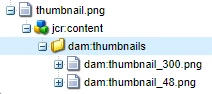
Even though those options didn't fix it, I have figured it out. It's not about recompiling the jsp or java. It's on the thumbnail.png node. After the thumbnail.png is uploaded and used in the UI, AEM automatically generates different sized thumbnails, stored in thumbnail.png/jcr:content/dam:thumbnails.

Even though the parent thumbnail.png is updated, these are remaining the same. The way to clear them out is to go into crx/de and delete the dam:thumbnails folder. Then the next time thumbnail is used in the UI, it will be recreated with new images in it.

3 replies

Matt-H-AuthorAccepted solution
Level 3
Apr 17, 2019 8:39 PM UTC

Thank you for the advice - I appreciate the replies.

Even though those options didn't fix it, I have figured it out. It's not about recompiling the jsp or java. It's on the thumbnail.png node. After the thumbnail.png is uploaded and used in the UI, AEM automatically generates different sized thumbnails, stored in thumbnail.png/jcr:content/dam:thumbnails.

Even though the parent thumbnail.png is updated, these are remaining the same. The way to clear them out is to go into crx/de and delete the dam:thumbnails folder. Then the next time thumbnail is used in the UI, it will be recreated with new images in it.

Translate
Gaurav-Behl
Level 10
Apr 17, 2019 6:18 PM UTC
Ravi_Pampana
New Participant
Apr 17, 2019 6:02 PM UTC

It might be some caching issue, did you try clearing libs jsp cache (/system/console/slingjsp) and also jsp cache under Apache Sling Commons FileSystem ClassLoaderorg.apache.sling.commons.fsclassloader (/data/classes/org/apache/jsp/libs)

Translate