
How hide Request Publication and Request Unpublication in AEM 6.5 | Community
Skip to main content
venkateshk87129
New Participant
May 13, 2020
Solved

How hide Request Publication and Request Unpublication in AEM 6.5

  • May 13, 2020
  • 2 replies
  • 6212 views

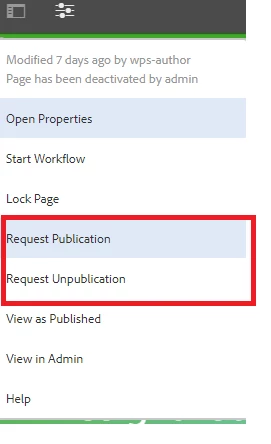
How to hide Request publication and Request Unpublication option to content authors, this option is showing for  only if users don't have permission for workflows request-for-activation and request-for-deactivation
 

This post is no longer active and is closed to new replies. Need help? Start a new post to ask your question.
Best answer by Dipti_Chauhan

All these options are available at : /libs/wcm/core/content/editor/jcr:content/content/items/content/header/items/headerbar/items/pageinfopopover/items/list/items

 and these are rendered based on granite:rendercondition. You need to overlay your item and update rendercondition based on your requirement,


Thanks

Dipti


2 replies

Dipti_Chauhan
Dipti_ChauhanAccepted solution
New Participant
May 14, 2020

All these options are available at : /libs/wcm/core/content/editor/jcr:content/content/items/content/header/items/headerbar/items/pageinfopopover/items/list/items

 and these are rendered based on granite:rendercondition. You need to overlay your item and update rendercondition based on your requirement,


Thanks

Dipti


venkateshk87129
New Participant
May 15, 2020
Thanks dipti.
joerghoh
Employee
May 13, 2020

You can use renderconditions to hide/display according to your own requirements. See http://www.nateyolles.com/blog/2016/07/aem-granite-custom-render-conditions for a nice introduction to this topic.

venkateshk87129
New Participant
May 15, 2020
thanks jorg, This articls helps to customizatin