
How set Asset Finder default value? | Community
Skip to main content
Dinu_Arya
New Participant
October 19, 2022
Solved

How set Asset Finder default value?

  • October 19, 2022
  • 2 replies
  • 1198 views

Hi Team,


How to change the default option in Asset Finder? I want to show Documents by default instead of images. How to do that? Please let me know.


Thanks,

AryA

This post is no longer active and is closed to new replies. Need help? Start a new post to ask your question.
Best answer by lukasz-m

Hi @dinu_arya,

You will have to do 2 changes to achieve your goal:
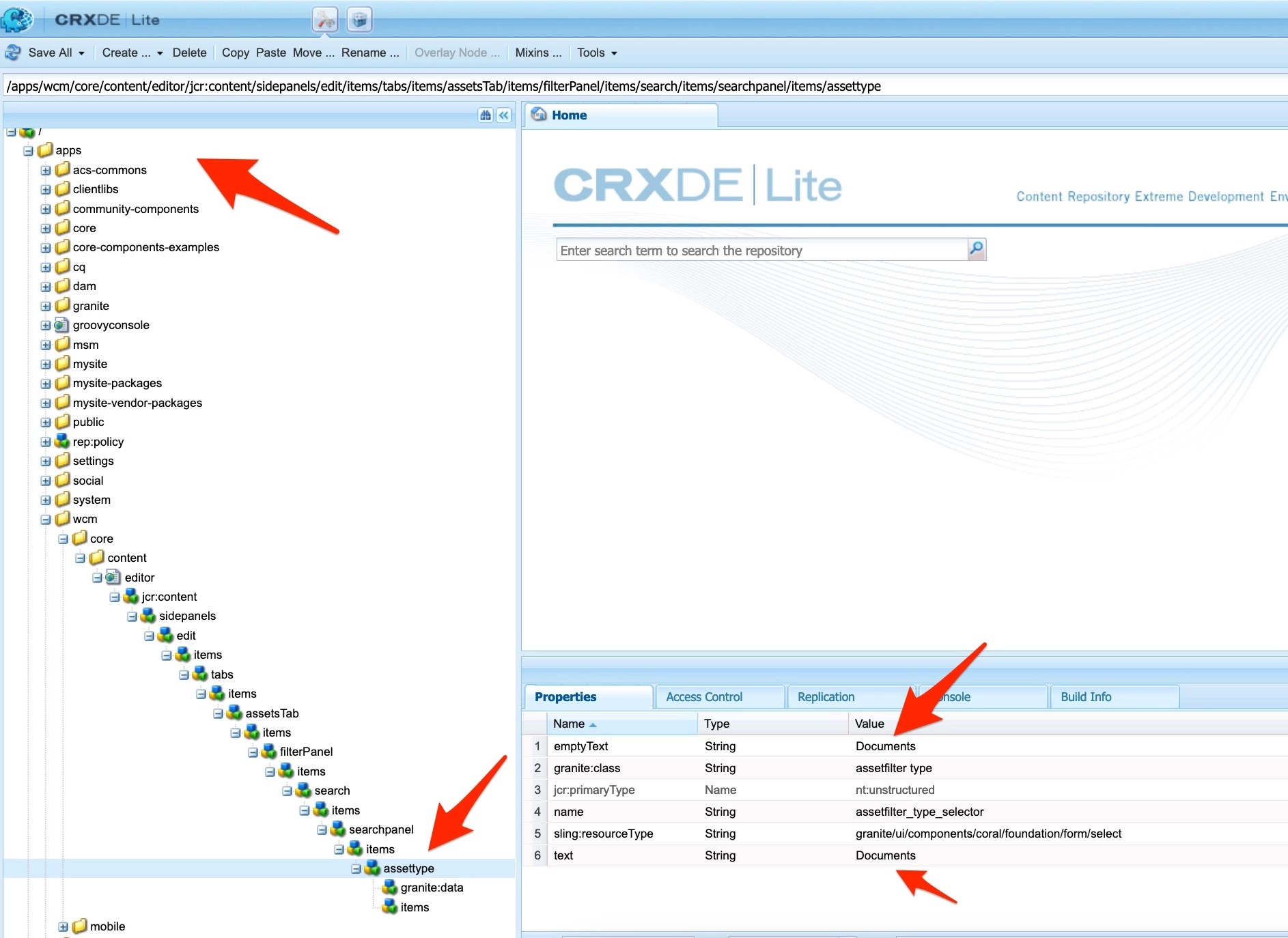
  1. Overlay /libs/wcm/core/content/editor/jcr:content/sidepanels/edit/items/tabs/items/assetsTab/items/filterPanel/items/search/items/searchpanel/items/assettype, so under apps you should have structure like below. Change emptyText and text properties to Documents
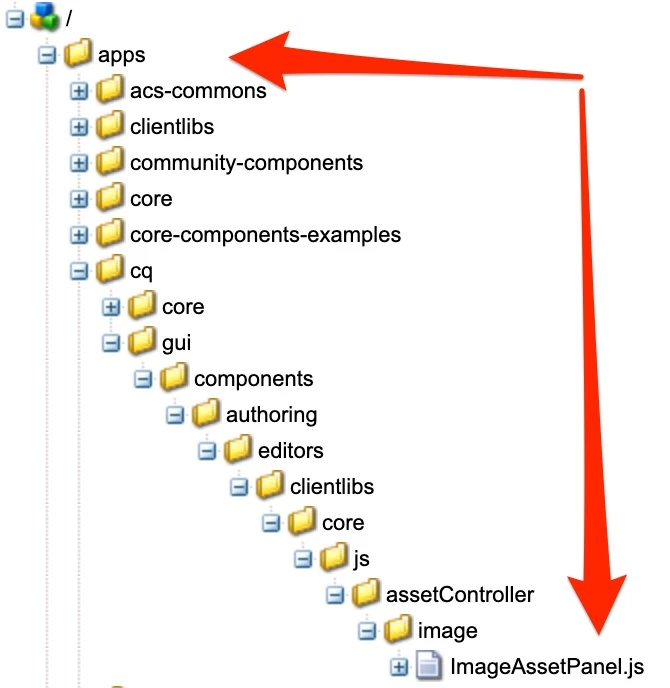
  2. Overlay /libs/cq/gui/components/authoring/editors/clientlibs/core/js/assetController/image/ImageAssetPanel.js, as a result you should have following structure under apps /apps/cq/gui/components/authoring/editors/clientlibs/core/js/assetController/image/ImageAssetPanel.js Set mimeType like below.

    /*
     * ADOBE CONFIDENTIAL
     *
     * Copyright 2015 Adobe Systems Incorporated
     * All Rights Reserved.
     *
     * NOTICE:  All information contained herein is, and remains
     * the property of Adobe Systems Incorporated and its suppliers,
     * if any.  The intellectual and technical concepts contained
     * herein are proprietary to Adobe Systems Incorporated and its
     * suppliers and may be covered by U.S. and Foreign Patents,
     * patents in process, and are protected by trade secret or copyright law.
     * Dissemination of this information or reproduction of this material
     * is strictly forbidden unless prior written permission is obtained
     * from Adobe Systems Incorporated.
     */
    ;
    (function ($, ns, channel, window, undefined) {
    
        /**
         * Asset Controller for the extended image type
         *
         * All assets that are related to the notion of image
         *
         * @memberOf Granite.author.ui.assetFinder
         * @inner
         * @alias imageAssetController
         * @ignore
         * @type {Granite.author.ui.assetFinder~AssetController}
         */
        var self = {},
            name = 'Images';
    
        // make the loadAssets function more flexible
        self.searchRoot = '/content/dam';
        // open assets in the admin view (to edit properties)
        self.viewInAdminRoot = '/assetdetails.html{+item}';
    
        var searchPath = self.searchRoot,
            imageServlet = '/bin/wcm/contentfinder/asset/view.html',
            itemResourceType = 'cq/gui/components/authoring/assetfinder/asset';
    
        /**
         Pre asset type switch hook
         */
        self.setUp = function () {};
    
        /**
         Post asset type switch hook
         */
        self.tearDown = function () {};
    
        /**
         * Loads extended image type resources
         *
         * @param query {String} search query
         * @param lowerLimit {Number} lower bound for paging
         * @param upperLimit {Number} upper bound for paging
         * @returns {jQuery.Promise}
         */
        self.loadAssets = function (query, lowerLimit, upperLimit) {
            var param = {
                '_dc': new Date().getTime(),  // cache killer
                'query': query.concat("order:\"-jcr:content/jcr:lastModified\" "), // sort by jcr:content/jcr:lastModified property
                'mimeType': 'application/vnd.openxmlformats,application/msword,application/vnd.ms-powerpoint,application/mspowerpoint,application/powerpoint,application/x-mspowerpoint,application/x-msexcel,application/x-excel,application/excel,application/vnd.ms-excel,application/pdf,application/vnd.openxmlformats-officedocument.wordprocessingml.document,text/plain',
                'itemResourceType': itemResourceType, // single item rendering (cards)
                'limit': lowerLimit + ".." + upperLimit,
                '_charset_': 'utf-8'
            };
    
            return $.ajax({
                type: 'GET',
                dataType: 'html',
                url: Granite.HTTP.externalize(imageServlet) + searchPath,
                data: param
            });
        };
    
        /**
         * Set URL to image servlet
         * @param {String} imgServlet - URL to image servlet
         */
        self.setServlet = function (imgServlet) {
            imageServlet = imgServlet;
        };
    
        self.setSearchPath = function (spath) {
            searchPath = spath;
        };
    
        self.setItemResourceType = function (rt) {
            itemResourceType = rt;
        };
    
        self.resetSearchPath = function () {
            searchPath = self.searchRoot;
        };
    
        // register as a asset tab
        ns.ui.assetFinder.register(name, self);
    
    }(jQuery, Granite.author, jQuery(document), this));
    This change is needed if you want to see Documents as initial list under Assets Finder.

Useful links:

2 replies

Lokesh_Vajrala
New Participant
October 19, 2022

You can use the Granite.author.ui.assetFinder library to load the Documents when Side Panel is opened. Here is the snippet of js code you can use to achieve it:  

channel.on("cq-sidepanel-beforetoggle", function() {
       // Set the Documents as the selection
        Granite.author.ui.assetFinder.$el.find('.rail-view.active .assetfilter.type').find("coral-select-item[value='Documents']")[0].selected=true;
       // trigger change event to load the Documents
        let changeEvent = new Event('change');
        Granite.author.ui.assetFinder.$el.find('.rail-view.active .assetfilter.type')[0].dispatchEvent(changeEvent);
    });

Load the above script to a clientlib with categories - cq.authoring.editor.core


OOTB editor node /libs/wcm/core/content/editor/jcr:content is marked as granite:InternalArea and can't overlay to change the order. 

lukasz-m
New Participant
October 19, 2022

OOTB editor node /libs/wcm/core/content/editor/jcr:content is marked as granite:InternalArea and can't overlay to change the order. 


@lokesh_vajrala too which AEM version are you referring? In AEM 6.5.14 it is not marked as an granite:InternalArea so it can be safely changed via overlay.

Lokesh_Vajrala
New Participant
October 19, 2022

@lukasz-m I'm on cloud service sdk and it is marked as InternalArea 

lukasz-m
lukasz-mAccepted solution
New Participant
October 19, 2022

Hi @dinu_arya,

You will have to do 2 changes to achieve your goal:
  1. Overlay /libs/wcm/core/content/editor/jcr:content/sidepanels/edit/items/tabs/items/assetsTab/items/filterPanel/items/search/items/searchpanel/items/assettype, so under apps you should have structure like below. Change emptyText and text properties to Documents
  2. Overlay /libs/cq/gui/components/authoring/editors/clientlibs/core/js/assetController/image/ImageAssetPanel.js, as a result you should have following structure under apps /apps/cq/gui/components/authoring/editors/clientlibs/core/js/assetController/image/ImageAssetPanel.js Set mimeType like below.

    /*
     * ADOBE CONFIDENTIAL
     *
     * Copyright 2015 Adobe Systems Incorporated
     * All Rights Reserved.
     *
     * NOTICE:  All information contained herein is, and remains
     * the property of Adobe Systems Incorporated and its suppliers,
     * if any.  The intellectual and technical concepts contained
     * herein are proprietary to Adobe Systems Incorporated and its
     * suppliers and may be covered by U.S. and Foreign Patents,
     * patents in process, and are protected by trade secret or copyright law.
     * Dissemination of this information or reproduction of this material
     * is strictly forbidden unless prior written permission is obtained
     * from Adobe Systems Incorporated.
     */
    ;
    (function ($, ns, channel, window, undefined) {
    
        /**
         * Asset Controller for the extended image type
         *
         * All assets that are related to the notion of image
         *
         * @memberOf Granite.author.ui.assetFinder
         * @inner
         * @alias imageAssetController
         * @ignore
         * @type {Granite.author.ui.assetFinder~AssetController}
         */
        var self = {},
            name = 'Images';
    
        // make the loadAssets function more flexible
        self.searchRoot = '/content/dam';
        // open assets in the admin view (to edit properties)
        self.viewInAdminRoot = '/assetdetails.html{+item}';
    
        var searchPath = self.searchRoot,
            imageServlet = '/bin/wcm/contentfinder/asset/view.html',
            itemResourceType = 'cq/gui/components/authoring/assetfinder/asset';
    
        /**
         Pre asset type switch hook
         */
        self.setUp = function () {};
    
        /**
         Post asset type switch hook
         */
        self.tearDown = function () {};
    
        /**
         * Loads extended image type resources
         *
         * @param query {String} search query
         * @param lowerLimit {Number} lower bound for paging
         * @param upperLimit {Number} upper bound for paging
         * @returns {jQuery.Promise}
         */
        self.loadAssets = function (query, lowerLimit, upperLimit) {
            var param = {
                '_dc': new Date().getTime(),  // cache killer
                'query': query.concat("order:\"-jcr:content/jcr:lastModified\" "), // sort by jcr:content/jcr:lastModified property
                'mimeType': 'application/vnd.openxmlformats,application/msword,application/vnd.ms-powerpoint,application/mspowerpoint,application/powerpoint,application/x-mspowerpoint,application/x-msexcel,application/x-excel,application/excel,application/vnd.ms-excel,application/pdf,application/vnd.openxmlformats-officedocument.wordprocessingml.document,text/plain',
                'itemResourceType': itemResourceType, // single item rendering (cards)
                'limit': lowerLimit + ".." + upperLimit,
                '_charset_': 'utf-8'
            };
    
            return $.ajax({
                type: 'GET',
                dataType: 'html',
                url: Granite.HTTP.externalize(imageServlet) + searchPath,
                data: param
            });
        };
    
        /**
         * Set URL to image servlet
         * @param {String} imgServlet - URL to image servlet
         */
        self.setServlet = function (imgServlet) {
            imageServlet = imgServlet;
        };
    
        self.setSearchPath = function (spath) {
            searchPath = spath;
        };
    
        self.setItemResourceType = function (rt) {
            itemResourceType = rt;
        };
    
        self.resetSearchPath = function () {
            searchPath = self.searchRoot;
        };
    
        // register as a asset tab
        ns.ui.assetFinder.register(name, self);
    
    }(jQuery, Granite.author, jQuery(document), this));
    This change is needed if you want to see Documents as initial list under Assets Finder.

Useful links: