How to access multifield values of a design dialog in sightly | Community
Skip to main content
Level 2
Sep 24, 2018 9:07 PM UTC
Solved

How to access multifield values of a design dialog in sightly

I have multifield (granite/ui/components/coral/foundation/form/multifield) in a design dialog.  And the values are being saved in the design template (/etc/designs/<myapp>/jcr:content/<mytemplate>/<mymultifield>/item[n]).

How can I access these values in my sightly template.

I was trying something like this ${currentStyle.<mymultifield>.listChildren}, but its not working

Please help.  Thanks in advance.

I am on version 6.3

This post is no longer active and is closed to new replies. Need help? Start a new post to ask your question.
VeenaVikraman
VeenaVikramanAccepted solution
New Participant
Sep 25, 2018 11:27 AM UTC

Hi ybharath264​

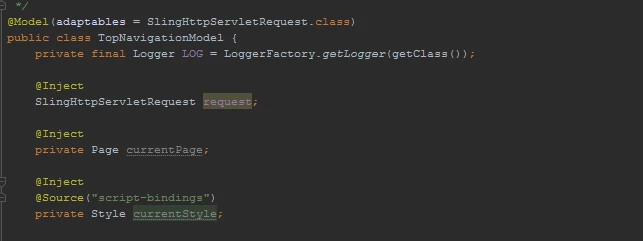
  In your model , you can inject currentStyle as below. Once you get this

After injecting the same , you can use it as below (just a sample) . You can use the Style ("The Adobe AEM Quickstart and Web Application.") methods

@PostConstruct
protected void init() {

   try {

   pageList = new ArrayList<SimplePage>();
  long absParent = currentStyle.get("absParent", 2L);

........

......

........

}

catch (Exception e) {

   LOG.error("Exception:", e);
   }

}

Hope this helps. Happy coding

Thanks

Veena

4 replies

Level 2
Apr 3, 2020 6:20 PM UTC
ybharath64: Did you happen to resolve this problem ? If yes, can you please help with snippet of code for understanding.
Translate
akashs51893872
Level 3
May 25, 2019 7:21 AM UTC

You can access directly from HTL

SCREENSHOT (with the name of the design multifield property I am trying to access) :

CODE:

<div class="container">

  <sly

          data-sly-test="${currentStyle}"

       data-sly-use.xtcontainerstyleResource="${currentStyle.path}">

    <div data-sly-test="${xtcontainerstyleResource}" class="${currentStyle.containerCSSClasses}">

      <sly data-sly-test="${xtcontainerstyleResource.hasChildren}"

           data-sly-list="${xtcontainerstyleResource.listChildren}">

        <sly data-sly-test="${item.name == 'divElements'}"

             data-sly-list="${item.listChildren}">

          <div class="${item.cssClass}">

            <sly data-sly-resource="${ item.name @ resourceType='wcm/foundation/components/responsivegrid' }"></sly>

          </div>

        </sly>

      </sly>

    </div>

  </sly>

  <sly data-sly-test="${!currentStyle}">

    <sly data-sly-resource="${ item.name @ resourceType='wcm/foundation/components/responsivegrid' }"></sly>

</div>

Translate
VeenaVikraman
VeenaVikramanAccepted solution
New Participant
Sep 25, 2018 11:27 AM UTC

Hi ybharath264​

  In your model , you can inject currentStyle as below. Once you get this

After injecting the same , you can use it as below (just a sample) . You can use the Style ("The Adobe AEM Quickstart and Web Application.") methods

@PostConstruct
protected void init() {

   try {

   pageList = new ArrayList<SimplePage>();
  long absParent = currentStyle.get("absParent", 2L);

........

......

........

}

catch (Exception e) {

   LOG.error("Exception:", e);
   }

}

Hope this helps. Happy coding

Thanks

Veena

Translate
arunpatidar
New Participant
Sep 25, 2018 10:53 AM UTC

Hi,

To access multifield values, you have to go with java or JS Use API, similar to dialog multifield value and return as list and then use in HTL.

Translate
Arun Patidar