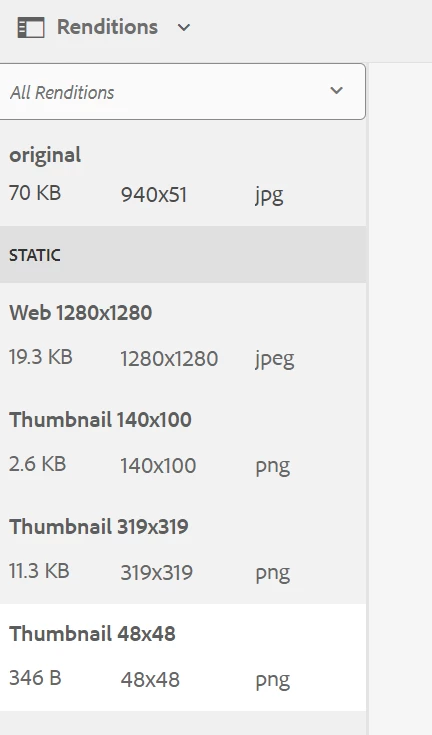
How to Accessing particular rendition of an Image uplaoded in aem dam using graphql | Community
Skip to main content
This post is no longer active and is closed to new replies. Need help? Start a new post to ask your question.
Aditya_Chabuku
Aditya_ChabukuAccepted solution
New Participant
December 4, 2024

Hi @17526305 ,


You can add Image Rendition as well in the below code to get Appropriate image to display.

Here is detailed documentation.

https://experienceleague.adobe.com/en/docs/experience-manager-learn/getting-started-with-aem-headless/how-to/images#:~:text=AEM's%20GraphQL%20queries%20can%20be,the%20image%20is%20referenced%20from.&text=_dynamicUrl%20is%20the%20URL%20to%20for%20image%20asset's%20web%2Doptimized%20delivery. 


Cheers,

Aditya


query($path: String!, $imageFormat: AssetTransformFormat=JPG, $imageSeoName: String, $imageWidth: Int, $imageQuality: Int) { adventureByPath( _path: $path _assetTransform: { format: $imageFormat width: $imageWidth quality: $imageQuality preferWebp: true } ) { item { _path title primaryImage { ... on ImageRef { _dynamicUrl } } } } }


Thanks,Aditya Chabuku

3 replies

kautuk_sahni
Employee
January 29, 2025

@17526305 Did you find the suggestion helpful? Please let us know if you require more information. Otherwise, please mark the answer as correct for posterity. If you've discovered a solution yourself, we would appreciate it if you could share it with the community. Thank you!

Translate
Kautuk Sahni
Aditya_Chabuku
Aditya_ChabukuAccepted solution
New Participant
December 4, 2024

Hi @17526305 ,


You can add Image Rendition as well in the below code to get Appropriate image to display.

Here is detailed documentation.

https://experienceleague.adobe.com/en/docs/experience-manager-learn/getting-started-with-aem-headless/how-to/images#:~:text=AEM's%20GraphQL%20queries%20can%20be,the%20image%20is%20referenced%20from.&text=_dynamicUrl%20is%20the%20URL%20to%20for%20image%20asset's%20web%2Doptimized%20delivery. 


Cheers,

Aditya


query($path: String!, $imageFormat: AssetTransformFormat=JPG, $imageSeoName: String, $imageWidth: Int, $imageQuality: Int) { adventureByPath( _path: $path _assetTransform: { format: $imageFormat width: $imageWidth quality: $imageQuality preferWebp: true } ) { item { _path title primaryImage { ... on ImageRef { _dynamicUrl } } } } }


Translate
Thanks,Aditya Chabuku
December 4, 2024

Hi @aditya_chabuku , Thank you for your response. My mistake, I didn't mention the AEM version we are using. It seems you're referring to the web-optimized images feature, but according to the documentation, it's not supported for AEM 6.5. Is there an alternative for AEM 6.5 to provide rendered images or paths for different screen sizes for headless implmentation?

Thanks,
Avinash

Translate