How to Add a filter paths in damRenditionFilters ? | Community
Skip to main content
karansheel
New Participant
August 30, 2017
Solved

How to Add a filter paths in damRenditionFilters ?

  • August 30, 2017
  • 3 replies
  • 932 views

Hi,

We are using adobe dynamic media to display images and videos on front end. So to prevent replication of images/videos from author to publisher we have added a damRenditionFilters on replication agents.
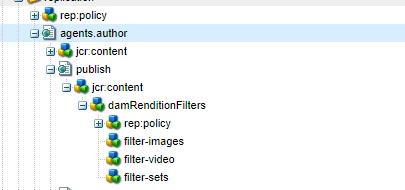
But now problem is,it's restricting all the images to replicate from author publisher. In my requirement i want to replicate some images from author to publisher. Is there any way through which we can add a filter of path on rendition filters. So that some images can also be replicate to author.

Thanks,

Karan

This post is no longer active and is closed to new replies. Need help? Start a new post to ask your question.
Best answer by smacdonald2008

The Eng team stated:

  Filters apply to mime types and cannot be path specific. Adding Akshay to confirm.

Akshay  - Yes that's correct. It filters by file type (mime). They can't do that at present by path or folders. This enhancement will be added down the line.

3 replies

kautuk_sahni
Employee
August 31, 2017

Documentation improvements request has also been created to add this note in the documentation.

~kautuk

Kautuk Sahni
smacdonald2008
smacdonald2008Accepted solution
New Participant
August 30, 2017

The Eng team stated:

  Filters apply to mime types and cannot be path specific. Adding Akshay to confirm.

Akshay  - Yes that's correct. It filters by file type (mime). They can't do that at present by path or folders. This enhancement will be added down the line.

smacdonald2008
New Participant
August 30, 2017

We are checking internally to see if other ppl have run into this situation.