How to add a new property for coral-column-preview-value | Community
Skip to main content
New Participant
August 26, 2019
Solved

How to add a new property for coral-column-preview-value

  • August 26, 2019
  • 7 replies
  • 6148 views

Hello All,

Can any one please let me know how to add a new property(to show tags) to the preview list in AEM sites. I am using AEM 6.3 version.
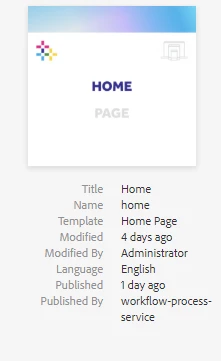
I want to show tags over here along with title,name and other properties.

Thanks,

Adithya.

This post is no longer active and is closed to new replies. Need help? Start a new post to ask your question.
Best answer by rmahendra

You can do it on the client side using javascript so that it's upgrade proof. Experiencing Adobe Experience Manager - Day CQ: In the blog "Experiencing Adobe Experience Manger - Day CQ"  has many posts on extending AEM consoles client side.

It will definitely be additional work but it will be helpful during upgrades. Give it a try!

7 replies

New Participant
September 11, 2019

Thanks.

rmahendra
rmahendraAccepted solution
Employee
August 30, 2019

You can do it on the client side using javascript so that it's upgrade proof. Experiencing Adobe Experience Manager - Day CQ: In the blog "Experiencing Adobe Experience Manger - Day CQ"  has many posts on extending AEM consoles client side.

It will definitely be additional work but it will be helpful during upgrades. Give it a try!

bpeddapudi
New Participant
April 21, 2022

Hi @rmahendra I have a similar requirement but this link was not working. Do you have any other example?

New Participant
August 27, 2019

Thanks for your help.

New Participant
August 27, 2019

Thanks for your help. I had implemented to display tags in our project by changing the columnpreview.jsp file.

cal-netsolution
New Participant
August 26, 2019

[Note] Couldn't edit the previous post. Here's a revision.

To add any new property to the preview list of pages, you need to overlay/override/slingresource merge this file /libs/cq/gui/components/coral/admin/page/columnpreview/columnpreview.jsp. Here is the logic

how those properties showing up. You need to customize based on your requirement.  

Best,

Cal    

arunpatidar
New Participant
August 26, 2019

I believe there is another file to render site column preview, located at

/libs/cq/gui/components/coral/admin/page/columnpreview/columnpreview.jsp

Thanks

Arun

Arun Patidar
cal-netsolution
New Participant
August 26, 2019

To add any new property to the preview list of pages, you need to overlay/override/slingresource merge this file /libs/screens/dcc/components/page/columnpreview/columnpreview.jsp.

Here is the logic how those properties showing up. You need to customize based on your requirement.

Best,

Cal