New Participant
June 17, 2021

how to add custom item under Page Information tab?

  • June 17, 2021
  • 4 replies
  • 1812 views

Hello,


Is here any way to add item under Page Information tab?
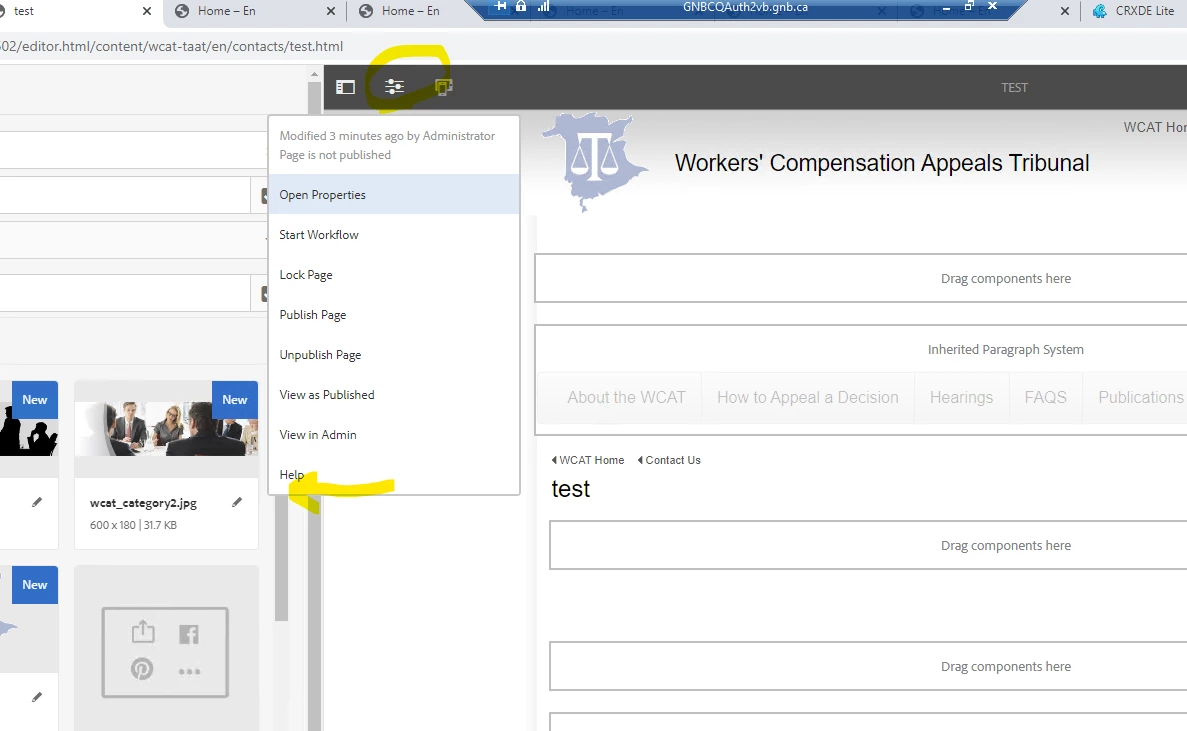
 

Thank you,

Keehwan

This post is no longer active and is closed to new replies. Need help? Start a new post to ask your question.

4 replies

Varun_Shakya
New Participant
June 18, 2021

See this location 

/libs/wcm/core/content/editor/jcr:content/content/items/content/header/items/headerbar/items/pageinfopopover


It has all the items, try adding your custom option, dig little more into this, I ll also see if any there is anything else .. I ll update here

Dipti_Chauhan
New Participant
June 18, 2021

Hi @keehwan1 

  you can refer this  http://experience-aem.blogspot.com/2018/09/aem-64-touch-ui-add-view-in-publish-to-editor-page-info-dropdown.html for adding new item under page information Tab. And if these items needs to be rendered based on some condition than you can use granite:rendercondition . 

you can refer : https://levelup.gitconnected.com/aem-creating-custom-granite-render-conditions-28a21958f420 for adding custom render condition.


Thanks

Dipti

Bhuwan_B
New Participant
June 17, 2021
keehwan1Author
New Participant
June 17, 2021

Thank you, Bhuwan.

We have a custom dialog on certain page custom component.

I would like to add a text with link under Page Information tab.

If the page is created with the page component, then the custom page component dialog will be open when user clicks on the link.

Is it passible to accomplish this with java/jsp code?