How to add custom property in project task(in backend via crxde) in vanilla AEM 6.4 instance and fetch its value. | Community
Skip to main content
cquser1
New Participant
June 10, 2018
Solved

How to add custom property in project task(in backend via crxde) in vanilla AEM 6.4 instance and fetch its value.

  • June 10, 2018
  • 4 replies
  • 1334 views

Hi All,

This is a requirement related to Show/hide custom button in http://localhost:4502/aem/inbox in vanilla AEM 6.4instance .

Suppose I create a task in my inbox by going to http://localhost:4502/projects/details.html/content/projects/we-retail  -> Start workflow -> Project Approval Workflow.

A task then gets created in the http://localhost:4502/aem/inbox .

This task in crxde is stored somewhere under /content/projects/we-retail/jcr:content/tasks/2018-06-08/task_from_workflowlaunchedbyproject. If I add a custom property to it say 'showCustom ={Boolean}true' and I want to fetch that value to show/hide my custom button[i.e, My Complete] in AEM inbox.

How should we go about doing this.

Tried few things[not sure if its a proper approach] :

-In the task created /content/projects/we-retail/jcr:content/tasks/2018-06-08/task_from_workflowlaunchedbyproject, added some value to existing description property.

- In /libs/cq/inbox/gui/components/inbox/inboxitem/list/list.html added data element data-custom-item="${item.description}".

- In custom js code able to read the value, based on which I am able to show/hide.

- But in case I add a custom property to the task, how do I do this, is a challenge.

Any thoughts/pointers/reference code here will be helpful.
This post is no longer active and is closed to new replies. Need help? Start a new post to ask your question.
Best answer by arunpatidar

Hi,

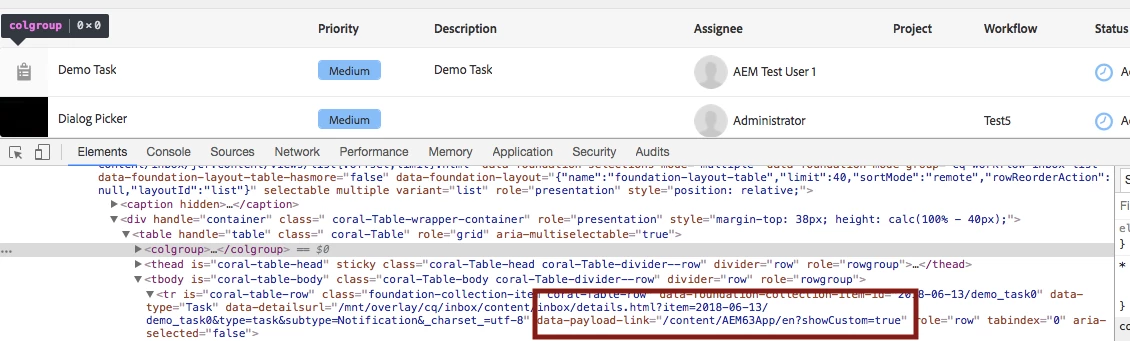
when you create a task, add custom parameter in content path i.e.

newTask.setContentPath("/content/AEM63App/en?showCustom=true");

and read this property when do show and hide.

Demo Code aem63app-repo/SimpleCreateTaskServlet.java at master · arunpatidar02/aem63app-repo · GitHub

Thanks

Arun

4 replies

arunpatidar
New Participant
June 17, 2018

Cheers

Arun Patidar
cquser1
cquser1Author
New Participant
June 17, 2018

Hi Arun,

Sorry for the delayed response.

Thanks a ton for all your help. Able to get some way now to go about this.

Once again, thanks a lot.

smacdonald2008
New Participant
June 13, 2018

Nice Answer

arunpatidar
arunpatidarAccepted solution
New Participant
June 13, 2018

Hi,

when you create a task, add custom parameter in content path i.e.

newTask.setContentPath("/content/AEM63App/en?showCustom=true");

and read this property when do show and hide.

Demo Code aem63app-repo/SimpleCreateTaskServlet.java at master · arunpatidar02/aem63app-repo · GitHub

Thanks

Arun

Arun Patidar