How to add multiple check-boxes to one section in touch UI dialog | Community
Skip to main content
August 1, 2017
Solved

How to add multiple check-boxes to one section in touch UI dialog

  • August 1, 2017
  • 3 replies
  • 6100 views

Hi,

Can anybody help me that how can we add multiple check-boxes to one section in touch UI dialog.
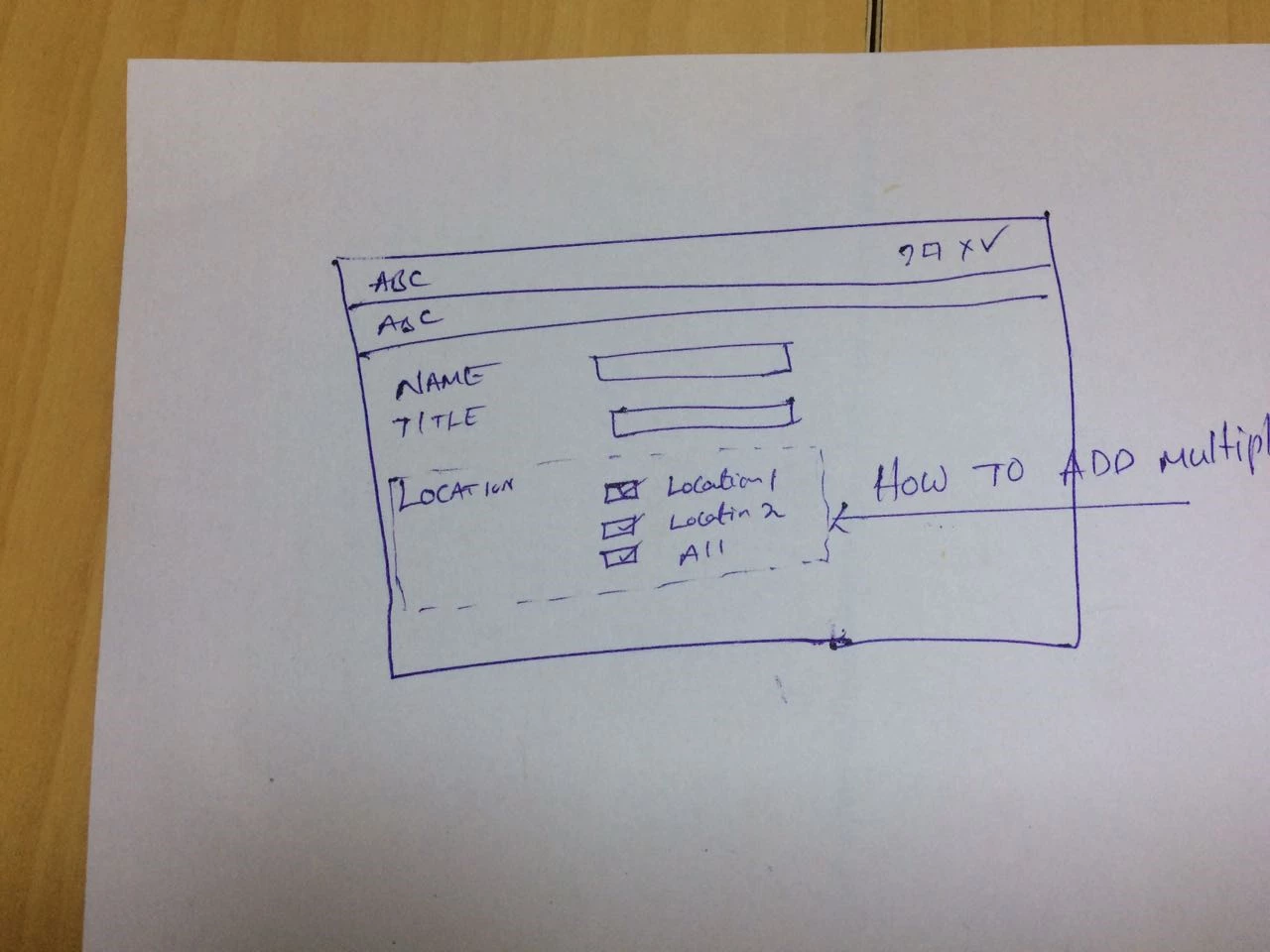
Regards,

Sandhya.

This post is no longer active and is closed to new replies. Need help? Start a new post to ask your question.
Best answer by susheel

Hi Sandhya,

You can create the dialog as below to get the nearest as per your requirement.

Dialog xml:

<?xml version="1.0" encoding="UTF-8"?>

<jcr:root xmlns:sling="http://sling.apache.org/jcr/sling/1.0" xmlns:cq="http://www.day.com/jcr/cq/1.0" xmlns:jcr="http://www.jcp.org/jcr/1.0" xmlns:nt="http://www.jcp.org/jcr/nt/1.0"

    jcr:primaryType="nt:unstructured"

    jcr:title="Properties"

    sling:resourceType="cq/gui/components/authoring/dialog">

    <content

        jcr:primaryType="nt:unstructured"

        sling:resourceType="granite/ui/components/foundation/container">

        <layout

            jcr:primaryType="nt:unstructured"

            sling:resourceType="granite/ui/components/foundation/layouts/fixedcolumns"/>

        <items jcr:primaryType="nt:unstructured">

            <column

                jcr:primaryType="nt:unstructured"

                sling:resourceType="granite/ui/components/foundation/container">

                <items jcr:primaryType="nt:unstructured">

                    <heading

                        jcr:primaryType="nt:unstructured"

                        sling:resourceType="granite/ui/components/foundation/form/textfield"

                        fieldDescription="Please provide page Heading"

                        fieldLabel="Page Heading"

                        name="./partnerHeading"/>

                    <description

                        jcr:primaryType="nt:unstructured"

                        sling:resourceType="granite/ui/components/foundation/form/textarea"

                        fieldDescription="Please provide page description"

                        fieldLabel="Page Description"

                        name="./partnerDescription"/>

                    <container

                        jcr:primaryType="nt:unstructured"

                        sling:resourceType="granite/ui/components/foundation/container">

                        <layout

                            jcr:primaryType="nt:unstructured"

                            sling:resourceType="granite/ui/components/foundation/layouts/fixedcolumns"

                            maximized="{Boolean}false"/>

                        <items jcr:primaryType="nt:unstructured">

                            <column1

                                jcr:primaryType="nt:unstructured"

                                sling:resourceType="granite/ui/components/foundation/container"

                                class="custom-section">

                                <items jcr:primaryType="nt:unstructured">

                                    <text

                                        jcr:primaryType="nt:unstructured"

                                        sling:resourceType="granite/ui/components/foundation/heading"

                                        level="2"

                                        text="LOCATION"/>

                                </items>

                            </column1>

                            <column2

                                jcr:primaryType="nt:unstructured"

                                sling:resourceType="granite/ui/components/foundation/container"

                                class="custom-section">

                                <items jcr:primaryType="nt:unstructured">

                                    <location1

                                        jcr:primaryType="nt:unstructured"

                                        sling:resourceType="granite/ui/components/foundation/form/checkbox"

                                        name="./location1"

                                        text="Location1"

                                        value="location1"/>

                                    <location2

                                        jcr:primaryType="nt:unstructured"

                                        sling:resourceType="granite/ui/components/foundation/form/checkbox"

                                        name="./location2"

                                        text="Location2"

                                        value="location1"/>

                                    <all

                                        jcr:primaryType="nt:unstructured"

                                        sling:resourceType="granite/ui/components/foundation/form/checkbox"

                                        name="./all"

                                        text="All"

                                        value="all"/>

                                </items>

                            </column2>

                        </items>

                    </container>

                </items>

            </column>

        </items>

    </content>

</jcr:root>


Create a clientlib in the same component with category as cq.authoring.dialog and add following CSS to it.

.coral-FixedColumn-column.custom-section {

    float: left;

    width: 45%;

}

.coral-FixedColumn-column h2 {

    margin:0;

}

It would look something like below image:
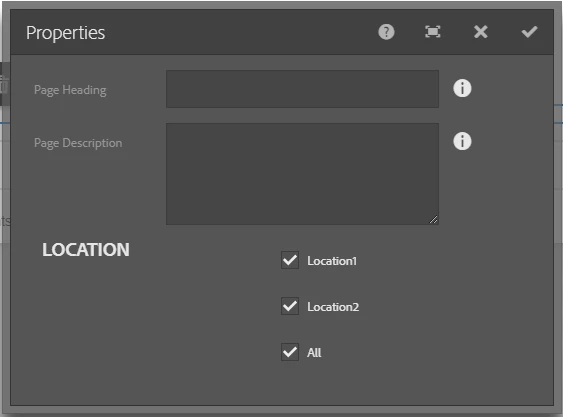
Let me know if you have any queries.

3 replies

August 3, 2017

Thank you all for your help.

susheel
susheelAccepted solution
New Participant
August 1, 2017

Hi Sandhya,

You can create the dialog as below to get the nearest as per your requirement.

Dialog xml:

<?xml version="1.0" encoding="UTF-8"?>

<jcr:root xmlns:sling="http://sling.apache.org/jcr/sling/1.0" xmlns:cq="http://www.day.com/jcr/cq/1.0" xmlns:jcr="http://www.jcp.org/jcr/1.0" xmlns:nt="http://www.jcp.org/jcr/nt/1.0"

    jcr:primaryType="nt:unstructured"

    jcr:title="Properties"

    sling:resourceType="cq/gui/components/authoring/dialog">

    <content

        jcr:primaryType="nt:unstructured"

        sling:resourceType="granite/ui/components/foundation/container">

        <layout

            jcr:primaryType="nt:unstructured"

            sling:resourceType="granite/ui/components/foundation/layouts/fixedcolumns"/>

        <items jcr:primaryType="nt:unstructured">

            <column

                jcr:primaryType="nt:unstructured"

                sling:resourceType="granite/ui/components/foundation/container">

                <items jcr:primaryType="nt:unstructured">

                    <heading

                        jcr:primaryType="nt:unstructured"

                        sling:resourceType="granite/ui/components/foundation/form/textfield"

                        fieldDescription="Please provide page Heading"

                        fieldLabel="Page Heading"

                        name="./partnerHeading"/>

                    <description

                        jcr:primaryType="nt:unstructured"

                        sling:resourceType="granite/ui/components/foundation/form/textarea"

                        fieldDescription="Please provide page description"

                        fieldLabel="Page Description"

                        name="./partnerDescription"/>

                    <container

                        jcr:primaryType="nt:unstructured"

                        sling:resourceType="granite/ui/components/foundation/container">

                        <layout

                            jcr:primaryType="nt:unstructured"

                            sling:resourceType="granite/ui/components/foundation/layouts/fixedcolumns"

                            maximized="{Boolean}false"/>

                        <items jcr:primaryType="nt:unstructured">

                            <column1

                                jcr:primaryType="nt:unstructured"

                                sling:resourceType="granite/ui/components/foundation/container"

                                class="custom-section">

                                <items jcr:primaryType="nt:unstructured">

                                    <text

                                        jcr:primaryType="nt:unstructured"

                                        sling:resourceType="granite/ui/components/foundation/heading"

                                        level="2"

                                        text="LOCATION"/>

                                </items>

                            </column1>

                            <column2

                                jcr:primaryType="nt:unstructured"

                                sling:resourceType="granite/ui/components/foundation/container"

                                class="custom-section">

                                <items jcr:primaryType="nt:unstructured">

                                    <location1

                                        jcr:primaryType="nt:unstructured"

                                        sling:resourceType="granite/ui/components/foundation/form/checkbox"

                                        name="./location1"

                                        text="Location1"

                                        value="location1"/>

                                    <location2

                                        jcr:primaryType="nt:unstructured"

                                        sling:resourceType="granite/ui/components/foundation/form/checkbox"

                                        name="./location2"

                                        text="Location2"

                                        value="location1"/>

                                    <all

                                        jcr:primaryType="nt:unstructured"

                                        sling:resourceType="granite/ui/components/foundation/form/checkbox"

                                        name="./all"

                                        text="All"

                                        value="all"/>

                                </items>

                            </column2>

                        </items>

                    </container>

                </items>

            </column>

        </items>

    </content>

</jcr:root>


Create a clientlib in the same component with category as cq.authoring.dialog and add following CSS to it.

.coral-FixedColumn-column.custom-section {

    float: left;

    width: 45%;

}

.coral-FixedColumn-column h2 {

    margin:0;

}

It would look something like below image:

Let me know if you have any queries.

smacdonald2008
New Participant
August 1, 2017

To get chekboxes into an AEM component dialog - you need to set the correct resource type in the JCR path of the touch UI dialog path. See the different fields in this article - we have tabs and each tab has different fields --

Adobe Experience Manager Help | Creating an AEM 6.2 HTML Template Language tab movie component

To get a checkbox into a dialog - the resource type is Checkbox — Granite UI 1.0 documentation.

To see a basic dialog -- see this article -- Adobe Experience Manager Help | Creating your first Adobe Experience Manager Touch UI component