How to add path.self=true in group path? | Community
Skip to main content
New Participant
September 7, 2022
Solved

How to add path.self=true in group path?

  • September 7, 2022
  • 2 replies
  • 4082 views

type=sling:Folder
daterange.property=jcr:created
daterange.lowerBound=2022-09-06T01:00:00.000
daterange.upperBound=2022-09-08T18:00:00.000
group.1_group.path=/content/dam
group.2_group.path=/content/dam/we-retail
group.p.or=true
p.limit=-1


How to add path.self=true in above query.


This post is no longer active and is closed to new replies. Need help? Start a new post to ask your question.
Best answer by Anmol_Bhardwaj

This is a rule within AEM where a query will stop after traversing a certain amount of nodes.

There are 3 ways in which you can overcome this:


1. Add more identifiers to your query which will narrow it down and search for less nodes. 

Example: sling:resourceType, fulltext etc.

Why this works is because there are indexes for many JCR properties which are provided within AEM OOTB.

If you don't have any other identifiers, then

2. You would need to create a custom index which will then decrease your query time and also not traverse through all these nodes.

Reference: https://helpx.adobe.com/in/experience-manager/kb/create-custom-oak-index.html


The third way (is not a recommended approach if you are planning to use this query in a PROD,STG environment ).

But, if you are using it as a one-time thing in your local instance,there is a way where you can change the number of nodes traversed.

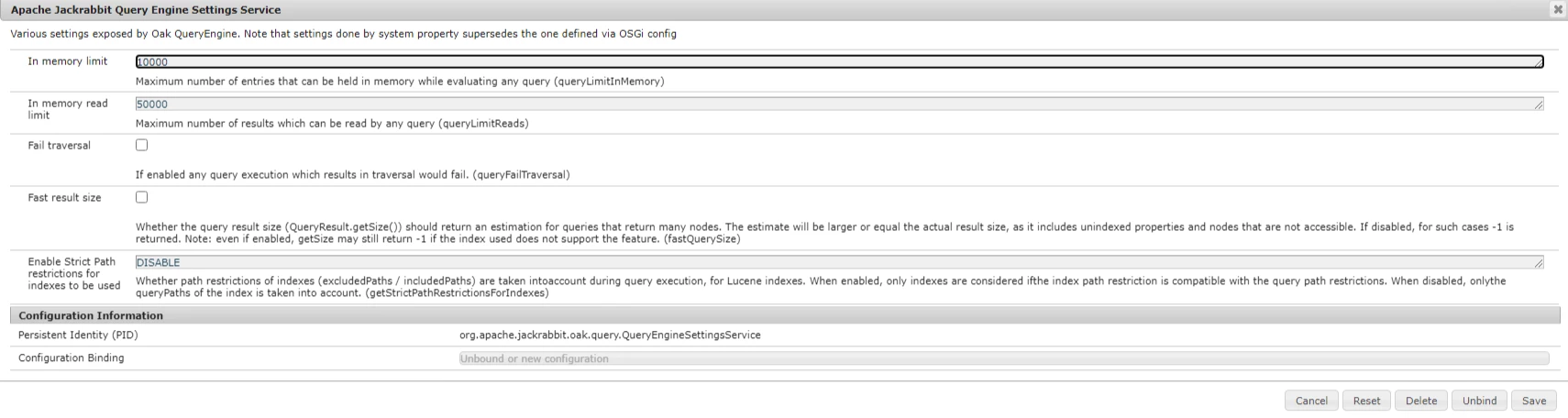
3. In your /system/console/configMgr, change the number of in-memory limit.


2 replies

milind_bachani
Employee
September 7, 2022
New Participant
September 7, 2022

Hi @milind_bachani 

getting below error after adding 

group.1_group.path.self=true
group.2_group.path.self=true
Employee
September 7, 2022

@akshaybhujbale ,


What are you searching for folders modified?


Hope this helps


Thanks

Employee
September 7, 2022

Hi @akshaybhujbale,


type=sling:Folder daterange.property=jcr:created daterange.lowerBound=2022-09-06T01:00:00.000 daterange.upperBound=2022-09-08T18:00:00.000 group.1_group.path=/content/dam group.1_group.path.self=true group.2_group.path=/content/dam/we-retail group.2_group.path.self=true group.p.or=true p.limit=-1

References

https://github.com/paulrohrbeck/aem-links/blob/master/querybuilder_cheatsheet.md

https://hashimkhan.in/2015/12/02/query-builder/


Hope this helps!!

Thanks

New Participant
September 7, 2022

when I have tried with ur query getting above error.

Anmol_Bhardwaj
Anmol_BhardwajAccepted solution
New Participant
September 7, 2022

This is a rule within AEM where a query will stop after traversing a certain amount of nodes.

There are 3 ways in which you can overcome this:


1. Add more identifiers to your query which will narrow it down and search for less nodes. 

Example: sling:resourceType, fulltext etc.

Why this works is because there are indexes for many JCR properties which are provided within AEM OOTB.

If you don't have any other identifiers, then

2. You would need to create a custom index which will then decrease your query time and also not traverse through all these nodes.

Reference: https://helpx.adobe.com/in/experience-manager/kb/create-custom-oak-index.html


The third way (is not a recommended approach if you are planning to use this query in a PROD,STG environment ).

But, if you are using it as a one-time thing in your local instance,there is a way where you can change the number of nodes traversed.

3. In your /system/console/configMgr, change the number of in-memory limit.