How to add payload in Custom workflow | Community
Skip to main content
This post is no longer active and is closed to new replies. Need help? Start a new post to ask your question.
Accepted solution
Feb 26, 2019 1:24 PM UTC

Hi Manikantha,

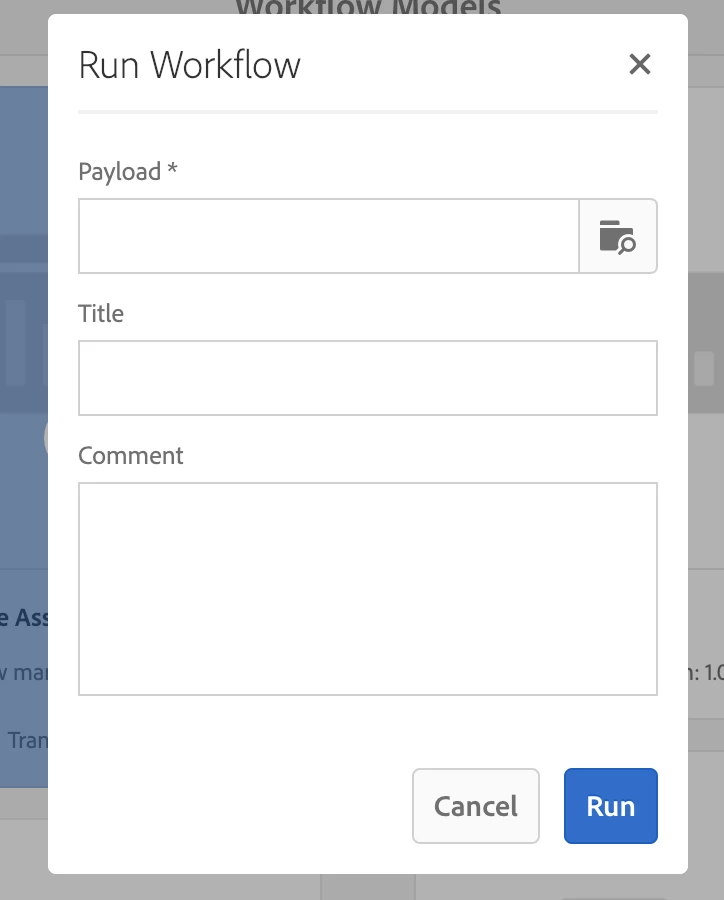
You can go to your custom workflow model and click on start workflow to start your workflow. You should be seeing an option called "Payload *" where you can give your payload path and start your custom workflow. Please take a look at the screenshot below:

Please take a look at below articles. They help you understand how to implement custom workflows:

Adobe Experience Manager Help | Creating an Adobe Experience Manager Custom 6.4 Worflow Step with a dialog

Adobe Experience Manager Help | Creating an Adobe Experience Manager Custom Worflow Step with a dialog

Create a custom workflow

I hope this helps!

Regards,

Lavanya Malyala

2 replies

smacdonald2008
Level 10
Feb 26, 2019 2:36 PM UTC

Look at Section 4 in the TOC here:

Adobe Experience Manager Developer Guide.pdf - Google Drive

You will see a number of WORKFLOW articles. Read through these articles and you will learn a lot about workflows - including how to set a payload for a workflow.

Translate
Accepted solution
Feb 26, 2019 1:24 PM UTC

Hi Manikantha,

You can go to your custom workflow model and click on start workflow to start your workflow. You should be seeing an option called "Payload *" where you can give your payload path and start your custom workflow. Please take a look at the screenshot below:

Please take a look at below articles. They help you understand how to implement custom workflows:

Adobe Experience Manager Help | Creating an Adobe Experience Manager Custom 6.4 Worflow Step with a dialog

Adobe Experience Manager Help | Creating an Adobe Experience Manager Custom Worflow Step with a dialog

Create a custom workflow

I hope this helps!

Regards,

Lavanya Malyala

Translate