How to authenticate aem user in custom login form? | Community
Skip to main content
Mario248
New Participant
March 19, 2025
Solved

How to authenticate aem user in custom login form?

  • March 19, 2025
  • 2 replies
  • 997 views

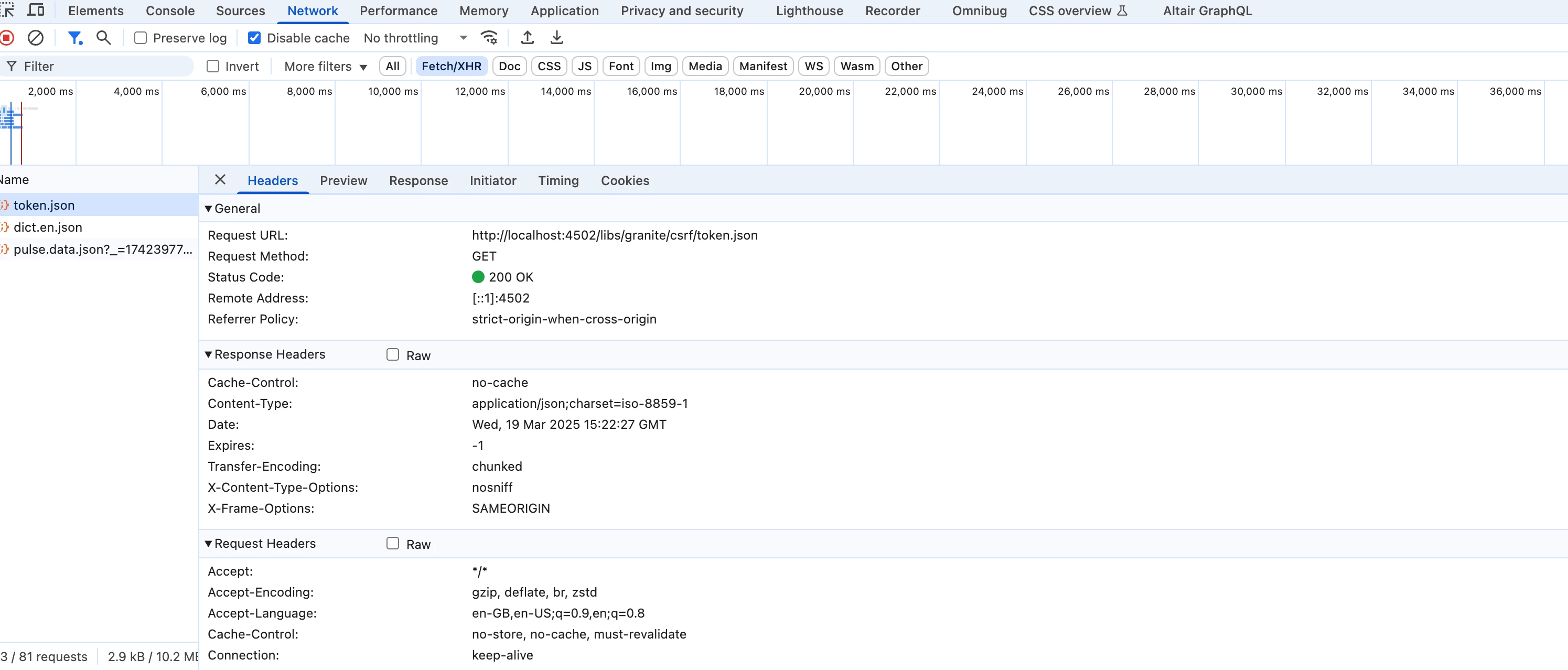
I have created a custom login page for the AEM Publish instance which prompts users to enter a username and password similar to AEM's default login. I want to invoke the AEM authentication handler to verify whether the entered credentials are correct and authenticate the user. I noticed the following network calls in the default AEM login process.


Is there any AEM API available to invoke aem default auth handler ?

Best answer by AmitVishwakarma

Hi @mario248 ,

1.Create a Custom Login Page (HTML/HTL)

Place it anywhere in your AEM publish instance, e.g., /content/mysite/login.html
Use this exact form markup:

<form action="/j_security_check" method="POST"> <input type="text" name="j_username" placeholder="Username" required /> <input type="password" name="j_password" placeholder="Password" required /> <input type="hidden" name="j_validate" value="true" /> <!-- Optional: Redirect after login --> <input type="hidden" name="resource" value="/content/mysite/en/home.html" /> <button type="submit">Login</button> </form>

The action /j_security_check is key — it tells AEM to use the default authentication logic.

2. How It Works Behind the Scenes

     - User submits the form
     - AEM calls the default auth handler
     - It checks username/password in CRX repository (UserManager)
     - If correct ➜ AEM creates session + login-token cookie
     - Redirects user to the resource URL or the originally requested page


3. What Happens After Login

     - AEM sets a login-token in cookie
     - User is authenticated
     - Session maintained via cookie

4. Handle Login Failure (Optional)

     - If credentials are wrong ➜ AEM redirects back to /libs/granite/core/content/login.html
     - To show a custom error ➜ You can override AEM's login selector (optional)

          - OR use a Sling Filter to intercept failure and redirect back to your custom page

5. CSRF Token Needed?

     - NO — CSRF token is not needed for login (/j_security_check handles it internally)


Regards,
Amit

2 replies

AmitVishwakarma
AmitVishwakarmaAccepted solution
New Participant
March 20, 2025

Hi @mario248 ,

1.Create a Custom Login Page (HTML/HTL)

Place it anywhere in your AEM publish instance, e.g., /content/mysite/login.html
Use this exact form markup:

<form action="/j_security_check" method="POST"> <input type="text" name="j_username" placeholder="Username" required /> <input type="password" name="j_password" placeholder="Password" required /> <input type="hidden" name="j_validate" value="true" /> <!-- Optional: Redirect after login --> <input type="hidden" name="resource" value="/content/mysite/en/home.html" /> <button type="submit">Login</button> </form>

The action /j_security_check is key — it tells AEM to use the default authentication logic.

2. How It Works Behind the Scenes

     - User submits the form
     - AEM calls the default auth handler
     - It checks username/password in CRX repository (UserManager)
     - If correct ➜ AEM creates session + login-token cookie
     - Redirects user to the resource URL or the originally requested page


3. What Happens After Login

     - AEM sets a login-token in cookie
     - User is authenticated
     - Session maintained via cookie

4. Handle Login Failure (Optional)

     - If credentials are wrong ➜ AEM redirects back to /libs/granite/core/content/login.html
     - To show a custom error ➜ You can override AEM's login selector (optional)

          - OR use a Sling Filter to intercept failure and redirect back to your custom page

5. CSRF Token Needed?

     - NO — CSRF token is not needed for login (/j_security_check handles it internally)


Regards,
Amit
Mario248
Mario248Author
New Participant
March 20, 2025

Thanks for sharing the links. All above links talk about how you can write custom authentication handler. But I dont want to implement custom authentication. I just want to use OOTB authentication handler. The only different is I want to build my own login page and leverage OOTB authentication handler code.

giuseppebaglio
New Participant
March 20, 2025

Have a look at here: https://sling.apache.org/documentation/the-sling-engine/authentication/authentication-authenticationhandler/form-based-authenticationhandler.html 

You can mimic the default login form submission and ensure your custom login page’s HTML form matches the structure/parameters used by AEM’s OOTB login:

<form action="/j_security_check" method="post"> <input type="text" name="j_username" placeholder="Username"> <input type="password" name="j_password" placeholder="Password"> <input type="hidden" name="j_validate" value="true"> <input type="hidden" name="resource" value="/content/site/home.html"> <!-- Optional redirect --> <input type="submit" value="Login"> </form>


In theory (I never tried it myself) there is no need to write a custom AuthenticationHandler because the OOTB handler will:

  • Validate credentials against the repository (CRX/User Management)
  • Generate the authentication token (login-token cookie)
  • Redirect based on resource or requested page.