
How to author/select AEM pages in component dialog? | Community
Skip to main content
Mario248
New Participant
June 13, 2022
Solved

How to author/select AEM pages in component dialog?

  • June 13, 2022
  • 3 replies
  • 1761 views

I am building a custom component which will be used to list down few other pages. Basically I want to get the list pages(multi field) from author and show them in the page for which I need to know what resource type I should I use in component dialog. 


I read all OOTB dialogs (https://developer.adobe.com/experience-manager/reference-materials/6-4/granite-ui/api/jcr_root/libs/granite/ui/components/coral/foundation/server.html), text, image, video, rte but I could not find any xtype/ resource type that is related to select any page.


Is there any easy way to get the page path from component dialog ?
This post is no longer active and is closed to new replies. Need help? Start a new post to ask your question.
Best answer by SantoshSai

@Hi @mario248 ,

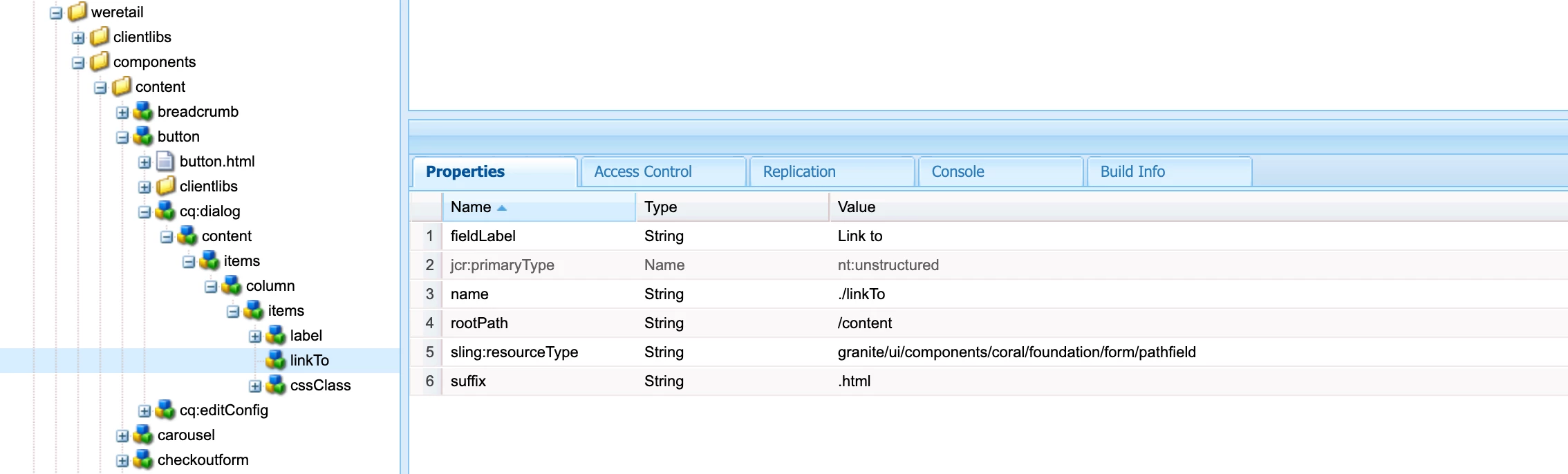
Please refer below button component for we-retail for similar page selection requirement

/apps/weretail/components/content/button/cq:dialog/content/items/column/items/linkTo

To answer your question - here is the resourceType can be used for the same 

granite/ui/components/coral/foundation/form/pathfield

which has additional properties rootPath - which is source data root path. Absolute or relative path for the root folder for the source data.

Hope that helps!

Regards,

Santosh

3 replies

SantoshSai
SantoshSaiAccepted solution
New Participant
June 13, 2022

@Hi @mario248 ,

Please refer below button component for we-retail for similar page selection requirement

/apps/weretail/components/content/button/cq:dialog/content/items/column/items/linkTo

To answer your question - here is the resourceType can be used for the same 

granite/ui/components/coral/foundation/form/pathfield

which has additional properties rootPath - which is source data root path. Absolute or relative path for the root folder for the source data.

Hope that helps!

Regards,

Santosh

Santosh Sai
JeevanRaj
New Participant
June 13, 2022

Hi @mario248 


What you need is a pathBrowser. You can refer the below.


<pageList jcr:primaryType="nt:unstructured" sling:resourceType="granite/ui/components/coral/foundation/form/pathfield" fieldLabel="Logo Path" name="./logoPath" required="true" rootPath="/content/abc"/>


Himanshu_Jain
New Participant
June 13, 2022

Use sling:resourceType as /libs/granite/ui/components/coral/foundation/form/pathfield

Himanshu Jain