How to create ExperienceFrgment and how to add in page | Community
Skip to main content
New Participant
November 19, 2022
Solved

How to create ExperienceFrgment and how to add in page

  • November 19, 2022
  • 2 replies
  • 770 views

Hi Team,


I want to create ExperenceFrgmemt and need add that Fragment in page .Please help me on this


Thankyou

Chandrika

This post is no longer active and is closed to new replies. Need help? Start a new post to ask your question.
Best answer by SantoshSai

Hi @chandrika123,

Please follow below steps,

Creating an Experience Fragment

To create an Experience Fragment:

  1. Select Experience Fragments from the Global Navigation.

    screen_shot_2018-04-05at92221am1

  2. Navigate to the required folder and select Create.

  3. Select Experience Fragment to open the Create Experience Fragment wizard.

    Select the required Template, then Next:


    xf-authoring-02

  4. Enter the Properties for your Experience Fragment.

    A Title is mandatory. If the Name is left blank it will be derived from the Title.


    xf-authoring-03

  5. Click Create.

    A message will be displayed. Select:

    • Done to return to the console
    • Open to open the fragment editor

Using your Experience Fragment

You can now use your Experience Fragment when authoring your pages:

  1. Open any page for editing.

    For example: http://localhost:4502/editor.html/content/we-retail/language-masters/en/products/men.html

  2. Create an instance of the Experience Fragment component, by dragging the component from the Components browser to the page paragraph system:
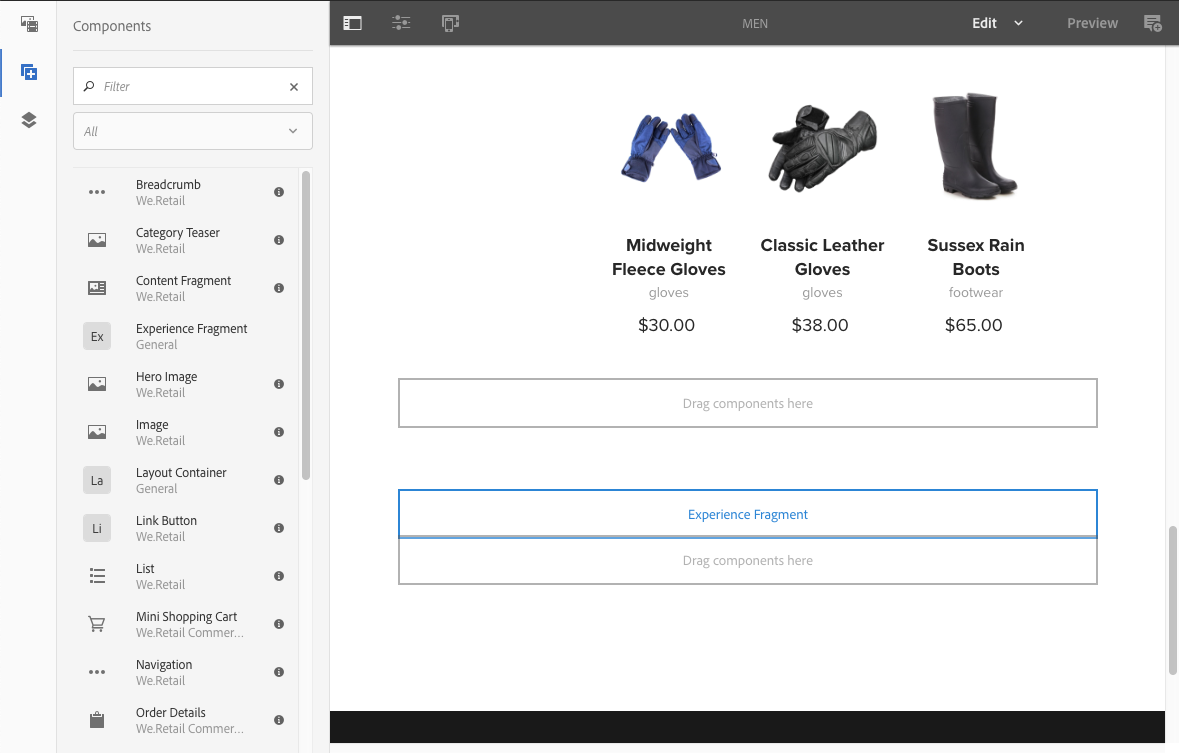
    xf-authoring-09

     
  3. Add the actual Experience Fragment to the component instance; either:

    • Drag the required fragment from the Assets Browser and drop onto the component
    • Select Configure from the component toolbar and specify the fragment to use, confirm with Done (tick)
     

    xf-authoring-10

References:

Hope that helps!

Regards,

Santosh

2 replies

Mani_kumar_
New Participant
November 19, 2022

Hi @chandrika123 

We have official documentation for creating the experience fragments and how to use them by Adobe

Please refer the document below which explains in detail

https://experienceleague.adobe.com/docs/experience-manager-64/authoring/authoring/experience-fragments.html?lang=en

Hope this is helpful

SantoshSai
SantoshSaiAccepted solution
New Participant
November 19, 2022

Hi @chandrika123,

Please follow below steps,

Creating an Experience Fragment

To create an Experience Fragment:

  1. Select Experience Fragments from the Global Navigation.

    screen_shot_2018-04-05at92221am1

  2. Navigate to the required folder and select Create.

  3. Select Experience Fragment to open the Create Experience Fragment wizard.

    Select the required Template, then Next:


    xf-authoring-02

  4. Enter the Properties for your Experience Fragment.

    A Title is mandatory. If the Name is left blank it will be derived from the Title.


    xf-authoring-03

  5. Click Create.

    A message will be displayed. Select:

    • Done to return to the console
    • Open to open the fragment editor

Using your Experience Fragment

You can now use your Experience Fragment when authoring your pages:

  1. Open any page for editing.

    For example: http://localhost:4502/editor.html/content/we-retail/language-masters/en/products/men.html

  2. Create an instance of the Experience Fragment component, by dragging the component from the Components browser to the page paragraph system:

    xf-authoring-09

     
  3. Add the actual Experience Fragment to the component instance; either:

    • Drag the required fragment from the Assets Browser and drop onto the component
    • Select Configure from the component toolbar and specify the fragment to use, confirm with Done (tick)
     

    xf-authoring-10

References:

Hope that helps!

Regards,

Santosh

Santosh Sai